# Get Carrier Configurations for Group
Source: https://docs.noyo.com/api-reference/groups/configurations/get-carrier-configuration-by-group-list
GET /api/v1/groups/{group_id}/carrier_configurations
Get a list of carrier configurations for a group.
# Create Group Connection
Source: https://docs.noyo.com/api-reference/groups/connections/create-group-connection
POST /api/v1/group_connections
Create a new connection for a brand new group with a given carrier
# Create Group Connection with Existing Group
Source: https://docs.noyo.com/api-reference/groups/connections/create-group-connection-with-existing-group
POST /api/v1/groups/{group_id}/group_connections
Create a new carrier connection for an existing group
# Get Group Connection
Source: https://docs.noyo.com/api-reference/groups/connections/get-group-connection
GET /api/v1/group_connections/{connection_id}
Returns the latest status of a single group connection based on the ID provided.
Returns the latest status of a single group connection based on the ID provided.
# Get Group Connection Request List
Source: https://docs.noyo.com/api-reference/groups/connections/get-group-connection-request-list
GET /api/v1/group_connections
Returns a list of all group connections.
Returns a list of all group connections.
# Get Group Connection Request List by Group
Source: https://docs.noyo.com/api-reference/groups/connections/get-group-connection-request-list-by-group
GET /api/v1/groups/{group_id}/group_connections
Returns a list of all group connections for a given group ID.
# Group Connections
Source: https://docs.noyo.com/api-reference/groups/connections/group-connections
GET /api/v1/groups/{group_id}/group_connections
Get connection information for a group
# Group Connections
Source: https://docs.noyo.com/api-reference/groups/connections/index
Connect and manage group-carrier relationships
# Group Connections
The Group Connections APIs allow you to connect groups to carriers and manage those connections.
## Connection Management
* [Create Group Connection](/api-reference/groups/connections/create-group-connection)
* [Create Group Connection with Existing Group](/api-reference/groups/connections/create-group-connection-with-existing-group)
* [Get Group Connection](/api-reference/groups/connections/get-group-connection)
* [Get Group Connection Request List](/api-reference/groups/connections/get-group-connection-request-list)
* [Get Group Connection Request List by Group](/api-reference/groups/connections/get-group-connection-request-list-by-group)
* [Retry Group Connection with Existing Group](/api-reference/groups/connections/retry-group-connection-with-existing-group)
# Retry Group Connection with Existing Group
Source: https://docs.noyo.com/api-reference/groups/connections/retry-group-connection-with-existing-group
PUT /api/v1/group_connections/{connection_id}/retry
Retry a carrier connection for an existing group
# Create Contact
Source: https://docs.noyo.com/api-reference/groups/contacts/create-contact
POST /api/v1/groups/{group_id}/contacts
Create a new contact for a group.
# Edit Contact
Source: https://docs.noyo.com/api-reference/groups/contacts/edit-contact
PUT /api/v1/groups/{group_id}/contacts/{contact_id}/{version}
Edit a specific contact.
# Get Contact
Source: https://docs.noyo.com/api-reference/groups/contacts/get-contact
GET /api/v1/groups/{group_id}/contacts/{contact_id}
Get details for a specific contact.
# List Contacts
Source: https://docs.noyo.com/api-reference/groups/contacts/get-contact-list
GET /api/v1/groups/{group_id}/contacts
Get a list of contacts for a group.
# Create Group
Source: https://docs.noyo.com/api-reference/groups/create-group
POST /api/v1/groups
Create a new group
# Confirm Group Disconnection Request
Source: https://docs.noyo.com/api-reference/groups/disconnections/confirm-group-disconnection-request
PUT /api/v1/group_disconnection_requests/{group_disconnection_request_id}/confirm
Confirm a group disconnection request
# Create Group Disconnection Request
Source: https://docs.noyo.com/api-reference/groups/disconnections/create-group-disconnection-request
POST /api/v1/group_disconnection_requests
Create a new group disconnection request
# Edit Group Disconnection Request
Source: https://docs.noyo.com/api-reference/groups/disconnections/edit-group-disconnection-request
PUT /api/v1/group_disconnection_requests/{group_disconnection_request_id}/{version}
Edit an existing group disconnection request
# Get Group Disconnection Request
Source: https://docs.noyo.com/api-reference/groups/disconnections/get-group-disconnection-request-by-id
GET /api/v1/group_disconnection_requests/{group_disconnection_request_id}
Get a specific group disconnection request
# Get Group Disconnection Request List
Source: https://docs.noyo.com/api-reference/groups/disconnections/get-group-disconnection-request-list
GET /api/v1/group_disconnection_requests
Get a list of all group disconnection requests
# Get Group Disconnection Requests by Group
Source: https://docs.noyo.com/api-reference/groups/disconnections/get-group-disconnection-request-list-by-group
GET /api/v1/groups/{group_id}/group_disconnection_requests
Get a list of group disconnection requests for a specific group
# Group Disconnections
Source: https://docs.noyo.com/api-reference/groups/disconnections/group-disconnections
GET /api/v1/groups/{group_id}/group_disconnection_requests
Get disconnection information for a group
# Reject Group Disconnection Request
Source: https://docs.noyo.com/api-reference/groups/disconnections/reject-group-disconnection-request
PUT /api/v1/group_disconnection_requests/{group_disconnection_request_id}/reject
Reject a group disconnection request
# Edit Group
Source: https://docs.noyo.com/api-reference/groups/edit-group
PUT /api/v1/groups/{group_id}/{version}
Edit a specific group
# Get Feed Run
Source: https://docs.noyo.com/api-reference/groups/feed-runs/get-feed-run
GET /api/v1/feed_runs/{feed_run_id}
Get a specific feed run
# List Feed Runs
Source: https://docs.noyo.com/api-reference/groups/feed-runs/get-feed-run-list
GET /api/v1/feed_runs
Get a list of all feed runs
# Get Feed
Source: https://docs.noyo.com/api-reference/groups/feeds/get-feed
GET /api/v1/feeds/{feed_id}
Get a specific feed
# List Feeds
Source: https://docs.noyo.com/api-reference/groups/feeds/get-feed-list
GET /api/v1/feeds
Get a list of all feeds
# Get Group
Source: https://docs.noyo.com/api-reference/groups/get-group
GET /api/v1/groups/{group_id}
Get a specific group
# List Groups
Source: https://docs.noyo.com/api-reference/groups/get-group-list
GET /api/v1/groups
Get a list of all groups
# Get Location
Source: https://docs.noyo.com/api-reference/groups/locations/get-location
GET /api/v1/groups/{group_id}/locations/{location_id}
Get details for a specific location.
# Get Location List
Source: https://docs.noyo.com/api-reference/groups/locations/get-location-list
GET /api/v1/groups/{group_id}/locations
Get a list of locations for a group.
# Get Group Plan
Source: https://docs.noyo.com/api-reference/groups/plans/get-group-plan
GET /api/v1/plans/{plan_id}
Returns the group plan specified by unique identifier
# Get Group Plan List
Source: https://docs.noyo.com/api-reference/groups/plans/get-group-plan-list
GET /api/v1/groups/{group_id}/plans
Get a list of plans for a group
# Get Group Plan Rates List
Source: https://docs.noyo.com/api-reference/groups/plans/get-group-plan-rates-list
GET /api/v1/groups/{group_id}/plan_rates
Get a list of plan rates for a group
# Create Renewal Decision
Source: https://docs.noyo.com/api-reference/groups/renewals/create-renewal-decision
POST /api/v1/groups/{group_id}/renewal_decisions
Create a new renewal decision for a given renewal date.
# Edit Renewal Decision
Source: https://docs.noyo.com/api-reference/groups/renewals/edit-renewal-decision
PUT /api/v1/renewal_decisions/{renewal_decision_id}/{version}
Edit an existing renewal decision for a group.
# Get Renewal Decision
Source: https://docs.noyo.com/api-reference/groups/renewals/get-renewal-decision
GET /api/v1/groups/{group_id}/renewal_decisions/{renewal_decision_id}
Returns a renewal decision by ID.
# Get Renewal Decisions
Source: https://docs.noyo.com/api-reference/groups/renewals/get-renewal-decisions
GET /api/v1/renewal_decisions
Returns all renewal decisions. This includes the status, which determines whether the carrier is ready to accept member requests for the new plan year. If the status is `not_ready`, Noyo will return one or more issues, each with a level and message.
# Get Renewal Decisions by Group
Source: https://docs.noyo.com/api-reference/groups/renewals/get-renewal-decisions-by-group
GET /api/v1/groups/{group_id}/renewal_decisions
Returns all renewal decisions for a group. This includes the status, which determines whether the carrier is ready to accept member requests for the new plan year. If the status is `not_ready`, Noyo will return one or more issues, each with a level and message.
# Get Latest Sync
Source: https://docs.noyo.com/api-reference/groups/syncs/get-latest-group-audit-request
GET /api/v1/groups/{group_id}/audit_requests/latest
Noyo regularly audits each Group against the carrier(s) that the Group has coverage with in order to find updated data and potential mismatches. This endpoint returns metadata about the latest group audit request that was completed. If no group audits have been completed the `completed_at` timestamp will be the timestamp of when the group was created and the `carrier_ids` array will be empty.
# Get Latest Syncs
Source: https://docs.noyo.com/api-reference/groups/syncs/get-latest-group-audit-request-list
GET /api/v1/groups/{group_id}/audit_requests/list_latest
Noyo regularly audits each Group against the carrier(s) that the Group has coverage with in order to find updated data and potential mismatches. This endpoint returns metadata about the latest group audit requests that were completed for each carrier. If no group audits have been completed the `completed_at` timestamp will be the timestamp of when the group was created and the `carrier_ids` array will be empty.
# Get Issue
Source: https://docs.noyo.com/api-reference/issues/get-issue
GET /api/v1/issues/{issue_id}
Get a specific Issue by its ID.
# List Issues
Source: https://docs.noyo.com/api-reference/issues/list-issues
GET /api/v1/issues
List existing Issues. Supports filtering on various fields including array containment.
# Get Dependent
Source: https://docs.noyo.com/api-reference/members/dependents/getdependent
GET /api/v1/dependents/{dependent_id}
Returns the latest version of a single dependent based on the ID provided.
# Get Dependent List
Source: https://docs.noyo.com/api-reference/members/dependents/getdependentlist
GET /api/v1/employees/{employee_id}/dependents
Returns a list of all dependents for a given employee.
# Get Employee Dependent
Source: https://docs.noyo.com/api-reference/members/dependents/getemployeedependent
GET /api/v1/employees/{employee_id}/dependents/{dependent_id}
Returns the latest version of a single dependent of an employee based on the ID provided.
# Get Employee
Source: https://docs.noyo.com/api-reference/members/employees/getemployee
GET /api/v1/employees/{employee_id}
Returns the latest version of a single employee based on the ID provided.
# Get Employee List
Source: https://docs.noyo.com/api-reference/members/employees/getemployeelist
GET /api/v1/employees
Filter employees across all groups in your organization.
# Get Group Employee
Source: https://docs.noyo.com/api-reference/members/employees/getgroupemployee
GET /api/v1/groups/{group_id}/employees/{employee_id}
Returns the latest version of a single employee based on the Noyo ID or Custom Individual ID provided.
# Get Group Employee List
Source: https://docs.noyo.com/api-reference/members/employees/getgroupemployeelist
GET /api/v1/groups/{group_id}/employees
Filter employees within a group.
There may be some cases where you wish to find a specific employee in a group, but do not know their Noyo `id`. We provide a way to filter your employee list for a given group via query parameters. The following parameters are accepted by the API in the query string:
| Parameter | Type | Description |
| :- | :- | :- |
| `date_of_birth` | date | ISO-8601 date string for the date of birth of the employee to be filtered on |
| `first_name` | string | First name of the employee to be filtered on |
| `last_name` | string | Last name of the employee to be filtered on |
| `name` | string | A name search for all name fields for the employee to be filtered on |
The filtering is not case-sensitive and it does not require an exact match on the value (e.g. searching for "ann" will match against "Ann" as well as "Annie").
# Get Individual Enrollment
Source: https://docs.noyo.com/api-reference/members/enrollments/getindividualenrollment
GET /api/v1/individual_enrollments/{individual_enrollment_id}
Returns the latest version of a single individual enrollment based on the ID provided.
# Get Individual Enrollments by Dependent
Source: https://docs.noyo.com/api-reference/members/enrollments/getindividualenrollmentbydependentlist
GET /api/v1/dependents/{dependent_id}/individual_enrollments
Returns a list of all individual enrollments for a given dependent.
# Get Individual Enrollments by Employee
Source: https://docs.noyo.com/api-reference/members/enrollments/getindividualenrollmentbyemployeelist
GET /api/v1/employees/{employee_id}/individual_enrollments
Returns a list of all individual enrollments for a given employee.
# Get Individual Enrollments by Group
Source: https://docs.noyo.com/api-reference/members/enrollments/getindividualenrollmentbygrouplist
GET /api/v1/groups/{group_id}/individual_enrollments
Returns a list of all individual enrollments for a given group.
# Get Individual Enrollments by Group Enrollment
Source: https://docs.noyo.com/api-reference/members/enrollments/getindividualenrollmentlist
GET /api/v1/group_enrollments/{group_enrollment_id}/individual_enrollments
Returns a list of all individual enrollments for a given group enrollment.
# Individual Enrollments
Source: https://docs.noyo.com/api-reference/members/enrollments/individual-enrollments
GET /api/v1/employees/{employee_id}/individual_enrollments
Get a list of all individual enrollments in the system
# Get a list of all Member Premiums
Source: https://docs.noyo.com/api-reference/members/premiums/getmemberpremiumsbyemployeeid
GET /api/v1/employees/{employee_id}/premiums
Returns list of Member Premium information for an employee and dependents
# Create a COBRA Enrollment Member Request
Source: https://docs.noyo.com/api-reference/requests/cobraenrollmentmemberrequest
POST /api/v1/employees/{employee_id}/member_requests/cobra_enrollment
The COBRA enrollment member request is used to add an existing employee, and optionally their dependents to multiple coverages at multiple carriers. This is for a continuation of benefits situation, when main line coverage either has already been terminated, or will be in conjunction with this member request.
The Member Request workflow is now deprecated in favor of using [Member
Snapshot](/docs/members/using-snapshots/using-snapshots)
# Create a COBRA Open Enrollment Member Request
Source: https://docs.noyo.com/api-reference/requests/cobraopenenrollmentmemberrequest
POST /api/v1/employees/{employee_id}/member_requests/cobra_open_enrollment
The COBRA open enrollment member request is used to make changes to employees, dependents and COBRA coverages during the open enrollment period.
The Member Request workflow is now deprecated in favor of using [Member
Snapshot](/docs/members/using-snapshots/using-snapshots)
# Create a COBRA Qualifying Life Event Member Request
Source: https://docs.noyo.com/api-reference/requests/cobraqualifyinglifeeventmemberrequest
POST /api/v1/employees/{employee_id}/member_requests/cobra_qualifying_life_event
The COBRA qualifying life event member request is used to make changes to employees, dependents and COBRA coverages due to a qualifying life event.
The Member Request workflow is now deprecated in favor of using [Member
Snapshot](/docs/members/using-snapshots/using-snapshots)
# Create a COBRA Termination Member Request
Source: https://docs.noyo.com/api-reference/requests/cobraterminationmemberrequest
POST /api/v1/employees/{employee_id}/member_requests/cobra_termination
The COBRA termination member request is used to remove an employee and their dependents from COBRA coverage at all carriers. The `cobra_termination_date` is the date on which the COBRA coverage should be terminated.
The Member Request workflow is now deprecated in favor of using [Member
Snapshot](/docs/members/using-snapshots/using-snapshots)
# Create a new Dependent
Source: https://docs.noyo.com/api-reference/requests/create-dependent
POST /api/v1/employees/{employee_id}/dependents
Create a new dependent for an employee.
The Member Request workflow is now deprecated in favor of using [Member
Snapshot](/docs/members/using-snapshots/using-snapshots)
# Create a new Employee
Source: https://docs.noyo.com/api-reference/requests/create-employee
POST /api/v1/employees
Create a new employee for a group.
The Member Request workflow is now deprecated in favor of using [Member
Snapshot](/docs/members/using-snapshots/using-snapshots)
# Create an Enrollment Snapshot Member Request
Source: https://docs.noyo.com/api-reference/requests/createenrollmentsnapshotmemberrequest
POST /api/v1/employees/{employee_id}/member_requests/enrollment_snapshot
The Enrollment Snapshot Member Request allows you to communicate the desired state of an employee's coverage elections during an employee's new hire period. You can use it in one of two cases:
* To enroll an employee and their dependents for the first time. Please reference the [New Hire Enrollment](#new-hire-enrollment) documentation section for more details.
* To amend and replace a previous New Hire member request with the latest complete set of coverage elections, described in this section below.
The Member Request workflow is now deprecated in favor of using [Member
Snapshot](/docs/members/using-snapshots/using-snapshots)
# Create a Demographic Change Member Request
Source: https://docs.noyo.com/api-reference/requests/demographicchangememberrequest
POST /api/v1/employees/{employee_id}/member_requests/demographic_change
The Member Request workflow is now deprecated in favor of using [Member
Snapshot](/docs/members/using-snapshots/using-snapshots)
# Get Employee Member Request List
Source: https://docs.noyo.com/api-reference/requests/getemployeememberrequestlist
GET /api/v1/employees/{employee_id}/member_requests
Returns a list of all member requests for a given employee. Each member request may have one or more associated member transactions.
The Member Request workflow is now deprecated in favor of using [Member
Snapshot](/docs/members/using-snapshots/using-snapshots)
# Get Member Request
Source: https://docs.noyo.com/api-reference/requests/getmemberrequest
GET /api/v1/member_requests/{request_id}
Returns the latest version of a single member request based on the ID provided.
The Member Request workflow is now deprecated in favor of using [Member
Snapshot](/docs/members/using-snapshots/using-snapshots)
# Get Member Transactions By Member Request
Source: https://docs.noyo.com/api-reference/requests/getmembertransactionsbymemberrequestlist
GET /api/v1/member_requests/{request_id}/member_transactions
Returns a list of all member transactions for a given member request.
The Member Request workflow is now deprecated in favor of using [Member
Snapshot](/docs/members/using-snapshots/using-snapshots)
# Get Organization Member Request List
Source: https://docs.noyo.com/api-reference/requests/getorganizationmemberrequestlist
GET /api/v1/member_requests
Returns a list of all member requests for a given organization. Each member request may have one or more associated member transactions.
The Member Request workflow is now deprecated in favor of using [Member
Snapshot](/docs/members/using-snapshots/using-snapshots)
# Create a New Hire Enrollment Member Request
Source: https://docs.noyo.com/api-reference/requests/newhireenrollmentmemberrequest
POST /api/v1/employees/{employee_id}/member_requests/new_hire
The new hire member request is used to add an existing employee, and optionally their dependents to multiple coverages at multiple carriers.
The Member Request workflow is now deprecated in favor of using [Member
Snapshot](/docs/members/using-snapshots/using-snapshots)
# Create a Open Enrollment Member Request
Source: https://docs.noyo.com/api-reference/requests/openenrollmentmemberrequest
POST /api/v1/employees/{employee_id}/member_requests/open_enrollment
The open enrollment member request is used to make changes to existing employees, dependents and coverages during the open enrollment period.
The Member Request workflow is now deprecated in favor of using [Member
Snapshot](/docs/members/using-snapshots/using-snapshots)
# Create a Qualifying Life Event Member Request
Source: https://docs.noyo.com/api-reference/requests/qualifyinglifeeventmemberrequest
POST /api/v1/employees/{employee_id}/member_requests/qualifying_life_event
The qualifying life event member request is used to make changes to existing employees, dependents and coverages due to a qualifying life event.
The Member Request workflow is now deprecated in favor of using [Member
Snapshot](/docs/members/using-snapshots/using-snapshots)
# Create a Termination Member Request
Source: https://docs.noyo.com/api-reference/requests/terminationmemberrequest
POST /api/v1/employees/{employee_id}/member_requests/termination
The `termination` member request is used to remove an employee and their dependents from coverage at all carriers. The `last_work_date` will be communicated to the carrier and the `last_day_of_coverage` will be determined by the carrier and included in the result.
The Member Request workflow is now deprecated in favor of using [Member
Snapshot](/docs/members/using-snapshots/using-snapshots)
# Create Member Snapshot
Source: https://docs.noyo.com/api-reference/snapshots/create-member-snapshot
POST /api/v1/groups/{group_id}/member_snapshots
Create a new member snapshot for a group
# Get Member Snapshot
Source: https://docs.noyo.com/api-reference/snapshots/get-member-snapshot
GET /api/v1/member_snapshots/{snapshot_id}
Get a specific member snapshot by ID
# Get CalculatedMember Snapshot for Employee
Source: https://docs.noyo.com/api-reference/snapshots/get-member-snapshot-for-employee
GET /api/v1/employees/{employee_id}/member_snapshot
Get a Member Snapshot by Employee ID. This will be calculated based on the current state of Noyo data for the employee.
# Get Member Snapshots for Employee
Source: https://docs.noyo.com/api-reference/snapshots/get-member-snapshots-for-employee-list
GET /api/v1/employees/{employee_id}/member_snapshots
Get a list of all member snapshots for a specific employee
# List Member Snapshots for Group
Source: https://docs.noyo.com/api-reference/snapshots/get-member-snapshots-for-group-list
GET /api/v1/groups/{group_id}/member_snapshots
Get a list of all member snapshots for a specific group
# List Member Snapshots
Source: https://docs.noyo.com/api-reference/snapshots/get-member-snapshots-list
GET /api/v1/member_snapshots
Get a list of all member snapshots in the system
# List Differences
Source: https://docs.noyo.com/api-reference/tracking/get-differences
GET /api/v1/differences
Returns a list of differences.
# Get a Transaction
Source: https://docs.noyo.com/api-reference/transactions/getmembertransaction
GET /api/v1/member_transactions/{transaction_id}
Returns the latest version of a single member transaction based on the ID provided.
Deprecated
# Get Member Transactions by Member Request
Source: https://docs.noyo.com/api-reference/transactions/getmembertransactionsbymemberrequestlist
GET /api/v1/member_requests/{request_id}/member_transactions
Returns a list of all member transactions for a given member request.
Deprecated
# Get a list of all Member Transactions
Source: https://docs.noyo.com/api-reference/transactions/getmembertransactionslist
GET /api/v1/member_transactions
Returns a list of transaction ids by associated difference impact score.
Deprecated
# Get Latest Status Detail
Source: https://docs.noyo.com/api-reference/transactions/status-detail/getlateststatusdetail
GET /api/v1/member_transactions/{transaction_id}/status_details/latest
Returns the latest status detail for a given transaction.
Deprecated
# Get Status Details
Source: https://docs.noyo.com/api-reference/transactions/status-detail/getstatusdetaillist
GET /api/v1/member_transactions/{transaction_id}/status_details
Returns a list of all status details for a given transaction.
Deprecated
# Group and Plan Data
Source: https://docs.noyo.com/docs/data/group-data-endpoints
Data available for groups, enrollments, and plans
# Group Data
The **group** object represents an insured group/employer that is managed by your organization and successfully connected to Noyo. Group, plan, and enrollment data is available when a [group connection request](/docs/groups/connections/request-a-group-connection) for a Sync carrier is `complete` or when a Send group connection's status is `action_required`.
In general, you cannot edit group-level data through Noyo, with the exception of [name, FEIN, DBA name, and SIC code](/api-reference/groups/edit-group). All other group level data, like location addresses or tax information, must be changed directly with the carrier.
## Group basics
[Create a group](/docs/groups/create-a-group) to get started.
[Get a Single Group](/api-reference/groups/get-group) to view details such as the name of the group, the EIN, and the SIC code of the company. To see all the groups managed with Noyo by your organization, you can [Get a List of All Groups](/api-reference/groups/get-group-list). You can search that groups list with the company query param. It allows searches based on the group's `name` or `dba_name` values.
Other helpful group data is available using the group's ID:
* [Get Single Contact](/api-reference/groups/contacts/get-contact) for latest version of a single group contact
* [Get Contacts List](/api-reference/groups/contacts/get-contact-list) for a list of all group contacts for a given group
* [Get Locations](/api-reference/groups/locations/get-location-list) for all addresses associated with a group, or [Get Single Location](/api-reference/groups/locations/get-location) for the latest version of a specific address
## Carrier configurations
Certain carriers have custom data for each group, such as billing information. Use the [Get Group Carrier Configurations](/api-reference/groups/configurations/get-carrier-configuration-by-group-list) endpoint to retrieve any carrier-specific configuration data for a given group. This endpoint can be used to retrieve carrier-specific configuration data.
Here are the options for this object:
| Object | Type | Description |
| - | - | - |
| `group_id` | uuid | Unique identifier of the group in Noyo |
| `carrier_id` | uuid | Unique identifier of the carrier in Noyo |
| `carrier_group_id` | string | Unique identifier for the group in the carrier system |
| `configuration` | object | Carrier configuration details for the group |
### Filter for a carrier's group ID
You can use the combination of a `carrier_id` and a `carrier_group_id` to filter for a carrier-specific group ID. This ID will depend on the carrier, but it will generally be a unique identifier for the group from the carrier's system.
```sh theme={"system"}
curl -X GET
--header "Authorization: Bearer "
https://fulfillment.noyo.com/api/v1/groups?carrier_id=3092866a-e3a7-4c6e-964c-2bc45dfe7ad0&carrier_group_id=OXNEMWQ4WkxoQ0oK
```
## Carrier syncs
Noyo regularly syncs–or retrieves–group data from any Sync carriers the group has coverage with to bring in the carrier's version of the group. The [Get Latest Audit](/api-reference/groups/syncs/get-latest-group-audit-request) endpoint returns metadata about the last group audit that was completed.
If no group audits have been completed, the `completed_at` timestamp will be the timestamp of when the group was created and the `carrier_ids` array will be empty.
# Plan and enrollment data
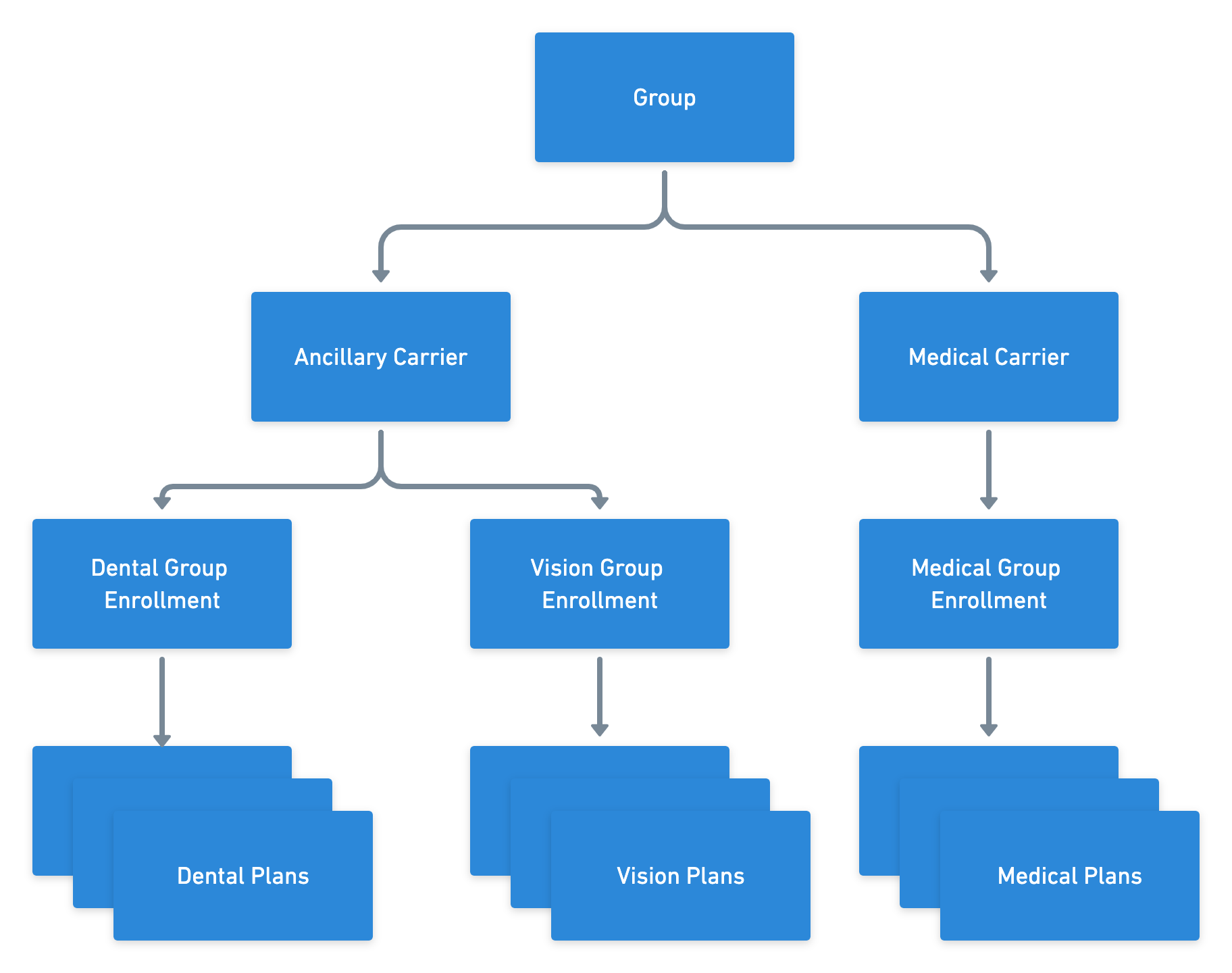
## Enrollments
The **enrollments** object represents the each individual line of coverage (LOC) being offered by a specific group (e.g. `medical`, `dental`, `vision`). You can manage the following types of benefits through Noyo:
* Accident
* Accidental death and dismemberment (AD\&D)
* Cancer
* Critical Illness
* Dental
* Hospital indemnity
* Life
* Long-term disability (LTD)
* Medical
* Short-term disability (STD)
* Vision
Start by [getting a list of all enrollments](/api-reference/groups/enrollments/get-group-enrollment-list) for a given group. This will return IDs, dates, and statuses for all the group's enrollments. You can then use each enrollment ID to [get a single group enrollment](/api-reference/groups/enrollments/get-group-enrollment) and its associated data in the future.
## Plan data
The **plans** object represents a plan or benefit offered by a carrier to employee or dependent members of a group.
You can use the group's ID to [get a list of all their plans](/api-reference/groups/plans/get-group-plan-list), which returns IDs for each individual plan. You can also use a group plan ID to [get details on a specific plan](/api-reference/groups/plans/get-group-plan).
Note that the response will be nested in a `plan` attribute. Different data is included in the response for each plan depending on its LOC. See below for specific data returned across all LOCs supported by Noyo and more detail on waiting periods.
#### Accident Plan Object
| Object | Type | Description |
| - | - | - |
| `id`\* | uuid | Unique identifier of the record in Noyo |
| `version`\* | uuid | Current version of the record |
| `group_enrollment_id`\* | uuid | Unique identifier of the associated group enrollment in the Noyo system |
| `carrier_id`\* | uuid | Unique identifier of the associated carrier in Noyo |
| `line_of_coverage`\* | string | Line of coverage for the group accident plan |
| `name`\* | string | Name of the group accident plan |
| `code` | string | Plan code of the group accident plan |
| `plan_type`\* | string | Type of group accident plan. One of: `basic`, `voluntary` |
| `effective_start_date` | date | ISO-8601 date string for the effective start date of the record |
| `effective_end_date` | date | ISO-8601 date string for the effective end date of the record |
| `status`\* | string | Status of the group accident plan. One of: `active`, `discontinued`, `pending` |
| `eligible_member_types`\* | array | List of member types eligible for the group accident plan. One of: `all`, `child`, `domestic-partner`, `employee`, `spouse` |
| `waiting_periods`\* | array | Member waiting period details for the group accident plan |
| `termination_policy`\* | string | Termination policy for the group accident plan. One of: `end_of_month`, `fifteenth_of_month`, `last_work_date` |
| `plan_configuration`\* | object | Group plan configuration details |
| `created`\* | timestamp | The date the record was created |
| `modified`\* | timestamp | The date the record was last updated |
#### AD\&D Plan Object
| Object | Type | Description |
| - | - | - |
| `id`\* | uuid | Unique identifier of the record in Noyo |
| `version`\* | uuid | Current version of the record |
| `group_enrollment_id`\* | uuid | Unique identifier of the associated group enrollment in the Noyo system |
| `carrier_id`\* | uuid | Unique identifier of the associated carrier in Noyo |
| `line_of_coverage`\* | string | Line of coverage for the group AD\&D plan |
| `name`\* | string | Name of the group AD\&D plan |
| `code` | string | Plan code of the group AD\&D plan |
| `plan_type`\* | string | Type of group AD\&D plan. One of: `basic`, `voluntary` |
| `effective_start_date` | date | ISO-8601 date string for the effective start date of the record |
| `effective_end_date` | date | ISO-8601 date string for the effective end date of the record |
| `status`\* | string | Status of the group AD\&D plan. One of: `active`, `discontinued`, `pending` |
| `eligible_member_types`\* | array | List of member types eligible for the group AD\&D plan. One of: `all`, `child`, `domestic-partner`, `employee`, `spouse` |
| `waiting_periods`\* | array | Member waiting period details for the group AD\&D plan |
| `termination_policy`\* | string | Termination policy for the group AD\&D plan. One of: `end_of_month`, `fifteenth_of_month`, `last_work_date` |
| `volume_rules`\* | object | Volume rules for the group AD\&D plan |
| `plan_configuration`\* | object | Group plan configuration details |
| `created`\* | timestamp | The date the record was created |
| `modified`\* | timestamp | The date the record was last updated |
#### Cancer Plan Object
| Object | Type | Description |
| - | - | - |
| `id`\* | uuid | Unique identifier of the record in Noyo |
| `version`\* | uuid | Current version of the record |
| `group_enrollment_id`\* | uuid | Unique identifier of the associated group enrollment in the Noyo system |
| `carrier_id`\* | uuid | Unique identifier of the associated carrier in Noyo |
| `line_of_coverage`\* | string | Line of coverage for the group cancer plan |
| `name`\* | string | Name of the group cancer plan |
| `code` | string | Plan code of the group cancer plan |
| `plan_type`\* | string | Type of group cancer plan. One of: `basic`, `voluntary` |
| `effective_start_date` | date | ISO-8601 date string for the effective start date of the record |
| `effective_end_date` | date | ISO-8601 date string for the effective end date of the record |
| `status`\* | string | Status of the group cancer plan. One of: `active`, `discontinued`, `pending` |
| `eligible_member_types`\* | array | List of member types eligible for the group cancer plan. One of: `all`, `child`, `domestic-partner`, `employee`, `spouse` |
| `waiting_periods`\* | array | Member waiting period details for the group cancer plan |
| `termination_policy`\* | string | Termination policy for the group cancer plan. One of: `end_of_month`, `fifteenth_of_month`, `last_work_date` |
| `plan_configuration`\* | object | Group plan configuration details |
| `created`\* | timestamp | The date the record was created |
| `modified`\* | timestamp | The date the record was last updated |
#### Critical Illness Plan Object
| Object | Type | Description |
| - | - | - |
| `id`\* | uuid | Unique identifier of the record in Noyo |
| `version`\* | uuid | Current version of the record |
| `group_enrollment_id`\* | uuid | Unique identifier of the associated group enrollment in the Noyo system |
| `carrier_id`\* | uuid | Unique identifier of the associated carrier in Noyo |
| `line_of_coverage`\* | string | Line of coverage for the group critical illness plan |
| `name`\* | string | Name of the group critical illness plan |
| `code` | string | Plan code of the group critical illness plan |
| `plan_type`\* | string | Type of group critical illness plan. One of: `basic`, `voluntary` |
| `effective_start_date` | date | ISO-8601 date string for the effective start date of the record |
| `effective_end_date` | date | ISO-8601 date string for the effective end date of the record |
| `status`\* | string | Status of the group critical illness plan. One of: `active`, `discontinued`, `pending` |
| `eligible_member_types`\* | array | List of member types eligible for the group critical illness plan. One of: `all`, `child`, `domestic-partner`, `employee`, `spouse` |
| `waiting_periods`\* | array | Member waiting period details for the group critical illness plan |
| `termination_policy`\* | string | Termination policy for the group critical illness plan. One of: `end_of_month`, `fifteenth_of_month`, `last_work_date` |
| `volume_rules`\* | object | Volume rules for the group critical illness plan |
| `plan_configuration`\* | object | Group plan configuration details |
| `created`\* | timestamp | The date the record was created |
| `modified`\* | timestamp | The date the record was last updated |
#### Dental Plan Object
| Object | Type | Description |
| - | - | - |
| `id`\* | uuid | Unique identifier of the record in Noyo |
| `version`\* | uuid | Current version of the record |
| `group_enrollment_id`\* | uuid | Unique identifier of the associated group enrollment in the Noyo system |
| `carrier_id`\* | uuid | Unique identifier of the associated carrier in Noyo |
| `line_of_coverage`\* | string | Line of coverage for the group dental plan |
| `name`\* | string | Name of the group dental plan |
| `code` | string | Plan code of the group dental plan |
| `effective_start_date` | date | ISO-8601 date string for the effective start date of the record |
| `effective_end_date` | date | ISO-8601 date string for the effective end date of the record |
| `plan_type` | string | Type of group dental plan. One of: `aso`, `dhmo`, `epo`, `indemnity`, `pos`, `ppo` |
| `network` | string | Network name of the plan designated by the carrier |
| `voluntary` | boolean | True if the group dental plan is a voluntary plan |
| `status`\* | string | Status of the group dental plan. One of: `active`, `discontinued`, `pending` |
| `eligible_member_types`\* | array | List of member types eligible for the group dental plan. One of: `all`, `child`, `domestic-partner`, `employee`, `spouse` |
| `waiting_periods`\* | array | Member waiting period details for the group dental plan |
| `termination_policy`\* | string | Termination policy for the group dental plan. One of: `end_of_month`, `fifteenth_of_month`, `last_work_date` |
| `cobra_rules`\* | object | `eligible`: True if group plan is eligible for COBRA enrollments |
| `created`\* | timestamp | The date the record was created |
| `modified`\* | timestamp | The date the record was last updated |
| `plan_configuration`\* | object | Group plan configuration details |
#### Hospital Indemnity Plan Object
| Object | Type | Description |
| - | - | - |
| `id`\* | uuid | Unique identifier of the record in Noyo |
| `version`\* | uuid | Current version of the record |
| `group_enrollment_id`\* | uuid | Unique identifier of the associated group enrollment in the Noyo system |
| `carrier_id`\* | uuid | Unique identifier of the associated carrier in Noyo |
| `line_of_coverage`\* | string | Line of coverage for the group hospital indemnity plan |
| `name`\* | string | Name of the group hospital indemnity plan |
| `code` | string | Plan code of the group hospital indemnity plan |
| `plan_type`\* | string | Type of group hospital indemnity plan. One of: `basic`, `voluntary` |
| `effective_start_date` | date | ISO-8601 date string for the effective start date of the record |
| `effective_end_date` | date | ISO-8601 date string for the effective end date of the record |
| `status`\* | string | Status of the group hospital indemnity plan. One of: `active`, `discontinued`, `pending` |
| `eligible_member_types`\* | array | List of member types eligible for the group hospital indemnity plan. One of: `all`, `child`, `domestic-partner`, `employee`, `spouse` |
| `waiting_periods`\* | array | Member waiting period details for the group hospital indemnity plan |
| `termination_policy`\* | string | Termination policy for the group hospital indemnity plan. One of: `end_of_month`, `fifteenth_of_month`, `last_work_date` |
| `plan_configuration`\* | object | Group plan configuration details |
| `created`\* | timestamp | The date the record was created |
| `modified`\* | timestamp | The date the record was last updated |
#### Life Plan Object
| Object | Type | Description |
| - | - | - |
| `id`\* | uuid | Unique identifier of the record in Noyo |
| `version`\* | uuid | Current version of the record |
| `group_enrollment_id`\* | uuid | Unique identifier of the associated group enrollment in the Noyo system |
| `carrier_id`\* | uuid | Unique identifier of the associated carrier in Noyo |
| `line_of_coverage`\* | string | Line of coverage for the group life plan |
| `name`\* | string | Name of the group life plan |
| `code` | string | Plan code of the group life plan |
| `plan_type`\* | string | Type of group life plan. One of: `basic`, `voluntary` |
| `effective_start_date` | date | ISO-8601 date string for the effective start date of the record |
| `effective_end_date` | date | ISO-8601 date string for the effective end date of the record |
| `status`\* | string | Status of the group life plan. One of: `active`, `discontinued`, `pending` |
| `eligible_member_types`\* | array | List of member types eligible for the group life plan. One of: `all`, `child`, `domestic-partner`, `employee`, `spouse` |
| `waiting_periods`\* | array | Member waiting period details for the group life plan |
| `termination_policy`\* | string | Termination policy for the group life plan. One of: `end_of_month`, `fifteenth_of_month`, `last_work_date` |
| `volume_rules`\* | object | Volume rules for the group life plan |
| `plan_configuration`\* | object | Group plan configuration details |
| `created`\* | timestamp | The date the record was created |
| `modified`\* | timestamp | The date the record was last updated |
#### LTD Plan Object
| Object | Type | Description |
| - | - | - |
| `id`\* | uuid | Unique identifier of the record in Noyo |
| `version`\* | uuid | Current version of the record |
| `group_enrollment_id`\* | uuid | Unique identifier of the associated group enrollment in the Noyo system |
| `carrier_id`\* | uuid | Unique identifier of the associated carrier in Noyo |
| `line_of_coverage`\* | string | Line of coverage for the group LTD plan |
| `name`\* | string | Name of the group LTD plan |
| `code` | string | Plan code of the group LTD plan |
| `plan_type`\* | string | Type of group LTD plan. One of: `basic`, `voluntary` |
| `effective_start_date` | date | ISO-8601 date string for the effective start date of the record |
| `effective_end_date` | date | ISO-8601 date string for the effective end date of the record |
| `status`\* | string | Status of the group LTD plan. One of: `active`, `discontinued`, `pending` |
| `eligible_member_types`\* | array | List of member types eligible for the group LTD plan. One of: `all`, `child`, `domestic-partner`, `employee`, `spouse` |
| `waiting_periods`\* | array | Member waiting period details for the group LTD plan |
| `termination_policy`\* | string | Termination policy for the group LTD plan. One of: `end_of_month`, `fifteenth_of_month`, `last_work_date` |
| `volume_rules`\* | object | Volume rules for the group LTD plan |
| `plan_configuration`\* | object | Group plan configuration details |
| `created`\* | timestamp | The date the record was created |
| `modified`\* | timestamp | The date the record was last updated |
#### Medical Plan Object
| Object | Type | Description |
| - | - | - |
| `id`\* | uuid | Unique identifier of the record in Noyo |
| `version`\* | uuid | Current version of the record |
| `group_enrollment_id`\* | uuid | Unique identifier of the associated group enrollment in the Noyo system |
| `carrier_id`\* | uuid | Unique identifier of the associated carrier in Noyo |
| `line_of_coverage`\* | string | Line of coverage for the group medical plan |
| `name`\* | string | Name of the group medical plan |
| `code` | string | Plan code of the group medical plan |
| `effective_start_date` | date | ISO-8601 date string for the effective start date of the record |
| `effective_end_date` | date | ISO-8601 date string for the effective end date of the record |
| `plan_type` | string | Type of group medical plan. One of: `epo`, `hdhp`, `hmo`, `hmp`, `pos`, `ppo` |
| `network` | string | Network name of the plan designated by the carrier |
| `metal_tier` | string | Metal tier designation of the group medical plan. One of: `bronze`, `gold`, `platinum`, `silver` |
| `status`\* | string | Status of the group medical plan. One of: `active`, `discontinued`, `pending` |
| `eligible_member_types` | array | Eligible member types for the group medical plan |
| `waiting_periods`\* | array | Member waiting period details for the group medical plan |
| `termination_policy`\* | string | Termination policy for the group medical plan. One of: `end_of_month`, `fifteenth_of_month`, `last_work_date` |
| `cobra_rules`\* | object | `eligible`: True if group plan is eligible for COBRA enrollments |
| `plan_configuration`\* | object | Group plan configuration details |
| `created`\* | timestamp | The date the record was created |
| `modified`\* | timestamp | The date the record was last updated |
#### STD Plan Object
| Object | Type | Description |
| - | - | - |
| `id`\* | uuid | Unique identifier of the record in Noyo |
| `version`\* | uuid | Current version of the record |
| `group_enrollment_id`\* | uuid | Unique identifier of the associated group enrollment in the Noyo system |
| `carrier_id`\* | uuid | Unique identifier of the associated carrier in Noyo |
| `line_of_coverage`\* | string | Line of coverage for the group STD plan |
| `name`\* | string | Name of the group STD plan |
| `code` | string | Plan code of the group STD plan |
| `plan_type`\* | string | Type of group STD plan. One of: `basic`, `voluntary` |
| `effective_start_date` | date | ISO-8601 date string for the effective start date of the record |
| `effective_end_date` | date | ISO-8601 date string for the effective end date of the record |
| `status`\* | string | Status of the group STD plan. One of: `active`, `discontinued`, `pending` |
| `eligible_member_types`\* | array | List of member types eligible for the group STD plan. One of: `all`, `child`, `domestic-partner`, `employee`, `spouse` |
| `waiting_periods`\* | array | Member waiting period details for the group STD plan |
| `termination_policy`\* | string | Termination policy for the group STD plan. One of: `end_of_month`, `fifteenth_of_month`, `last_work_date` |
| `volume_rules`\* | object | Volume rules for the group STD plan |
| `plan_configuration`\* | object | Group plan configuration details |
| `created`\* | timestamp | The date the record was created |
| `modified`\* | timestamp | The date the record was last updated |
#### Vision Plan Object
| Object | Type | Description |
| - | - | - |
| `id`\* | uuid | Unique identifier of the record in Noyo |
| `version`\* | uuid | Current version of the record |
| `group_enrollment_id`\* | uuid | Unique identifier of the associated group enrollment in the Noyo system |
| `carrier_id`\* | uuid | Unique identifier of the associated carrier in Noyo |
| `line_of_coverage`\* | string | Line of coverage for the group vision plan |
| `name`\* | string | Name of the group vision plan |
| `code` | string | Plan code of the group vision plan |
| `effective_start_date` | date | ISO-8601 date string for the effective start date of the record |
| `effective_end_date` | date | ISO-8601 date string for the effective end date of the record |
| `voluntary` | boolean | True if the group vision plan is a voluntary plan |
| `status`\* | string | Status of the group vision plan. One of: `active`, `discontinued`, `pending` |
| `eligible_member_types`\* | array | List of member types eligible for the group vision plan. One of: `all`, `child`, `domestic-partner`, `employee`, `spouse` |
| `waiting_periods`\* | array | Member waiting period details for the group vision plan |
| `termination_policy`\* | string | Termination policy for the group vision plan. One of: `end_of_month`, `fifteenth_of_month`, `last_work_date` |
| `cobra_rules`\* | object | `eligible`: True if group plan is eligible for COBRA enrollments |
| `plan_configuration`\* | object | Group plan configuration details |
| `created`\* | timestamp | The date the record was created |
| `modified`\* | timestamp | The date the record was last updated |
## Waiting periods
Each group plan may include one or more waiting period rules based on the information made available by the carrier.
Each waiting period will always have a `waiting_period_enrollment_type` field. The `waiting_period_enrollment_type` determines when the waiting period is used: `new_member` applies to new members enrolling as new hires, `current_member` applies to existing members enrolling with a QLE, and `rehire` applies to previously active members re-enrolling as a rehire.
Each waiting period will always have a `waiting_period_rule` field. This field is a general description of the waiting period rule, and determines which other fields will be present in the waiting period response.
Some waiting period rules have a `waiting_period_coinciding` flag. This flag is relevant when the rule defines a specific date for starting coverage and the member waiting period may end on that date.
For example, the waiting period rule may be '1st of month after hire date' for a new member with a hire date of January 1st. When `waiting_period_coinciding` is true, the member would begin coverage immediately in the coinciding period, starting on January 1st. When `waiting_period_coinciding` is false, the member coverage would be pushed out to the following period starting February 1st.
#### Fixed Waiting Period Object
| Object | Type | Description |
| - | - | - |
| `waiting_period_enrollment_type`\* | string | Enrollment type to decide which relevant waiting period should be applied. One of: `current_member`, `new_member`, `rehire` |
| `waiting_period_rule`\* | string | Waiting period rule describing the waiting period for the member. One of: `hire_date` |
#### Fixed Coinciding Waiting Period Object
| Object | Type | Description |
| - | - | - |
| `waiting_period_enrollment_type`\* | string | Enrollment type to decide which relevant waiting period should be applied. One of: `current_member`, `new_member`, `rehire` |
| `waiting_period_rule`\* | string | Waiting period rule describing the waiting period for the member. One of: `fifteenth_of_month_after_event`, `fifteenth_of_month_after_hire_date`, `first_of_month_after_event`, `first_of_month_after_hire_date`, `first_or_fifteenth_of_month_after_event`, `first_or_fifteenth_of_month_after_hire_date` |
| `waiting_period_coinciding`\* | boolean | True if the effective date can equal the final day of waiting period |
#### Variable Waiting Period Object
| Object | Type | Description |
| - | - | - |
| `waiting_period_enrollment_type`\* | string | Enrollment type to decide which relevant waiting period should be applied. One of: `current_member`, `new_member`, `rehire` |
| `waiting_period_rule`\* | string | Waiting period rule describing the waiting period for the member. One of: `after_waiting_period` |
| `waiting_period_amount`\* | integer | Amount of time required for the waiting period |
| `waiting_period_unit`\* | string | Unit of time required for the waiting period. One of: `business_day`, `day`, `month`, `week`, `year` |
#### Variable Coinciding Waiting Period Object
| Object | Type | Description |
| - | - | - |
| `waiting_period_enrollment_type`\* | string | Enrollment type to decide which relevant waiting period should be applied. One of: `current_member`, `new_member`, `rehire` |
| `waiting_period_rule`\* | string | Waiting period rule describing the waiting period for the member. One of: `fifteenth_of_month_after_waiting_period`, `first_of_month_after_waiting_period`, `first_or_fifteenth_of_month_after_waiting_period` |
| `waiting_period_amount`\* | integer | Amount of time required for the waiting period |
| `waiting_period_unit`\* | string | Unit of time required for the waiting period. One of: `business_day`, `day`, `month`, `week`, `year` |
| `waiting_period_coinciding`\* | boolean | True if the effective date can equal the final day of waiting period |
# Member Data
Source: https://docs.noyo.com/docs/data/member-data-endpoints
Data available for employees and dependents
A **member** is any employee or dependent enrolled in insurance. Our endpoints are structured to deliver employee and dependent data independently.
Member data is sourced from the regular data syncs we perform with Sync-level carriers, or it is submitted via member snapshots for Send-level carrier connections.
Most of the time you will not create members directly through Noyo. Instead, members will be created via [snapshots](/docs/members/using-snapshots/using-snapshots) or carrier syncs. Because of this, it will be important to understand [member linking](/docs/groups/mapping/linking-members).
# Employee data
The **employee** object represents an employee within a group. It contains personal information about the employee including name, address, and contact info as well as employment-related information like salary, occupation and employment status.
### Getting employees
You can get employee data in several different ways, including via large, filterable lists of employees.
* [Get a single employee](/api-reference/members/employees/getgroupemployee) based on `employee_id`
* [Get a single employee for a given group](/api-reference/members/employees/getgroupemployee), based on a combination of `employee_id` and `group_id`
* [Get all employees for a given group](/api-reference/members/employees/getgroupemployeelist), based on `group_id`. See below for filtering.
* [Get all employees associated with your organization](/api-reference/members/employees/getemployeelist), regardless of group. See below for filtering.
#### Filtering Employees in a Group
There may be some cases where you wish to find a specific employee in a group, but do not know their Noyo `id`. We provide a way to [filter your employee list](/api-reference/members/employees/getgroupemployeelist) for a given group via query parameters. The following parameters are accepted by the API in the query string:
| Object | Type | Description |
| - | - | - |
| `date_of_birth` | date | ISO-8601 date string for the date of birth of the employee to be filtered on |
| `first_name` | string | First name of the employee to be filtered on |
| `last_name` | string | Last name of the employee to be filtered on |
| `name` | string | A name search for all name fields for the employee to be filtered on |
The filtering is not case-sensitive and it does not require an exact match on the value (e.g. searching for "ann" will match against "Ann" as well as "Annie").
#### Filtering All Employees
There may be some cases where you wish to [find a specific employee across all of your groups](/api-reference/members/employees/getemployeelist), but do not know their Noyo `id`. We provide a way to filter your employee list via query parameters. The following parameters are accepted by the API in the query string:
| Object | Type | Description |
| - | - | - |
| `date_of_birth` | date | ISO-8601 date string for the date of birth of the employee to be filtered on |
| `first_name` | string | First name of the employee to be filtered on |
| `last_name` | string | Last name of the employee to be filtered on |
| `name` | string | A name search for all name fields for the employee to be filtered on |
The filtering is not case-sensitive and it does not require an exact match on the value (e.g. searching for "ann" will match against "Ann" as well as "Annie").
# Dependent data
The **dependent** object represents an employee's dependent. It contains personal information about the dependent including name, address, and contact info along with the dependent's relationship to the employee.
### Getting dependents
You can [get dependent data directly](/api-reference/members/dependents/getdependent) with a `dependent_id`, or with a `dependent_id` and `employee_id` combination with the [Get a Single Dependent of Employee](/api-reference/members/dependents/getemployeedependent) endpoint.
You can also [fetch a list of dependents for a given employee](/api-reference/members/dependents/getdependentlist) using the employee's `employee_id`.
# Individual enrollments
Each member has a separate Individual Enrollment for each coverage type they are enrolled in or have waived. You can get a list of Individual Enrollments for each [group](/api-reference/members/enrollments/getindividualenrollmentbygrouplist), [group enrollment](/api-reference/members/enrollments/getindividualenrollmentlist) (i.e., line of coverage), [employee](/api-reference/members/enrollments/getindividualenrollmentbyemployeelist), or [dependent](/api-reference/members/enrollments/getindividualenrollmentbydependentlist).
Individual enrollments are a rich source of data, containing fields like COBRA enrollment, coverage start and end dates, volume information where applicable, and carrier-specific configurations.
If you are managing member changes through Noyo, you will be manipulating individual enrollments by [sending member snapshots](/docs/members/using-snapshots/using-snapshots) that update coverage.
## Member premiums
When available from the carrier, Noyo can return a premium amount that was billed to a member. Currently we can return premium amounts for Beam, with more carriers coming soon.
Callers can [query the API](/api-reference/members/premiums/getmemberpremiumsbyemployeeid) by `employee_id` to retrieve a list of member premiums associated with the employee and their family unit. The size of the response list will depend on the granularity of data made available by the carrier.
For example, if an employee is enrolled in dental and vision coverage and we know the exact cost split between each line of coverage, the response list would contain two member premium records, one with the dental `amount` and a single `billed_members` entry for the employee + dental plan, and one with the vision `amount` and a single `billed_members` entry for the employee + vision plan.
On the other hand, if we only know the total combined cost for both coverages, the response list would contain one member premium record with the total `amount` and two `billed_members` entries, one for the employee + dental plan and one for the employee + vision plan.
# Temporal Data
Source: https://docs.noyo.com/docs/data/temporal-data
How to handle data that changes over time
Several of the Noyo models track data elements that change over time. For example, a plan may only last for one year before being discontinued, or a member might have the same life plan for multiple years but change their coverage volume for that plan over time.
The [group carrier configuration](https://docs.noyo.com/api-reference/groups/configurations/get-carrier-configuration-by-group-list), [group plan](https://docs.noyo.com/api-reference/groups/plans/get-group-plan), and [individual enrollment](https://docs.noyo.com/api-reference/members/enrollments/getindividualenrollment) models are all temporally tracked.
Data at the group level is all sourced from the carrier. You can query this data to get an array of records tracking changes over time, but you **cannot** edit the data directly.
You **are** able to edit individual enrollments via member snapshots; see more on that below.
Demographic information for employees and dependents is *not* temporal; the current state of demographic data is the only state that exists in our system. You should always send the most recent state of demographic data, and we will transmit that to the carrier. For example, if you know someone’s salary will change in the future, send us that salary with an effective date in the future. The amount you send will be the only record of a salary for that person; any previous salary amounts will not be stored or queryable.
## Using temporal data in member snapshots
In [member snapshots](https://docs.noyo.com/api-reference/snapshots/create-member-snapshot), each coverage has an `enrolled_members` list. Each enrolled member can include `effective_start_date`, `effective_end_date`, and optionally `latest_change_effective_date`; these dates determine the individual enrollment timeline for that member.
The `carrier_config` on a coverage is assigned an effective date based on the coverage’s `enrolled_members` in this order:
1. The system looks for the first enrolled member in list order where `individual_type == "employee"`
* If that employee has `latest_change_effective_date`, that date is used
* Otherwise, that employee’s `effective_start_date` is used
2. If there is no employee in `enrolled_members`, the system uses the first enrolled member in the list, which should be a dependent.
* If that dependent has `latest_change_effective_date`, that date is used
* Otherwise, that dependent’s `effective_start_date` is used
The system does not sort enrolled members or choose the earliest or latest date. If multiple employee entries are included in the same coverage, only the first employee entry in `enrolled_members` is used to determine the `carrier_config` effective date.
To represent changes during the year, provide separate effective periods. Coverage level fields such as `carrier_config` and `cobra_details`, and enrolled member fields such as `volume`, can then produce distinct temporal records.
### Important concepts
* `effective_start_date` - The original date that a member started coverage on a plan. When members are terminated and rehired, they get new effective start dates. This can differ from some other industry definitions, which define a new start any time benefits change.
* `effective_end_date` - The end date of coverage on a plan. Unless the coverage itself is ending, this should be set to datemax (`9999-12-31`). [Read more here](https://docs.noyo.com/docs/members/using-snapshots/end-dates).
* `effective_date` - A query parameter for some endpoints that allow the user to specify the relative date for which to see the state of a record.
* `latest_change_effective_date` - The effective date of the temporal data contained within the coverage block. See below for example usage.
## Example scenarios
### Mid-year benefit class change
If an employee has a QLE on June 1st that changes their benefit class from A to B for a coverage that’s active from January 1st, there are two ways to represent this in the member snapshot payload.
**Preferred method: one coverage block with a** `latest_change_effective_date`
Add a `latest_change_effective_date` to the enrolled member, and pass the new benefit class value in the `carrier_config` section.
```json Example Request lines theme={"system"}
{
"coverages": [
{
"carrier_id": "3a070236-770e-4521-adf9-5c342d03ed36",
"plan_id": "7c6de7e2-35a0-4ddf-a41b-c849a6569b49",
"line_of_coverage": "dental",
"carrier_config":{
"benefit_class_identifier": "B"
},
"enrolled_members": [
{
"individual_type": "employee",
"custom_individual_id": "1234567890",
"effective_start_date": "2025-01-01",
"effective_end_date": "9999-12-31",
"latest_change_effective_date": "2025-06-01"
}
]
}
]
}
```
**Alternative method: two coverage blocks with different** `effective_dates`
Edit the effective dates for each enrolled member in the original coverage block to January 1st through May 31st and leave the original `carrier_config` in place.
Then add a second coverage block with an effective date of June 1st, with the new benefit class defined in the associated `carrier_config` section.
This method is not recommended because specifying the previous state (benefit class A) can cause Noyo to attempt to fulfill that previous state at the carrier and thus run afoul of the carrier’s retro rules. For this example scenario, the user likely just wants to change the benefit class to B starting 6/1 and is not concerned with the earlier state.
```json Example Request lines theme={"system"}
{
"coverages": [
{
"carrier_id": "3a070236-770e-4521-adf9-5c342d03ed36",
"plan_id": "7c6de7e2-35a0-4ddf-a41b-c849a6569b49",
"line_of_coverage": "dental",
"carrier_config":{
"benefit_class_identifier": "A"
},
"enrolled_members": [
{
"individual_type": "employee",
"custom_individual_id": "1234567890",
"effective_start_date": "2025-01-01",
"effective_end_date": "2025-05-31"
}
]
},
{
"carrier_id": "3a070236-770e-4521-adf9-5c342d03ed36",
"plan_id": "7c6de7e2-35a0-4ddf-a41b-c849a6569b49",
"line_of_coverage": "dental",
"carrier_config":{
"benefit_class_identifier": "B"
},
"enrolled_members": [
{
"individual_type": "employee",
"custom_individual_id": "1234567890",
"effective_start_date": "2025-06-01",
"effective_end_date": "9999-12-31"
}
]
}
]
}
```
### Open enrollment election
During open enrollment, employees may enroll in new coverages with future effective dates while still being enrolled in current-year coverage. To express this in a member snapshot, you should ensure that any coverages that are discontinuing have an `effective_end_date` set. Then add a new coverage block for each new enrollment and set the `effective_start_date` to the day after the current coverage ends.
Note that this specific scenario is often considered a “plan switch.”
```json Request lines theme={"system"}
{
"coverages": [
{
"carrier_id": "3a070236-770e-4521-adf9-5c342d03ed36",
"plan_id": "7c6de7e2-35a0-4ddf-a41b-c849a6569b49",
"line_of_coverage": "dental",
"carrier_config": {},
"enrolled_members": [
{
"individual_type": "employee",
"custom_individual_id": "1234567890",
"effective_start_date": "2025-01-01",
"effective_end_date": "2025-12-31"
}
]
},
{
"carrier_id": "3a070236-770e-4521-adf9-5c342d03ed36",
"plan_id": "4e5ebd0c-b5e4-4988-b93f-3e78ff6cf1b5",
"line_of_coverage": "dental",
"carrier_config": {},
"enrolled_members": [
{
"individual_type": "employee",
"custom_individual_id": "1234567890",
"effective_start_date": "2026-01-01",
"effective_end_date": "9999-12-31"
}
]
}
]
}
```
## How carriers process temporal data
Carriers generally only process the current/latest state of a member’s data, which means that retroactive changes can be difficult for them to process. You can learn more about carrier-specific retro policies in our documentation in the Noyo web application, but in most cases we do not recommend sending changes to past data through Noyo.
# Using Noyo Data
Source: https://docs.noyo.com/docs/data/using-noyo-data
The building blocks you need for your next amazing product
What makes Noyo special is that we are able to read data directly from the Sync carriers in our network. That is, we can get a confirmation and a copy of the member's record back after we have submitted a change.
We source this data from carrier systems using their preferred formats; for some carriers we are connected via APIs, for others we use custom files, and for some it's a mix of both. Then we standardize all these inputs so you get structured data in the same format for every group, regardless of the carrier.
What does our Sync technology do for you? It gives you the building blocks you need to create better experiences for your clients, members, broker partners, and internal teams.
## Group, plan, and member data on demand
When a group has been successfully connected to Noyo, all of their group-, plan-, and member-level data becomes available through our APIs. You can use this data to seed your system and build the group's structure if they're a new client.
Many of our customers also use our endpoints to run regular comparisons between their records and the carriers, allowing them to identify potential coverage problems sooner.
**Data Access by Tier**
* **Premier Tier:** Premier connections are defined by full two-way access to data. After a group connection is complete, we pull in all available account structure, plan, and member data from the carrier into our system. You can then use our GET endpoints to access the most up-to-date data for the group. For Premier carriers, Noyo's system is populated with the carrier's version of the data, so you get round-trip confirmation of changes and a reliable source of truth for the member's record with the carrier.
* **Advanced and Standard Tiers:** Advanced and Standard connections use the same Noyo endpoints, but use a wider range of connection methods to each carrier. These tiers do not have access to the carrier's member-level data. The member data you retrieve from our endpoints will reflect what you submitted via snapshots and may not reflect the current state of the member in the carrier’s system.
To learn more about what data fields are available for connected groups, check out these guides:
* [Group and Plan Data](/docs/data/group-data-endpoints)
* [Member Data](/docs/data/member-data-endpoints)
## Managing enrollments through Noyo
You can easily send member enrollment and eligibility changes through Noyo all year long, eliminating the need for complex file feeds, manual portal work, customized carrier integrations, and complicated OE workflows.
Just build [member snapshots](/docs/members/using-snapshots) into your system to automate enrollment from beginning to end. When you manage enrollment with Noyo, you get:
* One API experience for all your carriers
* Built-in data validation and enforcement of business logic
* Full visibility into statuses and errors
* No blackout periods or special workflows during open enrollment
**Change Fulfillment by Tier**
* **Premier Tier:** Changes are delivered in minutes, not days, and you receive round-trip confirmation for each change. You have access to real-time error detection and a clear view into fulfillment.
* **Advanced Tier:** Changes are transmitted to the carrier on a roughly weekly schedule. The status of each change reflects whether it has been queued for transmission, sent, or if it has resulted in an error.
**Standard Tier:** We build and transmit files that conform to the carrier's preferred standards. We are not able to perform round-trip confirmation to confirm changes; instead, the status of each change reflects whether it has been sent to the carrier or not.
# Carrier Authorization
Source: https://docs.noyo.com/docs/groups/connections/authorization
Carriers enforce different authorization models on ben-admins, brokers, and Noyo
Group connection requests can be started prior to authorization, but they will enter an `action_required` or `carrier_authorization` status if the group is not yet authorized. You will be prompted for further action in the Noyo UI.
Authorization process can vary by carrier. Reference each carrier’s documentation for details on authorization processes.
Noyo works with carriers to improve their authorization requirements, with the goal of achieving automatic authorization for all carriers.
**Include optional fields whenever possible**\
Some data isn't required for all connections, such as broker FEINs or the group's tax ID. While these fields aren't required,Noyo recommends including all data you have access to. This will help prevent delays and further intervention in the connection process, along with keeping your integration easy to extend to additional carriers.
### Authorization models
Each carrier's process will fall into one of the following categories:
1. **Automatic Authorization for Noyo**\
Noyo has been granted authorization by the carrier to manage enrollment data for any group. There is no action needed by the broker or ben-admin.
2. **Per-group authorization by ben-admin platform**\
The ben-admin requests authorization per-group via a form or email. For all Send carriers, the ben-admin authorizes Noyo as their EDI partner.
3. **Bulk authorization by broker**\
The broker grants authorization via the carrier’s portal, a form, or an email. This must be done before a GCR can be completed.
4. **Per-group authorization by broker**\
For each group, the broker grants authorization via the carrier’s portal, a form, or an email. This must be done before a group can be connected to the carrier.
# Disconnecting a Group
Source: https://docs.noyo.com/docs/groups/connections/disconnect-a-group
Tell Noyo to stop exchanging data for a group
Groups may need to be disconnected from Noyo for a few different reasons:
* The group is no longer your customer and has moved to a different ben-admin solution
* The group has not renewed coverage with the carrier
* The group is no longer eligible for coverage with the carrier
Disconnecting groups properly prevents incorrect billing and manual cleanup work to fix erroneous enrollments.
# Group disconnection requests
Similar to Group Connection Requests, you must tell Noyo when a group needs to be disconnected from our system. On the date specified in the request, we will stop pulling the group's data from the carrier and will stop accepting new enrollment changes.
There are some instances where communications or automated responses from the carrier indicate that a group should be disconnected. When this happens, *we* will create a disconnection request that someone on your team must confirm or reject. Disconnection requests can be managed over API or in the Noyo web application.
## Sending a group disconnection request
First, [Create new group disconnection request](/api-reference/groups/disconnections/create-group-disconnection-request) and populate it with the relevant `carrier_id`, `effective_end_date`, and `group_id`. The `effective_end_date` is the last day that coverage should be managed through Noyo. When we receive the request we will process it and it will move through the statuses listed below.
If the request is rejected, it may be because of an invalid ID or end date. [Edit group disconnection request](/api-reference/groups/disconnections/edit-group-disconnection-request) to submit new or corrected data.
### Disconnection request statuses
Group disconnections will move through several different statuses as they pass through Noyo's system and are processed with carriers.
| Key | Description |
| - | - |
| `needs_review` | The group disconnection is awaiting your confirmation or rejection. |
| `processing` | Noyo is working on disconnecting the group from the carrier. |
| `completed` | The group has been disconnected from the carrier. |
| `rejected` | The group disconnection request has been rejected. The group will remain connected to the carrier. |
## Managing disconnection requests
[Get group disconnection request list](/api-reference/groups/disconnections/get-group-disconnection-request-list) to discover whether there are requests that need your attention. We recommend doing this weekly. You can also set up recurring checks for each group using our endpoint that [polls for disconnection requests for a specific group](/api-reference/groups/disconnections/get-group-disconnection-request-list-by-group).
You can use our endpoints to build an internal tool for your team to review, [Confirm group disconnection request](/api-reference/groups/disconnections/confirm-group-disconnection-request), or [Reject group disconnection request](/api-reference/groups/disconnections/reject-group-disconnection-request) disconnection requests.
### In the Noyo web application
You can also manage disconnection requests in the > ## Documentation Index
> Fetch the complete documentation index at: [https://docs.noyo.com/llms.txt](https://docs.noyo.com/llms.txt) Use this file to discover all available pages before exploring further.
# Connecting a Group
Source: https://docs.noyo.com/docs/groups/connections/request-a-group-connection
The first step in administering enrollments via Noyo
Connecting a group results in a live link between an employer group and a carrier through Noyo, allowing us to fulfill enrollment changes. This process activates Noyo for enrollment and eligibility fulfillment.
When a group connection request has been submitted, we start work to get approval from the carrier to administer your group. Along the way, you might be asked to help with authorizing us to help, or with making sure that your data aligns with the carrier’s. We'll guide you through everything that's required.
Once we have full authorization and a group connection is complete, any member snapshot you send for that group/carrier pair will be fulfilled with the carrier via Noyo.
### **Why Connect a Group?**
Connect a group when you're ready to activate fulfillment through Noyo. This can also mean switching from an existing fulfillment method.
Noyo supports connecting groups:
* Before any employees are enrolled with the carrier
* When employees are already enrolled with the carrier
## **Connection lifecycle**
A connection can move through a series of lifecycle stages. The specific steps required to establish a connection depend on the carrier tier and whether the carrier is already in Noyo’s network.
| **Connection stage** | **Description** |
| :- | :- |
| Not Connected | The connection is not currently active. |
| Initiated | A connection has been requested and is waiting to begin setup. |
| Vetting | Noyo is evaluating a carrier that is *not* currently in Noyo's network to determine whether the connection can be supported. |
| In Setup | The connection is actively being configured and prepared to go live. |
| Active | The connection is live and exchanging data. |
| Disconnecting | The connection is in the process of being disconnected. |
| Disconnected | The connection has been successfully disconnected. |
### **The Connection Process by Tier**
The path to a completed connection status differs depending on the carrier's tier.
**Premier Tier**
For Premier connections, we query the carrier's system directly for authorization and fetch all available account structure, plan, and enrollment data. We then pull this data into our system, do an initial data comparison, and make it available to you via our GET endpoints. Once the connection status is completed, you can send member snapshots for real-time fulfillment and round-trip confirmation.
**Advanced and Standard Tiers**
For these connections, the process is not fully complete until an initial "census" has been sent via member snapshots. This is necessary to create the group’s employees and dependents in our system, as we do not pull in member data from these tiers. This also allows our team to build and test the file with the carrier. The connection is only marked completed after the carrier has officially approved the file. You should continue to send enrollments to the carrier via your current method until the Noyo integration is approved.
### **Requesting a Group Connection**
Connecting a group is the process of populating Noyo's system with information about one group/carrier combination. As soon as the group's coverage application is approved by the carrier and their carrier-specific identifier (carrier\_group\_id) has been issued, you can send a group connection request.
To test different group connection request statuses in the sandbox environment, please see the "Sandbox Testing" section within each carrier's documentation page for specific scenario test group numbers.
**Requesting a Connection via API**
You can send a new connection for an existing group or create one from scratch. The carrier\_id is a unique ID Noyo assigns to each carrier in our network, while the carrier\_group\_id identifies the group in the carrier system (like a group number or policy number).
You can [add a new connection for an existing group](/api-reference/groups/connections/create-group-connection-with-existing-group) or [get a list of all their connection requests](/api-reference/groups/connections/get-group-connection-request-list-by-group).
Example group connection request:
```sh Request theme={"system"}
curl -X POST
--header "Authorization: Bearer "
https://fulfillment.noyo.com/api/v1/group_connections
{
"carrier_id": "c699414d-fd1c-4de4-86f0-66dfff2276c4",
"federal_ein": "123456789",
"group_data": {
"group_name": "Test Company",
"carrier_group_id": "00110011",
"broker_federal_ein": "123123123"
}
}
```
The `carrier_id` field is used throughout the Noyo API to identify a carrier. You can use it to request a connection with carriers that are already in Noyo's network, as well as carriers that are not yet in the network. If the carrier you want to connect is not available in the API, contact Noyo to have the carrier added before submitting the connection request.
You can find unique carrier identifiers and guidance for finding the appropriate `carrier_group_id` in the Noyo web application on each carrier's information page.
When the API call successfully creates a group connection request, the response includes:
* A unique ID for the **Group Connection**
* A unique ID for the **Group** added to Noyo
We recommend storing both IDs so you can reference these objects in subsequent API requests. Noyo will then work in the background to establish access to the group.
You can [pipe all your group connection requests](/api-reference/groups/connections/get-group-connection-request-list) into your own internal tools or manage them in our Noyo web application.
**Include all optional fields whenever possible**
Not all fields in a connection request are required. We still recommend providing as much information as possible every time - it helps avoid roadblocks and reduces average connection times.
## Connecting groups to Premier carriers
After you send a group connection request involving a Premier carrier, we query the carrier's system directly for authorization and fetch any account structure, plan, or enrollment data that exists. (Enrollment data will only be available for groups who have existing coverage with the carrier.) We structure and normalize this data and make it available to you through our GET endpoints. Most group connections with Premier carriers only take a few minutes to complete as long as the prerequisites are in place.
Next you'll [map plans and account structures](/docs/groups/mapping/mapping-plans-and-account-structures) (only if using [Explicit config](/docs/groups/mapping/explicit-vs-dynamic-configuration#dynamic-config-automap)) and [link members](/docs/groups/mapping/linking-members) to ensure our systems are aligned.
[Dynamic config](/docs/groups/mapping/explicit-vs-dynamic-configuration#dynamic-config-automap) is recommended for all new Noyo integrations and makes carrier-specific config values no longer required. This page should only be used for existing Noyo integrations.
For groups already set up in your system, Noyo makes it possible to review and compare the carrier data with your existing view of the group. We highly recommend doing this before sending enrollment changes to avoid creating discrepancies.
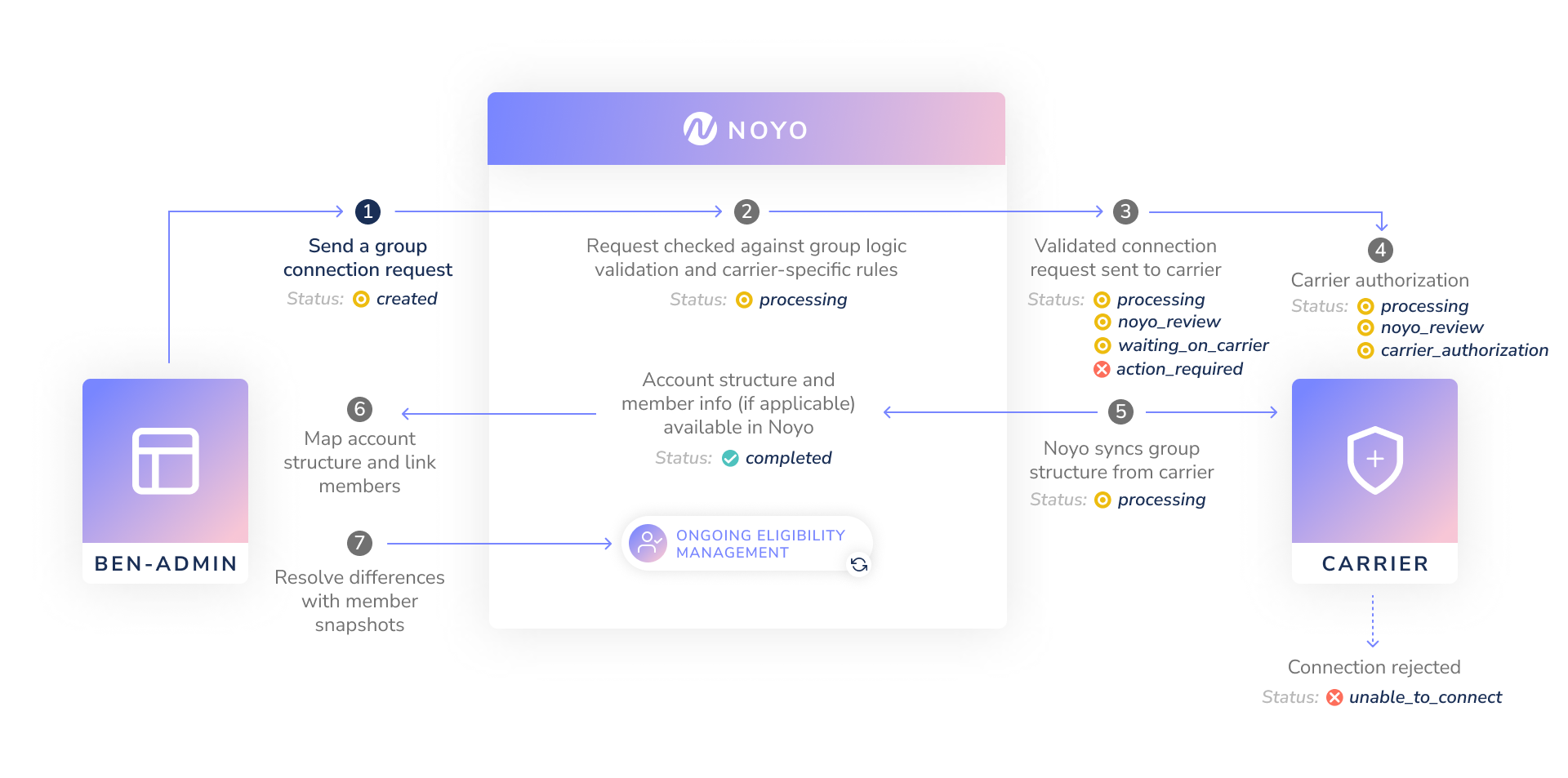
### Check the connection status
While a group connection request is in process, you can periodically poll for any updates to the Group Connection using the ID returned when the group connection was created. Here is an example request and response payload for the [Get Single Group Connection endpoint](/api-reference/groups/connections/get-group-connection):
```sh Request theme={"system"}
curl -X GET
--header "Authorization: Bearer "
https://fulfillment.noyo.com/api/v1/group_connections/dd9a1813-34f7-4c7e-86bc-f041f2cbd9a1
```
```json Response theme={"system"}
{
"id": "dd9a1813-34f7-4c7e-86bc-f041f2cbd9a1",
"version": "9906b5d2-e76d-4bad-ba4c-8ce90b6b867b",
"created": 1557329939,
"modified": 1557332412,
"organization_id": "d61fa455-adf4-4dc4-8c57-6d779ba9475e",
"carrier_id": "c699414d-fd1c-4de4-86f0-66dfff2276c4",
"group_id": "47c07963-2e34-4da2-86b4-cbc3c57111c1",
"request_type": "initial",
"status": "completed",
"completed": 1557330213,
"group_data": {
"group_name": "Test Company",
"carrier_group_id": "00110011",
"broker_federal_ein": "123123123"
}
}
```
When Noyo has finished processing all available data for the group and created the new records in our system, the status of the Group Connection will be updated to `completed`. At this point, you can use our API endpoints to access all the data we have about the group.
Group connections will move through several different statuses, as illustrated in the diagram above. Here's what those statuses mean:
| Key | Description |
| - | - |
| `created` | This status is the result of the initial submission (POST). We have not yet verified the current state of the carrier's system. |
| `processing` | We are communicating the group connection to the carrier involved. |
| `noyo_review` | Noyo is actively resolving an issue with the group connection; no action is needed from you. |
| `waiting_on_carrier` | The group connection has been submitted and the carrier is processing it. |
| `carrier_authorization` | There was an [authorization](/docs/groups/connections/authorization) problem when pulling group data from a carrier. It may require you to reach out to the carrier to resolve. |
| `action_required` | Action from you is required for successful processing. Notes are listed in the `setup_result` field on the group connection object. One case to know: **Prior connection must be disconnected** means the group still has an active connection for this carrier through another benefits platform. Ask the group to disconnect from their previous platform; once that disconnection is underway, the request continues automatically. Retrying the request re-checks right away. |
| `unable_to_connect` | The carrier was unable to install this group connection. Notes are listed in the `setup_result` field on the group connection object. |
| `completed` | The group connection has been completed and Noyo now has the ability to manage enrollment and eligibility changes for the specific group that is installed on the carrier's system |
| `canceled` | The group connection request was canceled before the connection was completed. Noyo also cancels a request automatically when one of your other groups already has an active connection to this carrier for the same carrier group; the `setup_result` names that group and carries `"error_scenario": "duplicate_connection"`. |
#### Setup Results
The `setup_result` allows us to pass along information that may be helpful in troubleshooting a failed group connection request. Its structure will depend on the group connection's status: if the request is in `noyo_review`, `action_required`, `waiting_on_carrier`, `unable_to_connect`, or `canceled`, the `setup_result` may contain an `error` string that gives further details about the specific issue involved, and for some cases an `error_scenario` constant that identifies the case (for example `cross_platform_duplicate` on an `action_required` request, or `duplicate_connection` on a `canceled` one). For other statuses, the `setup_result` will be empty.
## Connecting groups with Advanced & Standard carriers
After you send a group connection request involving a Standard or Advanced carrier, our team reaches out to that carrier for the group's account structure. It generally takes 1-2 weeks for the account structure to be received and loaded into our system, which makes it available through our endpoints; our team will inform you when this data is available so you can map plans and account structures and submit census data.
We do **not** pull enrollment data from Advanced/Standard carriers during the group connection process. This means you will need to create the group's employees and dependents in our system by sending an initial "census" via a series of member snapshots, with a `custom_individual_id` included for each member. The success responses will contain each person's Noyo ID, which you should include in future snapshots along with your custom ID. All 4xx errors will need to be resolved at this time to ensure that all enrollments are present and the Noyo team can build the file successfully.
Visit the Developer tab in the Noyo web application for a list of errors that can be sorted by path
Once you send the census snapshots, Noyo can populate the file with real data and complete the testing process according to the carrier's specifications. This typically takes up to 6 weeks with a responsive carrier. The Noyo team will reach out to you with any discrepancies the carrier identifies; to resolve them, you'll need to update/correct the bad data in your system (which may involve reaching out to the group admin) and send us new member snapshots, and then communicate the changes to the carrier directly as well. This process may need to be repeated until most discrepancies are resolved.
During this time, continue to send enrollments to the carrier via your current transmission methods (file, form, etc.) Once Noyo's integration has been approved by the carrier you can retire any existing methods of transmission.
While Noyo builds the file, you should continue to send enrollments to the carrier via your current transmission method (file, form, etc.). You should retire this method prior to Noyo's first delivery of an approved production file to the carrier to prevent data integrity issues in the carrier's system.
The carrier will officially approve the file when they determine that the structure is correct and the member data is sufficiently accurate. At this point, the group connection is marked `complete` in our system and new enrollments and changes can be sent to Noyo on an ongoing basis. We process these snapshots and identify the changes that should be sent on the next file (check the carrier's page in the Noyo web application for specifics on file delivery cadence). After the group connection is `complete`, you don't need to communicate changes directly to the carrier anymore.
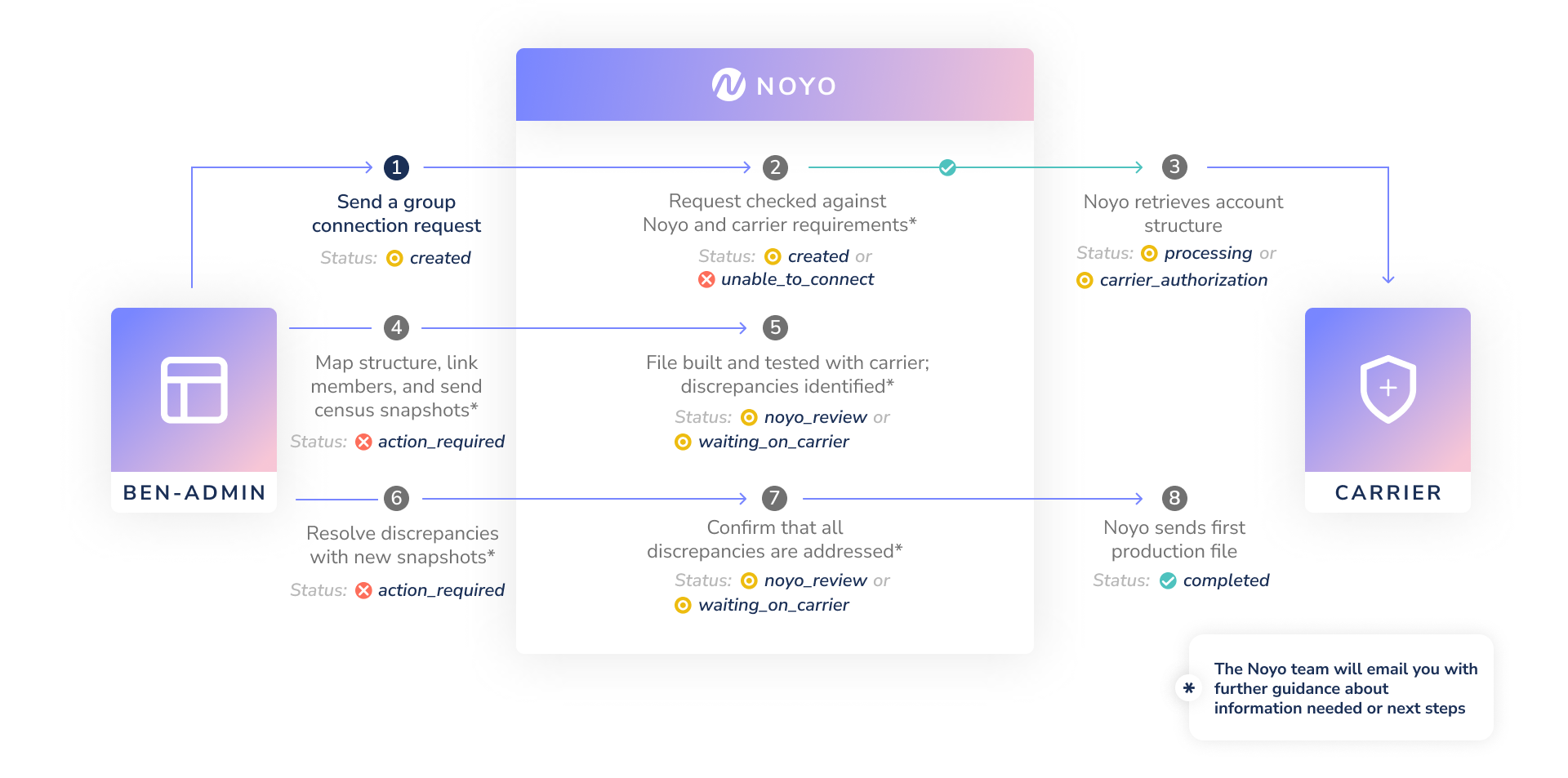
### Check the connection status
While a group connection request is in process, you can periodically poll for any updates to the Group Connection using the ID returned when the group connection was created. Here is an example request and response payload for the [Get Single Group Connection endpoint](/api-reference/groups/connections/get-group-connection):
```sh Request theme={"system"}
curl -X GET
--header "Authorization: Bearer "
https://fulfillment.noyo.com/api/v1/group_connections/dd9a1813-34f7-4c7e-86bc-f041f2cbd9a1
```
```json Response theme={"system"}
{
"id": "dd9a1813-34f7-4c7e-86bc-f041f2cbd9a1",
"version": "9906b5d2-e76d-4bad-ba4c-8ce90b6b867b",
"created": 1557329939,
"modified": 1557332412,
"organization_id": "d61fa455-adf4-4dc4-8c57-6d779ba9475e",
"carrier_id": "c699414d-fd1c-4de4-86f0-66dfff2276c4",
"group_id": "47c07963-2e34-4da2-86b4-cbc3c57111c1",
"request_type": "initial",
"status": "completed",
"completed": 1557330213,
"group_data": {
"group_name": "Test Company",
"carrier_group_id": "00110011",
"broker_federal_ein": "123123123"
}
}
```
When Noyo has sent the first production file, the status of the Group Connection will be updated to `completed`. At this point, you can use our API endpoints to access the most recent data you've sent us about the group.
Group connections will move through several different statuses, as illustrated in the diagram above. The status values are the same for all group connections, but the meanings vary slightly for Send connections:
| Key | Description |
| - | - |
| `created` | This status is the result of the initial submission (POST). We have not yet verified the current state of the carrier's system. |
| `processing` | We are communicating the group connection to the carrier involved. |
| `noyo_review` | Noyo is actively resolving an issue with the group connection; no action is needed from you. |
| `waiting_on_carrier` | We are waiting to receive group setup instructions from the carrier, or waiting to receive feedback on test files from the carrier. |
| `carrier_authorization` | We are working to obtain group information from the carrier before testing begins. |
| `action_required` | You need to either map plans and send the group census or resolve data discrepancies shared by the carrier. |
| `unable_to_connect` | The carrier was unable to accept this group connection. |
| `completed` | The production file was approved and you can manage enrollment and eligibility changes through Noyo for this group. |
| `canceled` | The group connection request was canceled before the connection was completed. |
### Group connection errors
| Error Name | Response Status Code | Description |
| - | - | - |
| Duplicate | `409` | Submitting a duplicate group connection (identical `carrier_id` and `carrier_group_id` as another group connection) will result in a 409 conflict error. |
| Missing Fields | `422` | If any required fields are missing, the request will result in a 422. |
| Carrier Group ID Format | `422` | Submitting a `carrier_group_id` that violates carrier-specific formatting will result in a 422 error. See carrier pages in the Noyo App for per-carrier formats. |
### Retrying a group connection request
If a group connection request has gone through its retry attempts and is in an `unable_to_connect` state, you can retry the group connection later through [this endpoint](/api-reference/groups/connections/retry-group-connection-with-existing-group). When you retry a group connection, you will have the option to update the unique identifier for the group (`carrier_group_id`).
Retrying a group connection keeps the `id` that was previously used to identify the group connection, and sends off the same request with any updated information to the carrier. This retry will update the status of the group connection to `processing`.
### Cancelling a request
To cancel an in-progress request, open the GCR in the Noyo app and select **Cancel GCR**.
Before cancelling, you’ll see a confirmation explaining the impact. Once cancelled, the request cannot be resumed. If you need to reconnect later, simply submit a new request.
 ### Ending a group connection
It's important to disconnect groups from Noyo if you are no longer managing them. [Learn how](/docs/groups/connections/disconnect-a-group).
# Create a Group
Source: https://docs.noyo.com/docs/groups/create-a-group
Learn how to create and configure a new group
We recommend creating groups in Noyo as soon as they are known to your ben-admin system. Then you can start sending member snapshots to Noyo to establish their data in our system; we use this data to calculate the group's eligibility for different types of carrier connections and write account structure mapping rules.
To create a group in Noyo, use the [Create Group endpoint](/api-reference/groups/create-group). This endpoint allows you to create a new group in our system with a small amount of information.
Once the group is created, you can begin sending snapshots for the group's members. Noyo will store this data but not send anything along to carriers just yet; instead, we'll use the employee data to calculate the group's eligibility for different types of carrier connections and eventually write mapping rules if needed.
Older integrations that do not use Noyo's [dynamic configuration and mapping features](/docs/groups/mapping/explicit-vs-dynamic-configuration) generally start their workflow with the group connection request, which creates the group synchronously.
### The group lifecycle with Noyo
After you create a group and populate it with employee records, you can choose when to activate data exchange through Noyo by **connecting** the group (covered in the next section). Here's a simplified view of the group lifecycle on Noyo:
### Ending a group connection
It's important to disconnect groups from Noyo if you are no longer managing them. [Learn how](/docs/groups/connections/disconnect-a-group).
# Create a Group
Source: https://docs.noyo.com/docs/groups/create-a-group
Learn how to create and configure a new group
We recommend creating groups in Noyo as soon as they are known to your ben-admin system. Then you can start sending member snapshots to Noyo to establish their data in our system; we use this data to calculate the group's eligibility for different types of carrier connections and write account structure mapping rules.
To create a group in Noyo, use the [Create Group endpoint](/api-reference/groups/create-group). This endpoint allows you to create a new group in our system with a small amount of information.
Once the group is created, you can begin sending snapshots for the group's members. Noyo will store this data but not send anything along to carriers just yet; instead, we'll use the employee data to calculate the group's eligibility for different types of carrier connections and eventually write mapping rules if needed.
Older integrations that do not use Noyo's [dynamic configuration and mapping features](/docs/groups/mapping/explicit-vs-dynamic-configuration) generally start their workflow with the group connection request, which creates the group synchronously.
### The group lifecycle with Noyo
After you create a group and populate it with employee records, you can choose when to activate data exchange through Noyo by **connecting** the group (covered in the next section). Here's a simplified view of the group lifecycle on Noyo:
![Lifecycle Diagram Jp]() # Explicit vs Dynamic Configuration
Source: https://docs.noyo.com/docs/groups/mapping/explicit-vs-dynamic-configuration
## Dynamic Configuration
Dynamic config is a new Noyo feature where Noyo takes on the mapping logic for most account structure values and surfaces any remaining unknown logic to you for your input. While this may present an extra step when connecting some groups to new carriers, it allows the initial integration to member snapshot to support all carriers and removes the need for carrier-specific fields to be passed in snapshots.
[Dynamic config](/docs/groups/mapping/explicit-vs-dynamic-configuration#dynamic-config-automap) is recommended for all new Noyo integrations and eliminates the need for carrier-specific values to be coded into member snapshots for each new carrier connection.
### What plan data should I send?
Your snapshots should include a consistent internal ID for each plan in your system (as the `custom_plan_id`) and your name for each plan (as the `plan_name`). The custom plan ID being static allows us to reliably map your plans, even if the plan name goes through minor changes.
### What member data should I send?
Carriers have different ways of dividing up members into different subgroupings, and these methods can vary by carrier as well as between different groups at the same carrier. In order for Noyo to map your groups correctly, we need to be able to determine which members fall into which category.
Noyo recommends that you capture as much information about employees, dependents, and their coverage options as possible in every snapshot to ensure compatibility with as many carriers as possible.
Noyo will create rules based off of information passed in the coverage block, as well as information included in the `employee.classifications` object.
#### Classifications
The classifications object is appropriate for subgroup information that applies to the employee or their entire family. The classifications block does not have a defined schema as it is designed to accept any relevant data.
Recommended information for the `classifications` object includes:
* Division, branch, team, or department info
* Company location/office name
* Leveling info (management, supervision, director, executive, key person, etc.)
* Subsidiary number or name
#### Classifications Changing Over Time
By default, Noyo's system will assume that a classification applies to the employee family for the entire span of all coverages in a member snapshot. If this is not the case, classifications can be given effective dates.
Imagine a scenario where there is a subgroup for executives, and a subgroup for all other members. If an employee who was not an executive is promoted to become an executive, we may not want their coverages to be impacted back to their original start date. The safest way to handle this is to add an `as_of` date to any data that has changed since the beginning of the earliest coverage in the member snapshot (or earlier).
This classification block represents that the employee is a "Head Attorney" and in the "Attorneys" job category for all of the coverage blocks in this member snapshot. It does not include any adjustments to time periods.
```json theme={"system"}
"classifications": {
"job_title": "Head Attorney",
"is_executive": false,
"job_category": "Attorneys",
"custom_field_19": [2025, 2026, 2027]
}
```
However, this classification block shows that the employee should be mapped onto the executive sub group starting 2025-01-01.
```json theme={"system"}
"classifications": {
"job_title": [
{
"value": "Head Attorney",
"effective_date": "2024-01-01",
},
{
"value": "Chief Legal Officer",
"effective_date": "2025-01-01"
}
],
"is_executive": [
{
"value": false,
"effective_date": "2024-01-01",
},
{
"value": true,
"effective_date": "2025-01-01"
},
],
"job_category": "Attorneys",
"custom_field_19": [2025, 2026, 2027]
}
```
The effective date is inclusive, and means that the data in the "value" key is correct from that day until the next value's effective date, if any.
You should send a classification value back as far as the earliest coverage, so that we can properly map the employee. It is safe to put an arbitrarily early date to represent the earliest data that Noyo needs to have.
If you would prefer to send only the latest date for your classifications, and would like to carry forward older dates rather than sending the full timeline in each member snapshot, reach out to Noyo for guidance.
#### Carrier Config Values
For data that might be different for different enrolled members, or that might be different per coverage, or change over time you can use the `carrier_config` attribute within a coverage block. This will accept any schema.
An example of where to use a `carrier_config` value is when a single plan has “high” or “low” options. If an option can be elected separately per person, even if the entire family is on the same plan, then “high” or “low” should be defined in the config.
The `carrier_config` values are assumed to apply starting at the "start\_date" or the "latest\_change\_effective" date of the coverage, whichever is later.
```json theme={"system"}
"carrier_config": {
"coverage_selection": "high"
}
```
### Plan Year Sensitive Data
Most mappings are plan year sensitive, and may change somewhat between plan years. For example, imagine that attorneys are mapped to sub group 1 in 2025 and sub group 2 in 2026, and the plan year starts on January 1st.
If a member snapshot comes in for an attorney with coverage from 1/1/2025 that continues indefinitely (until 12/31/9999), Noyo can split that into two coverages: one that maps the person to sub group `1` (for all of 2025) and one for sub group `2` (for 2026 onwards).
However, in order to avoid prematurely sending the carrier information about a future plan year, Noyo will only apply rules about a current or previous plan year, unless the snapshot contains an explicit reference to future data. In this scenario, we would split the coverage if:
1. It is currently the 2026 plan year or later.
2. It is earlier than the 2026 plan year, but open enrollment is upcoming, so snapshots are interpreted as including information about 2026
3. It is earlier than the 2026 plan year, but the start date or latest\_change\_effective date for one or more coverage in the snapshot is for a date in the future plan year
4. It is earlier than the 2026 plan year, but a classification has an effective date in a future plan year.
## Pre-release Caveats
* When using sandbox/test groups, explicit configuration may be required until rules are written. Your implementation team will provide guidance on how to structure snapshots for testing.
## What's not supported with dynamic configuration
The following scenarios are not currently supported when using dynamic configuration to complete mapping:
### Family/Employee Tiers
Family/Employee Tiering involves separate plans or configurations for an EE alone versus an EE and their family. A common example of this is that an EE enrolling alone gets put on the “EE Only” plan at the carrier, but if they need to add their family to coverage, all members of the family (including the EE) are put on the “EE + Spouse” plan. If your system only has one plan for both the EE and EE+FAM enrollments and you’d need us to infer the correct tier based on who’s enrolled, we will be unable to map this coverage.
However, if you’re able to send us a configuration value for each enrollee with the explicit tier information, we would be able to assign people to the correct tier within the plan.
### Mapping based on another coverage’s plan selection
This scenario is most common with Principal Financial products. Instead of having two dental plans, “Dental High” and “Dental Low,” there will instead be one dental plan with two configuration values like “Members electing Dental High” and “Members electing Dental Low.”
These configuration values would then be needed for Life insurance elections to determine some aspect of that coverage. We are not currently able to use the configuration value from the Dental coverage to send a value for the Life coverage.
### Adding or bundling coverage
If your system has two coverages bundled into one, such as Life/AD\&D, and set up as one plan in your system, but the carrier has them as two distinct LOCs and plans, Noyo is not able to accept a single Life or AD\&D enrollment and add the other coverage to it. We need to receive each enrollment in its own coverage block in the member snapshot.
### Ignoring or removing coverage
We are not able to ignore coverage blocks in member snapshots or map them onto nothing. Each coverage must have a matching coverage it’s mapped to. Some common examples of questions we get around ignoring/removing coverage are:
* The carrier bundles medical and dental into one plan but we have two in our system, can you just ignore the dental enrollment?
* Our system is trying to enroll a child in a plan that doesn’t allow children, can you just map their enrollment to nothing so it gets ignored?
* Can we send you enrollments for coverages not supported by Noyo and you just ignore them?
In all cases, the answer is that we aren’t able to support those scenarios today. All coverages in a snapshot must map to a valid plan or configuration.
## Explicit Config
In previous versions of Noyo, member snapshots required **explicit** carrier configuration to be defined on every incoming snapshot as detailed in [Mapping plans and account structures](/docs/groups/mapping/mapping-plans-and-account-structures). This is a multi-step process that involves:
1. Pulling down the carrier's view of the group
2. Mapping your system's stored information to the carrier's group structure (benefit classes, subgroups, bill groups, divisions, locations, etc.) along with plans
3. Sending the correct values on every snapshot
Using explicit carrier configurations will avoid any mapping tasks when connecting a group, but the structures and required fields differ by carrier and often require carrier-by-carrier engineering work.
Sample snapshot carrier configuration blocks:
```json Principal theme={"system"}
{
"benefit_class_identifier": "0001",
"benefit_subclass_identifier": "0001-01",
"bill_group_identifier": "0000",
"bill_subgroup_identifier": "0000",
"work_location_text": "ABCD1234"
}
```
```json UnitedHealthcare theme={"system"}
{
"population_id": "9444859",
"bill_group_id": "14776117"
}
```
For a fully enumerated list of per-carrier fields, see the [Carriers page](https://app.noyo.com/carriers) in the Noyo web application.
# Linking Members
Source: https://docs.noyo.com/docs/groups/mapping/linking-members
Associate your employee and dependent records to ours
For any group you administer via Noyo, you'll want to quickly send snapshots for everyone in the group. Importantly, sending snapshots allows you to link the members in your system to any that already exist at the carrier, ensuring that everyone is enrolled in the right coverages and your future demographic and enrollment changes will be processed accurately.
The Noyo `id` is a member identifier defined by Noyo, and is assigned to each employee and dependent when their record is created in the Noyo system. The `custom_individual_id` field in the Noyo system is available to store a unique identifier defined by you. Members do not have a custom ID until you assign one. All `custom_individual_id` values should be unique within each group and fixed so that they will not change over time. **Social security numbers should not be used as custom identifiers.**
# Linking overview
When your [group connection](/docs/groups/connections/request-a-group-connection) is complete, you'll need to link members and dependents. We always recommend sending an initial "census" for newly connected groups by triggering a [member snapshot](/docs/members/using-snapshots/using-snapshots) for each employee.
If **no employees** existed with the carrier already, as is typical with net-new groups or Standard/Advanced connections where carrier data is not available, this census will create the group's employees and dependents in our system. You should include a `custom_individual_id` for each member; the success responses for your snapshots will contain each person's Noyo ID.
Otherwise, **if employee records are already in Noyo**, as is typical with groups who are moving to Noyo mid-year, you'll use the `custom_individual_id` to establish a link between your own records of those members and ours (see below).
If you'd like, you can check for employee data before sending the census snapshots by using the [Get Group Employee List](/api-reference/members/employees/getemployeelist) endpoint.
## How to link members between your system and Noyo
### Option 1: Use our automatic member linking feature
This option is recommended
Noyo can attempt to link members in your snapshot payload to members in our system automatically based on demographic details when you use the automatic member linking feature. You can enable it by sending member snapshots with the `enable_member_auto_link` flag set to `true` and the `custom_individual_id` set to your own unique identifier.
When a snapshot is sent to Noyo tied to an existing group, we search for that member in the group using a combination of Name, DOB, and SSN. If there is a match, Noyo saves your custom identifier on that member the first time we see it, and any future snapshots with that custom ID will automatically be associated with the linked member. We also recommend saving our associated Noyo ID to use elsewhere in our API.
Because it's likely that your records and the carrier's records won't have the exact same data, Noyo's search algorithm is flexible and does not require strict matching of all demographic information in order to assign a custom ID and create a link. For example, if you have a member's name as "Jimmy" but it is "James" in our records, we will still match the member as long as the /\* glossary \*/DOB/\* glossary \*/ and /\* glossary \*/SSN/\* glossary \*/ are the same.
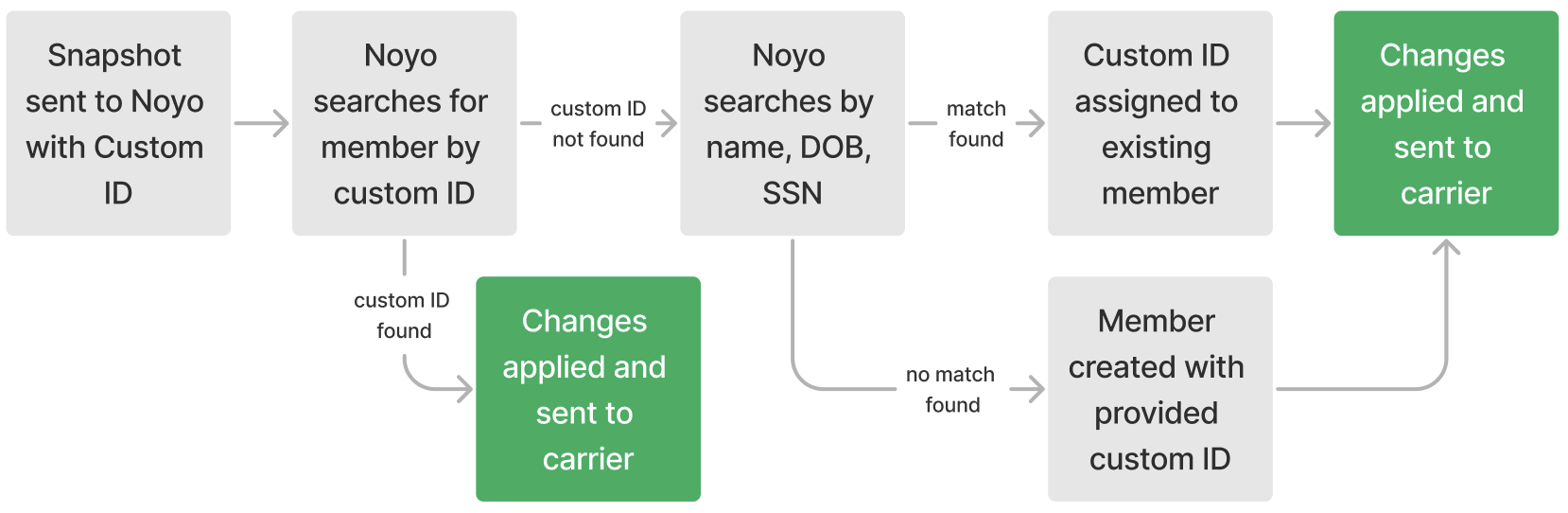
Sometimes the linking algorithm won't find a match, most often because the member in the snapshot doesn't yet exist in Noyo's records. When there's not a match, we will create a new member record that's associated with the custom ID in your submission. Whenever a new member is created, the API response will also include a block highlighting that new member:
```json theme={"system"}
"created_members": [
{
"id": "64aef550-ced5-4477-9cdc-26a1f97b5394",
"custom_individual_id": "123456789",
"type": "employee"
}
]
```
If you didn't expect the request to create any new members, you can use the response to investigate if the new member should have been created. To resolve a duplicate member, reach out to the Noyo team.
**Updating a custom ID**
If you need to update someone's `custom_individual_id`, you can send a snapshot for that person that includes *both* their Noyo `id` and the new `custom_individual_id`. We will update the record in our system to associate the person with the new `custom_individual_id`.
### Option 2: Use our GET endpoints and Noyo IDs
If you would rather do the work to match and link members in your own system, you can use Noyo's GET endpoints to retrieve member data and use that demographic information to match Noyo's records with the members in your system. After matching the members on your side, you can send a snapshot with the Noyo ID and your custom ID, and Noyo will save that association for future use.
There are two common strategies for finding and matching Noyo IDs for existing members:
1. You can attempt to match one member at a time from your system by calling our [Get Employee List](/api-reference/members/employees/getemployeelist) endpoint, and using the `name` and `date_of_birth` fields to filter members. The name field should receive a whitespace-separated combination of a first name, middle name, last name, and suffix, depending on what you have. For example, `?name=Peggy%20C%20Johnson`. If multiple employees are returned, you can then compare other data points to select the right employee from a small set of matches.
2. You can paginate through the [Get Group Employee List](/api-reference/members/employees/getemployeelist) API endpoint to retrieve a complete census of the group, then write your own algorithm to match the members in your own system.
In either case, we suggest you complete the matching process at the employee level first, then compare and link any dependents under their matched employees.
## Reconciling linked members
After completing member linking, the next step is to compare your own data to each member's coverage status at the carrier. This ensures that there are no discrepancies between your systems that could result in rejected changes or customer escalations down the line.
Here are some examples of how unreconciled data can affect your customers:
* If your system has an active coverage that Noyo can't find at the carrier, it could mean that a member's enrollment was never processed by the carrier. That member may not be covered when they go to the doctor.
* If the carrier has an active coverage that's not in your system, it could mean that a member is accidentally enrolled in coverage they didn't choose and there could be deduction or billing issues for the member. It's also possible the enrollment at the carrier is correct, but the member doesn't realize they have acdcess to these additional benefits.
### Reconciling Premier groups
After a group connection is complete for a group with a Sync connection, you can choose to do reconciliation on your own by using our GET endpoints to fetch member data and compare it with your own records. Our [Get Group Employee List](/api-reference/members/employees/getemployeelist) and [Get Dependent List](/api-reference/members/dependents/getdependentlist) endpoints return member demographic information, and our [Get Individual Enrollments by Employee](/api-reference/members/enrollments/getindividualenrollmentbyemployeelist) endpoint returns coverage information. Each individual enrollment includes an `individual_id`, `individual_type`, `line_of_coverage`, and `plan_id` that link to the member and plan in Noyo. The API also returns an effective start and effective end date when the coverage is active, and other important details like volume amounts and COBRA status.
If you identify any data mismatches, including missing employees or incorrect demographic or coverage data at the carrier, sending a member snapshot with all of their dependent and enrollment information will push those updates or corrections to the carrier, since the group is already live on the connection.
### Reconciling Advanced & Standard groups
After a group connection is complete for a group with an Advanced/Standard connection, and you have sent initial census snapshots for all members of the group, Noyo will work with the carrier to test and configure the connection. You may receive an error report from the carrier that highlights any data issues to be corrected before the connection can be established. You may need to correct data in your system or request updates from members, then send those updates to Noyo via additional member snapshots to allow Noyo to continue the testing cycle.
# Mapping Plans and Account Structures
Source: https://docs.noyo.com/docs/groups/mapping/mapping-plans-and-account-structures
Matching plans and account structures between our two systems
This step is only required for integrations using [Explicit config](/docs/groups/mapping/explicit-vs-dynamic-configuration#dynamic-config-automap).
# Explicit vs Dynamic Configuration
Source: https://docs.noyo.com/docs/groups/mapping/explicit-vs-dynamic-configuration
## Dynamic Configuration
Dynamic config is a new Noyo feature where Noyo takes on the mapping logic for most account structure values and surfaces any remaining unknown logic to you for your input. While this may present an extra step when connecting some groups to new carriers, it allows the initial integration to member snapshot to support all carriers and removes the need for carrier-specific fields to be passed in snapshots.
[Dynamic config](/docs/groups/mapping/explicit-vs-dynamic-configuration#dynamic-config-automap) is recommended for all new Noyo integrations and eliminates the need for carrier-specific values to be coded into member snapshots for each new carrier connection.
### What plan data should I send?
Your snapshots should include a consistent internal ID for each plan in your system (as the `custom_plan_id`) and your name for each plan (as the `plan_name`). The custom plan ID being static allows us to reliably map your plans, even if the plan name goes through minor changes.
### What member data should I send?
Carriers have different ways of dividing up members into different subgroupings, and these methods can vary by carrier as well as between different groups at the same carrier. In order for Noyo to map your groups correctly, we need to be able to determine which members fall into which category.
Noyo recommends that you capture as much information about employees, dependents, and their coverage options as possible in every snapshot to ensure compatibility with as many carriers as possible.
Noyo will create rules based off of information passed in the coverage block, as well as information included in the `employee.classifications` object.
#### Classifications
The classifications object is appropriate for subgroup information that applies to the employee or their entire family. The classifications block does not have a defined schema as it is designed to accept any relevant data.
Recommended information for the `classifications` object includes:
* Division, branch, team, or department info
* Company location/office name
* Leveling info (management, supervision, director, executive, key person, etc.)
* Subsidiary number or name
#### Classifications Changing Over Time
By default, Noyo's system will assume that a classification applies to the employee family for the entire span of all coverages in a member snapshot. If this is not the case, classifications can be given effective dates.
Imagine a scenario where there is a subgroup for executives, and a subgroup for all other members. If an employee who was not an executive is promoted to become an executive, we may not want their coverages to be impacted back to their original start date. The safest way to handle this is to add an `as_of` date to any data that has changed since the beginning of the earliest coverage in the member snapshot (or earlier).
This classification block represents that the employee is a "Head Attorney" and in the "Attorneys" job category for all of the coverage blocks in this member snapshot. It does not include any adjustments to time periods.
```json theme={"system"}
"classifications": {
"job_title": "Head Attorney",
"is_executive": false,
"job_category": "Attorneys",
"custom_field_19": [2025, 2026, 2027]
}
```
However, this classification block shows that the employee should be mapped onto the executive sub group starting 2025-01-01.
```json theme={"system"}
"classifications": {
"job_title": [
{
"value": "Head Attorney",
"effective_date": "2024-01-01",
},
{
"value": "Chief Legal Officer",
"effective_date": "2025-01-01"
}
],
"is_executive": [
{
"value": false,
"effective_date": "2024-01-01",
},
{
"value": true,
"effective_date": "2025-01-01"
},
],
"job_category": "Attorneys",
"custom_field_19": [2025, 2026, 2027]
}
```
The effective date is inclusive, and means that the data in the "value" key is correct from that day until the next value's effective date, if any.
You should send a classification value back as far as the earliest coverage, so that we can properly map the employee. It is safe to put an arbitrarily early date to represent the earliest data that Noyo needs to have.
If you would prefer to send only the latest date for your classifications, and would like to carry forward older dates rather than sending the full timeline in each member snapshot, reach out to Noyo for guidance.
#### Carrier Config Values
For data that might be different for different enrolled members, or that might be different per coverage, or change over time you can use the `carrier_config` attribute within a coverage block. This will accept any schema.
An example of where to use a `carrier_config` value is when a single plan has “high” or “low” options. If an option can be elected separately per person, even if the entire family is on the same plan, then “high” or “low” should be defined in the config.
The `carrier_config` values are assumed to apply starting at the "start\_date" or the "latest\_change\_effective" date of the coverage, whichever is later.
```json theme={"system"}
"carrier_config": {
"coverage_selection": "high"
}
```
### Plan Year Sensitive Data
Most mappings are plan year sensitive, and may change somewhat between plan years. For example, imagine that attorneys are mapped to sub group 1 in 2025 and sub group 2 in 2026, and the plan year starts on January 1st.
If a member snapshot comes in for an attorney with coverage from 1/1/2025 that continues indefinitely (until 12/31/9999), Noyo can split that into two coverages: one that maps the person to sub group `1` (for all of 2025) and one for sub group `2` (for 2026 onwards).
However, in order to avoid prematurely sending the carrier information about a future plan year, Noyo will only apply rules about a current or previous plan year, unless the snapshot contains an explicit reference to future data. In this scenario, we would split the coverage if:
1. It is currently the 2026 plan year or later.
2. It is earlier than the 2026 plan year, but open enrollment is upcoming, so snapshots are interpreted as including information about 2026
3. It is earlier than the 2026 plan year, but the start date or latest\_change\_effective date for one or more coverage in the snapshot is for a date in the future plan year
4. It is earlier than the 2026 plan year, but a classification has an effective date in a future plan year.
## Pre-release Caveats
* When using sandbox/test groups, explicit configuration may be required until rules are written. Your implementation team will provide guidance on how to structure snapshots for testing.
## What's not supported with dynamic configuration
The following scenarios are not currently supported when using dynamic configuration to complete mapping:
### Family/Employee Tiers
Family/Employee Tiering involves separate plans or configurations for an EE alone versus an EE and their family. A common example of this is that an EE enrolling alone gets put on the “EE Only” plan at the carrier, but if they need to add their family to coverage, all members of the family (including the EE) are put on the “EE + Spouse” plan. If your system only has one plan for both the EE and EE+FAM enrollments and you’d need us to infer the correct tier based on who’s enrolled, we will be unable to map this coverage.
However, if you’re able to send us a configuration value for each enrollee with the explicit tier information, we would be able to assign people to the correct tier within the plan.
### Mapping based on another coverage’s plan selection
This scenario is most common with Principal Financial products. Instead of having two dental plans, “Dental High” and “Dental Low,” there will instead be one dental plan with two configuration values like “Members electing Dental High” and “Members electing Dental Low.”
These configuration values would then be needed for Life insurance elections to determine some aspect of that coverage. We are not currently able to use the configuration value from the Dental coverage to send a value for the Life coverage.
### Adding or bundling coverage
If your system has two coverages bundled into one, such as Life/AD\&D, and set up as one plan in your system, but the carrier has them as two distinct LOCs and plans, Noyo is not able to accept a single Life or AD\&D enrollment and add the other coverage to it. We need to receive each enrollment in its own coverage block in the member snapshot.
### Ignoring or removing coverage
We are not able to ignore coverage blocks in member snapshots or map them onto nothing. Each coverage must have a matching coverage it’s mapped to. Some common examples of questions we get around ignoring/removing coverage are:
* The carrier bundles medical and dental into one plan but we have two in our system, can you just ignore the dental enrollment?
* Our system is trying to enroll a child in a plan that doesn’t allow children, can you just map their enrollment to nothing so it gets ignored?
* Can we send you enrollments for coverages not supported by Noyo and you just ignore them?
In all cases, the answer is that we aren’t able to support those scenarios today. All coverages in a snapshot must map to a valid plan or configuration.
## Explicit Config
In previous versions of Noyo, member snapshots required **explicit** carrier configuration to be defined on every incoming snapshot as detailed in [Mapping plans and account structures](/docs/groups/mapping/mapping-plans-and-account-structures). This is a multi-step process that involves:
1. Pulling down the carrier's view of the group
2. Mapping your system's stored information to the carrier's group structure (benefit classes, subgroups, bill groups, divisions, locations, etc.) along with plans
3. Sending the correct values on every snapshot
Using explicit carrier configurations will avoid any mapping tasks when connecting a group, but the structures and required fields differ by carrier and often require carrier-by-carrier engineering work.
Sample snapshot carrier configuration blocks:
```json Principal theme={"system"}
{
"benefit_class_identifier": "0001",
"benefit_subclass_identifier": "0001-01",
"bill_group_identifier": "0000",
"bill_subgroup_identifier": "0000",
"work_location_text": "ABCD1234"
}
```
```json UnitedHealthcare theme={"system"}
{
"population_id": "9444859",
"bill_group_id": "14776117"
}
```
For a fully enumerated list of per-carrier fields, see the [Carriers page](https://app.noyo.com/carriers) in the Noyo web application.
# Linking Members
Source: https://docs.noyo.com/docs/groups/mapping/linking-members
Associate your employee and dependent records to ours
For any group you administer via Noyo, you'll want to quickly send snapshots for everyone in the group. Importantly, sending snapshots allows you to link the members in your system to any that already exist at the carrier, ensuring that everyone is enrolled in the right coverages and your future demographic and enrollment changes will be processed accurately.
The Noyo `id` is a member identifier defined by Noyo, and is assigned to each employee and dependent when their record is created in the Noyo system. The `custom_individual_id` field in the Noyo system is available to store a unique identifier defined by you. Members do not have a custom ID until you assign one. All `custom_individual_id` values should be unique within each group and fixed so that they will not change over time. **Social security numbers should not be used as custom identifiers.**
# Linking overview
When your [group connection](/docs/groups/connections/request-a-group-connection) is complete, you'll need to link members and dependents. We always recommend sending an initial "census" for newly connected groups by triggering a [member snapshot](/docs/members/using-snapshots/using-snapshots) for each employee.
If **no employees** existed with the carrier already, as is typical with net-new groups or Standard/Advanced connections where carrier data is not available, this census will create the group's employees and dependents in our system. You should include a `custom_individual_id` for each member; the success responses for your snapshots will contain each person's Noyo ID.
Otherwise, **if employee records are already in Noyo**, as is typical with groups who are moving to Noyo mid-year, you'll use the `custom_individual_id` to establish a link between your own records of those members and ours (see below).
If you'd like, you can check for employee data before sending the census snapshots by using the [Get Group Employee List](/api-reference/members/employees/getemployeelist) endpoint.
## How to link members between your system and Noyo
### Option 1: Use our automatic member linking feature
This option is recommended
Noyo can attempt to link members in your snapshot payload to members in our system automatically based on demographic details when you use the automatic member linking feature. You can enable it by sending member snapshots with the `enable_member_auto_link` flag set to `true` and the `custom_individual_id` set to your own unique identifier.
When a snapshot is sent to Noyo tied to an existing group, we search for that member in the group using a combination of Name, DOB, and SSN. If there is a match, Noyo saves your custom identifier on that member the first time we see it, and any future snapshots with that custom ID will automatically be associated with the linked member. We also recommend saving our associated Noyo ID to use elsewhere in our API.
Because it's likely that your records and the carrier's records won't have the exact same data, Noyo's search algorithm is flexible and does not require strict matching of all demographic information in order to assign a custom ID and create a link. For example, if you have a member's name as "Jimmy" but it is "James" in our records, we will still match the member as long as the /\* glossary \*/DOB/\* glossary \*/ and /\* glossary \*/SSN/\* glossary \*/ are the same.

Sometimes the linking algorithm won't find a match, most often because the member in the snapshot doesn't yet exist in Noyo's records. When there's not a match, we will create a new member record that's associated with the custom ID in your submission. Whenever a new member is created, the API response will also include a block highlighting that new member:
```json theme={"system"}
"created_members": [
{
"id": "64aef550-ced5-4477-9cdc-26a1f97b5394",
"custom_individual_id": "123456789",
"type": "employee"
}
]
```
If you didn't expect the request to create any new members, you can use the response to investigate if the new member should have been created. To resolve a duplicate member, reach out to the Noyo team.
**Updating a custom ID**
If you need to update someone's `custom_individual_id`, you can send a snapshot for that person that includes *both* their Noyo `id` and the new `custom_individual_id`. We will update the record in our system to associate the person with the new `custom_individual_id`.
### Option 2: Use our GET endpoints and Noyo IDs
If you would rather do the work to match and link members in your own system, you can use Noyo's GET endpoints to retrieve member data and use that demographic information to match Noyo's records with the members in your system. After matching the members on your side, you can send a snapshot with the Noyo ID and your custom ID, and Noyo will save that association for future use.
There are two common strategies for finding and matching Noyo IDs for existing members:
1. You can attempt to match one member at a time from your system by calling our [Get Employee List](/api-reference/members/employees/getemployeelist) endpoint, and using the `name` and `date_of_birth` fields to filter members. The name field should receive a whitespace-separated combination of a first name, middle name, last name, and suffix, depending on what you have. For example, `?name=Peggy%20C%20Johnson`. If multiple employees are returned, you can then compare other data points to select the right employee from a small set of matches.
2. You can paginate through the [Get Group Employee List](/api-reference/members/employees/getemployeelist) API endpoint to retrieve a complete census of the group, then write your own algorithm to match the members in your own system.
In either case, we suggest you complete the matching process at the employee level first, then compare and link any dependents under their matched employees.
## Reconciling linked members
After completing member linking, the next step is to compare your own data to each member's coverage status at the carrier. This ensures that there are no discrepancies between your systems that could result in rejected changes or customer escalations down the line.
Here are some examples of how unreconciled data can affect your customers:
* If your system has an active coverage that Noyo can't find at the carrier, it could mean that a member's enrollment was never processed by the carrier. That member may not be covered when they go to the doctor.
* If the carrier has an active coverage that's not in your system, it could mean that a member is accidentally enrolled in coverage they didn't choose and there could be deduction or billing issues for the member. It's also possible the enrollment at the carrier is correct, but the member doesn't realize they have acdcess to these additional benefits.
### Reconciling Premier groups
After a group connection is complete for a group with a Sync connection, you can choose to do reconciliation on your own by using our GET endpoints to fetch member data and compare it with your own records. Our [Get Group Employee List](/api-reference/members/employees/getemployeelist) and [Get Dependent List](/api-reference/members/dependents/getdependentlist) endpoints return member demographic information, and our [Get Individual Enrollments by Employee](/api-reference/members/enrollments/getindividualenrollmentbyemployeelist) endpoint returns coverage information. Each individual enrollment includes an `individual_id`, `individual_type`, `line_of_coverage`, and `plan_id` that link to the member and plan in Noyo. The API also returns an effective start and effective end date when the coverage is active, and other important details like volume amounts and COBRA status.
If you identify any data mismatches, including missing employees or incorrect demographic or coverage data at the carrier, sending a member snapshot with all of their dependent and enrollment information will push those updates or corrections to the carrier, since the group is already live on the connection.
### Reconciling Advanced & Standard groups
After a group connection is complete for a group with an Advanced/Standard connection, and you have sent initial census snapshots for all members of the group, Noyo will work with the carrier to test and configure the connection. You may receive an error report from the carrier that highlights any data issues to be corrected before the connection can be established. You may need to correct data in your system or request updates from members, then send those updates to Noyo via additional member snapshots to allow Noyo to continue the testing cycle.
# Mapping Plans and Account Structures
Source: https://docs.noyo.com/docs/groups/mapping/mapping-plans-and-account-structures
Matching plans and account structures between our two systems
This step is only required for integrations using [Explicit config](/docs/groups/mapping/explicit-vs-dynamic-configuration#dynamic-config-automap).
[Dynamic config](/docs/groups/mapping/explicit-vs-dynamic-configuration#dynamic-config-automap) is recommended for all new Noyo integrations and makes carrier-specific config values no longer required.
If you'd like to manage enrollments for a group that's connected to Noyo, you'll need to map your plans and account structures to the ones Noyo found at the carrier so that both systems are speaking the same language. It's common for groups and plans to have different names between your system and the carrier, so this step helps Noyo establish a link.
This process may be familiar from configuring an EDI file, where each member is assigned the right benefit class or division based on the rules for the group and sent with the correct plan identifiers so they will be enrolled in the right coverages.
When you connect a group to Noyo, they will have their own unique account structure and plan options. Small groups will usually have just one account structure option and plan available for all employees, while larger groups could have complicated rules to categorize each employee and determine which plans they can choose.
Some carriers define a single account structure category (e.g. benefit classes), while others may define several (e.g. benefit classes, benefit subclasses, and bill groups).
Since Noyo doesn't have access to your view of the group, you will read Noyo's data and decide how the two systems line up, or if there is a mismatch or missing option that needs to be updated at the carrier. This process is the same across all carriers in the Noyo Network, though the data may take longer to appear in Noyo's system for Send carriers.
Use the `group_id` to get the account structure details for the group from our [Get carrier configuration by group list](/api-reference/groups/configurations/get-carrier-configuration-by-group-list). This is an example for a group with coverage at Guardian:
```sh Request theme={"system"}
curl -X GET
--header "Authorization: Bearer \"
```
```json Response [expandable] theme={"system"}
[
{
"group_id": "47c07963-2e34-4da2-86b4-cbc3c57111c1",
"carrier_id": "c699414d-fd1c-4de4-86f0-66dfff2276c4",
"carrier_group_id": "00110011",
"configuration": {
"bill_groups": [
{
"bill_group_name": "All Members",
"bill_group_identifier": "0000",
"bill_subgroup_identifier": ""
}
],
"benefit_classes": [
{
"benefit_class_name": "All CA Employees",
"benefit_class_identifier": "0001",
"benefit_subclass_identifier": ""
},
{
"benefit_class_name": "All Other Employees",
"benefit_class_identifier": "0002",
"benefit_subclass_identifier": ""
}
],
"master_agreement_number": "00110011"
}
}
]
```
Noyo will return basic details about each account structure category and option, with a free text description from the carrier ("All Members", "Executives") and a unique ID that Noyo would send to the carrier when enrolling a member or updating their coverage.
Often for complex or large groups, you will need to classify members (for example, which job title qualifies someone for the "Executives'' subclass or which employees are in the "Sales'' division). It's very possible you already have some process for the broker or group admin to set up and run these rules in your system. Our team will get into more detail on these scenarios as you start testing more complicated groups.
Use the `group_id` to get the list of plans for the group from our [Get group plan list](/api-reference/groups/plans/get-group-plan-list):
```sh Request theme={"system"}
curl -X GET
--header "Authorization: Bearer \"
```
```json Response [expandable] theme={"system"}
[
{
"id": "4bf04f73-0aad-48ac-b28a-e5f4def7c5e9",
"version": "e91b3060-7795-48e3-b0f6-26bd9825593d",
"created": 1557329939,
"modified": 1557332412,
"group_enrollment_id": "caf59ba1-88a3-4db6-9703-fd6562c664a9",
"carrier_id": "c699414d-fd1c-4de4-86f0-66dfff2276c4",
"line_of_coverage": "dental",
"name": "Dental - SmileDirect Plus",
"code": "",
"effective_start_date": "2020-01-01",
"effective_end_date": "9999-12-31",
"plan_type": "ppo",
"network": "",
"voluntary": false,
"status": "active",
"eligible_member_type": ["all"],
"waiting_periods": [
{
"waiting_period_unit": "day",
"waiting_period_amount": 30,
"waiting_period_rule": "first_of_month_after_event",
"waiting_period_coinciding": true,
"waiting_period_enrollment_type": "new_member"
},
{
"waiting_period_rule": "first_of_month_after_event",
"waiting_period_coinciding": true,
"waiting_period_enrollment_type": "current_member"
}
],
"termination_policy": "end_of_month",
"cobra_rules": {
"eligible": true
},
"plan_configuration": {
"benefit_class_identifiers": ["0001", "0002"]
}
}
]
```
Noyo will return basic details and benefit information for each plan, including a unique ID for the plan and its effective start and end dates. You can use the line of coverage (dental/vision), plan name, plan type (HMO or PPO, basic or voluntary) and other fields in the API response to match each plan with the corresponding benefit in your system.
You'll need to define a process to review the data between our two systems, make any matching decisions and store the correct IDs on your side. This might involve writing an algorithm to link records automatically or creating a page in your internal tools to view and edit stored identifiers. It might also involve creating a new column in your database to store these identifiers, or tagging records with a custom field. This process is needed when the initial group connection finishes, or any time the group enters their renewal window and makes a change to their account structure or decides to add or remove a plan.
# Managing Renewals
Source: https://docs.noyo.com/docs/groups/renewal-readiness
Peace of mind and a smoother open enrollment period
When a group makes their choice of new plans in preparation for open enrollment, Noyo helps you confirm accurate plan installation at the carrier to avoid coverage disruptions and timing issues for the new year.
You'll use our API to submit each group's **renewal decisions** (i.e., the plans they'll offer to employees this year) and Noyo will compare that data to the plans the carrier has on file. Once the carrier's data matches the renewal decisions, Noyo returns a status of `ready` and you can send new plan year elections with full confidence.
If we do detect that the carrier has the plans installed incorrectly, we'll return a message that describes the issue so it can be resolved.
![]() ## Using renewal decisions
We recommend submitting a group's renewal decisions as soon as the carrier has confirmed the group's selections; this generally happens about 60 days before the renewal or new effective date.
A renewal decision record is defined by the target renewal date, and includes the lines of coverage and plans that are expected to be active for that renewal date. Noyo will then continuously check the carrier's system to confirm that your decisions have been processed. If expectations are met, we will update the status of the renewal readiness record to `ready` and you can start sending member snapshots as soon as OE elections are made. Otherwise, we will update the status to `not_ready` and inform you of any remaining issues.
### Creating Renewal Decisions
First, [Create a renewal decision](/api-reference/groups/renewals/create-renewal-decision). The renewal decision may be submitted in a few different configurations:
* **With full data**: If you know all of the group's choices, each carrier can be configured with lines of coverage objects complete with open enrollment dates and plans
* **With no lines of coverage at all**: If you don't know which plans the group has selected for the new year, you can submit a `lines_of_coverage` block that is empty. In this case, we will move the renewal decision to `ready` when we find *any* plans at this carrier on the renewal date in question.
* **Without open enrollment dates for each line of coverage**: If you do not know what open enrollment dates to expect, submit each carrier block with lines of coverage with only plans underneath. In this case, only the plans will be compared within each carrier's lines of coverage.
A renewal decision may be created with a renewal date up to 30 days ago, and up to 6 months in the future. Both of these constraints are relative to the date the request is sent.
#### Dropping coverage
If a line of coverage should be discontinued and no plans should be active for an upcoming renewal, you can pass an empty block for that carrier and line of coverage.
Omitting a carrier from the request will mean that that carrier is not evaluated for renewal readiness, and omitting a line of coverage for a carrier will mean that Noyo will not check for any plans in that line of coverage at that carrier.
For the example request below, we would evaluate renewal readiness for the group with the two provided carriers. We would expect one medical plan to be active at the first carrier and no dental coverage to be active at the second carrier, while the presence of any other lines of coverage at either carrier would be ignored.
Use an empty object like the `dental` example below on a POST or a PUT to drop coverage
```json [expandable] theme={"system"}
{
"renewal_date": "2022-01-01",
"body": {
"carriers": [
{
"carrier_id": "4d4d815b-ae8f-430c-901f-1c9d5ee3f4f1",
"lines_of_coverage": {
"medical": {
"open_enrollment_start_date": "2021-07-01",
"open_enrollment_end_date": "2021-08-31",
"plans": [
{
"name": "Select Plus PPO HDHP Bronze BRJJ / C38"
}
]
}
}
},
{
"carrier_id": "6026ccdd-14e0-44dd-a68f-86b08cc89cf4",
"lines_of_coverage": {
"dental": {}
}
}
]
}
}
```
#### Renewal Decision Statuses
Renewal decisions will start with a `submitted` status, and then progress to `ready` or `not_ready`. The status can switch from `ready` to `not_ready` if we detect a carrier update that regresses their system to a state that is different from your decisions. The status can also switch from `not_ready` to `ready` if detected differences are resolved.
| Key | Description |
| - | - |
| `submitted` | This status is the result of the initial submission (POST). We have not yet verified the current state of the carrier's system. |
| `not_ready` | There is a difference between your submitted renewal decision and the carrier's current state. We will supply an array of `issues` in a response body. |
| `ready` | Your renewal decision reflects what is shown in the carrier's system. |
## Managing renewal decisions
You can [Get renewal decisions by group](/api-reference/groups/renewals/get-renewal-decisions-by-group), [Get renewal decision](/api-reference/groups/renewals/get-renewal-decision), or [Edit renewal decision](/api-reference/groups/renewals/edit-renewal-decision).
Getting renewal decisions includes the status; if the status is `not_ready`, Noyo will return one or more issues, each with a level and message.
## Testing renewal decisions
A renewal decision created on the [environments](/docs/introduction/getting-started/environments) will initially return in the `submitted` status. Within a random period of time, up to 15 seconds, it will return with an updated status, based on the scenarios below. This will simulate the process of a renewal decision being compared against carrier data.
Different renewal decision scenarios can be captured on the sandbox by using the renewal date's day of the month as a special value.
By supplying a renewal date with a day of the month of the following values, you will trigger the following scenarios:
| Day of Month | Status | Issue |
| - | - | - |
| `1` | `ready` | |
| `2` | `not_ready` | Missing Coverage |
| `3` | `not_ready` | Unexpected Coverage |
| `4` | `not_ready` | Unexpected coverage end date. Coverage still active, but carrier end date is before renewal date. |
| `5` | `not_ready` | Unexpected coverage end date. Coverage dropped, but carrier end date is after renewal date. |
| `6` | `not_ready` | Unexpected open enrollment dates |
| `7` | `not_ready` | Inconsistent plan quantities |
# About Noyo
Source: https://docs.noyo.com/docs/introduction/about-noyo
Your partner for seamless enrollment data exchange
With Noyo, you get everything you need to power seamless benefits enrollment and management. These guides are for ben-admin platforms who are integrating with Noyo's API.
After one up-front integration, you'll be connected to an entire ecosystem of carrier partners. You'll spend less time dealing with multiple pipelines and inefficient data transmission and more time creating great benefits experiences for your customers.
Here's what you'll use Noyo for:
* Connecting with many carriers through the same API
* Getting on-demand access to the carrier's version of enrollment data
* Automatically submitting enrollment changes for employees as they happen
* Confirming that coverages and enrollment changes are correct
* ...and anything else you can dream up!
### Connect with many carriers through the same API
Noyo works closely with insurers to build deep, bi-directional integrations into their existing systems. We design and build for each carrier's specific capabilities–whether that's endpoints, files, or a mix of the two–so you don't have to. Plus, we manage all upgrades, security, and connection maintenance so you get a universal experience across carriers.
Noyo's carrier network is organized into three distinct tiers: **Standard**, **Advanced**, and **Premier**. Our universal API seamlessly connects you to every carrier, regardless of their tier, providing a consistent experience for all your benefits data needs.
* **Standard Connections:** This tier provides our baseline EDI experience, with enrollment changes transmitted via file feeds.
* **Advanced Connections:** Building on the Standard tier, Advanced connections offer an enhanced EDI experience. You'll get faster connection timelines and more frequent, programmatic error reporting.
* **Premier Connections:** This tier offers the most robust experience through API-based integrations. Premier connections provide real-time data exchange, instant confirmations, and immediate error detection.
### Get on-demand access to the carrier's version of enrollment data
For groups connected through Noyo's Premier connections, we source that group's data from the carrier and make it available to you through our endpoints. This opens up a world of possibilities, including faster group setup, better reporting, identifying discrepancies, and a better OE experience.
### Automatically submit enrollment changes for employees as they happen
Coverage or eligibility changes that occur during policy administration, like enrolling new members or editing someone's demographic details, can be sent and managed through Noyo's API. No portals, emails, or weekly files; with Noyo, any type of change goes over our single API suite.
### Confirm that coverages and enrollment changes are correct
Noyo validates and routes changes to the correct carrier(s), who process them in their own systems. Then we confirm the changes and make the updated data available to you. All changes sent through Noyo are also trackable. Did the carrier accept that new hire enrollment? There's an endpoint for that.
## The Benefits Lifecycle
Noyo handles enrollment data for employee health and supplemental benefits, including medical, dental, vision, life, accident, and disability insurance coverage.
The lifecycle of a group's coverage plans generally looks like this:
A broker presents different plan options to the group admin
The group submits information to carriers to get quotes for plans
The group selects their plans and signs the contracts
The carrier(s) put the group's selections into their system(s)
The ben-admin platform builds the group's selections in their system
Employees use the ben-admin platform to choose which plans to enroll in or waive
Employees use the ben-admin platform to make updates to their data throughout the plan year
The broker and group admin decide whether to continue the same plans for the next year. This is the time for
employees to re-enroll or choose different plans.
Employees use the ben-admin platform to make updates to their data throughout the plan year
The broker and group admin decide whether to continue the same plans for the next year. This is the time for employees to re-enroll or choose different plans.
### Where does Noyo fit in?
Noyo enters the picture after **Step 4 - Installation**. All of the shopping, quoting, and selling has been done, and the carrier has already installed the group's plan information in their systems. This often means that they have already received census data, which is typically gathered by the group's broker and sent as a file.
Noyo can help you with **Step 5 - Setup** by making the carrier's data available for you to use if you are setting up the group in your own system. See [Using Noyo Data](doc:using-group-data) for more on what data you can get through our endpoints.
During **Steps 6–8**, your Noyo integration will take the place of whatever you're using today to transmit enrollment and demographic changes to insurance carriers. Examples of current methods include EDI (834, .csv, LDEx), carrier portals, paper forms, custom-built integrations, or phone calls.
# Getting Started
Source: https://docs.noyo.com/docs/introduction/getting-started
## If you're new to Noyo
Start with [About Noyo](/docs/introduction/about-noyo) to learn what we do and how our API can help you easily manage benefits enrollment data with multiple carriers.
Then check out the [Using Group Data](/docs/data/using-noyo-data) section to understand the specific data we make available and how you might use it in your own application.
## If you're ready to start building
The first step is [authentication](/docs/introduction/getting-started/authentication) to the API. From there you'll test calls to our [sandbox environment](/docs/introduction/getting-started/environments) and get familiar with [how our API is structured](/docs/introduction/getting-started/using-the-api).
Then learn about the benefits of connecting a group and how to [get your first group onto Noyo](/docs/groups/connections/request-a-group-connection).
If you'll be using Noyo to exchange enrollment and eligibility data with carriers, you'll need to learn how to [send member snapshots](/docs/members/using-snapshots/using-snapshots) too.
## Marketing considerations
The Noyo brand is synonymous with trusted data and a high-quality connection experience; build trust with your partners by showing that your benefits data is protected by Noyo. If you are licensing our technology, we require attribution when promoting Noyo-connected carriers.
If your usage of carrier names and logos is limited to *solely a visual representation of your UI or product offering*, you do not need to include reference to Noyo. However, you are then responsible for obtaining the requisite permissions to use said logos and/or brand names from their respective owners.
If you are *explicitly marketing the ability to connect, integrate, partner (or equivalent) with any carrier* for which you rely on Noyo's technology, you must include Noyo-authorized language in your marketing. There are two options for this:
* **In-context abbreviated language:** In the section where said marketing is communicated, you must include the Noyo logo next to the copy "Carrier connections powered by Noyo" (or equivalent). Our logo can appear in grayscale (no smaller than 24x24 pts) and language is flexible pending our express approval (though the font cannot be smaller than 13 pt). The logo and copy must appear together and be placed before the next major heading and/or section color change.
* **Full footer language:** Alternatively, Noyo integrations can be mentioned in your website footer. If you already provide regulated disclaimers for insurance licensure or TPA authorization, the Noyo disclaimer may appear in the same paragraph. The font cannot be smaller than 13 pt. This language must be included on every page the connection/integration is marketed and should be written as follows:
> **"PRODUCT NAME's integrations with insurance carriers are powered and protected by the Noyo benefits data platform."**
# Authentication
Source: https://docs.noyo.com/docs/introduction/getting-started/authentication
Authenticate to our API so you can start using the sandbox.
As an admin user for your organization, you can manage your API keys in the Noyo web application. We recommend adding a sandbox API key for each developer working on the integration. Each developer should securely save a respective key's `CLIENT_ID` and `CLIENT_SECRET`. Later, when moving to production, create a separate API key with live-only permission. Save this key's `CLIENT_ID` and `CLIENT_SECRET` securely in your own production environment to interact with the Noyo API.
Once you have an API key, you can generate a short-lived access token (valid for \~10 minutes) using the `CLIENT_ID` and `CLIENT_SECRET` as the username/password combination in a Basic Authentication header.
Use the following curl snippet directly, or import it into API client software such as Postman:
```sh theme={"system"}
curl -X POST
--header "Content-Type: application/json"
--header "Authorization: Basic :)>"
--data '{"grant_type": "client_credentials"}'
https://accounts.noyo.com/auth/public/token
```
The response will include your `ACCESS_TOKEN`:
```json theme={"system"}
{
"access_token": "",
"expires_in": 864000,
"token_type": "Bearer"
}
```
Use this `ACCESS_TOKEN` in the Authorization header for each request you make to the Noyo API, like this request to get a list of groups for your organization in the sandbox:
```sh theme={"system"}
curl -X GET
--header "Authorization: Bearer "
https://fulfillment-sandbox.noyo.com/api/v1/groups
```
You can make this request to test whether your token is working correctly. At this stage, you should have a sandbox group configured, which will be returned in this API result. You should get a `200` response to confirm a successful call:
```json theme={"system"}
{
"meta": {
"offset": 0,
"page_num": 1,
"page_size": 20,
"total_records": 1
},
"response": [
{
"id": "5d0b974b-2ee1-4d42-bf81-6715079b6a29",
"version": "e3d63d18-b210-450a-bdda-fadba098e9c2",
"created": 1631553366,
"modified": 1631553366,
"organization_id": "95e591f8-102d-4df9-8e9f-24e5c9b77d56",
"name": "Your Sandbox Group Name",
"sic_code": "",
"dba_name": "",
"federal_ein": ""
}
]
}
```
## Authentication troubleshooting
For most authentication issues you will receive one of the following error messages. For any other issues, contact [support@noyo.com](mailto:support@noyo.com).
### Missing credentials
A JWT has not been supplied in the Authorization HTTP header. Ensure that the Authorization HTTP header reads `Bearer `.
```json 401 Unauthorized theme={"system"}
{
"code": 16,
"message": "JWT validation failed: Missing or invalid credentials",
"details": [
{
"@type": "type.googleapis.com/google.rpc.DebugInfo",
"stackEntries": [],
"detail": "auth"
}
]
}
```
### Malformed JWT
The JWT has been truncated or altered in some way since it was originally acquired. Please double check the original HTTP response from [accounts.noyo.com/auth/public/token](https://accounts.noyo.com/auth/public/token).
```json 401 Unauthorized theme={"system"}
{
"code": 16,
"message": "JWT validation failed: The JWT cannot be validated with any of the public keys.",
"details": [
{
"@type": "type.googleapis.com/google.rpc.DebugInfo",
"stackEntries": [],
"detail": "auth"
}
]
}
```
### Expired token
The JWT has expired. We recommend requesting a new API token and re-attempting your original request. You can anticipate this issue by using the `expires_in` property returned along with any API token. The `expires_in` value is the number of milliseconds until the API token expires. A token refresh performed before that time could mitigate this issue.
```json 401 Unauthorized theme={"system"}
{
"code": 16,
"message": "JWT validation failed: TIME_CONSTRAINT_FAILURE",
"details": [
{
"@type": "type.googleapis.com/google.rpc.DebugInfo",
"stackEntries": [],
"detail": "auth"
}
]
}
```
# Authentication
[Using the API](/docs/introduction/getting-started/using-the-api)
# Environments
Source: https://docs.noyo.com/docs/introduction/getting-started/environments
Test in sandbox or send live data to production
# Endpoints
You will have access to two Noyo environments: **production**, where live data is flowing between Noyo and your connected carriers, and **sandbox**, where no data leaves the Noyo system.
For each endpoint, full URLs are available in the API Reference. In general, all APIs have the following prefixes:
| Environment | Endpoint Base URL |
| :- | :- |
| Production | [https://fulfillment.noyo.com](https://fulfillment.noyo.com) |
| Sandbox | [https://fulfillment-sandbox.noyo.com](https://fulfillment-sandbox.noyo.com) |
# Testing in sandbox
The Noyo sandbox environment is designed to be flexible for your testing needs. It provides a mix of pre-configured elements for immediate testing and the ability to request custom setups. The API of the sandbox is identical to that of the live services, but it does not carry out your actions against insurance carrier systems. This will allow you to develop and test your Noyo integration before going live. You can use your sandbox API credentials to generate an access token from [accounts.noyo.com/auth/public/token](https://accounts.noyo.com/auth/public/token).
## Working with pre-configured groups
To help you get started quickly and test common integration flows, your sandbox environment will be pre-populated with several **connected groups**. These groups are set up with "active" integrations with various insurance carriers, which means they have [connection requests](https://docs.noyo.com/docs/groups/connections/overview) that are in a `completed` state. For these groups, you can:
* **Retrieve data:** Use `GET` requests to retrieve group, plan, and employee data for these groups.
* **Submit snapshots:** You can send member snapshots for these pre-configured groups; the sandbox API will initially return the `processing` status. Within a random period of time after submission, up to 15 seconds, it will return the `completed` status. You can use this delay to test handling of requests which complete asynchronously.
You will be able to see the enrollment changes–such as adding a coverage or updating an address–that result from these snapshots in the Noyo app.
* **Manage employees:** While these groups come pre-loaded with sample active employees, you can edit the employee population by sending member snapshots to terminate people, enroll new members, or switch peoples' plans.
* **View data discrepancies:** One of your pre-configured groups will have simulated discrepancies for their data, which you can explore in the Noyo app or via the [Tracking API](https://docs.noyo.com/docs/members/tracking/the-tracking-api).
* **Send renewal decisions:** Read more about creating, managing, and testing renewal decisions in [Renewal Decisions](/api-reference/groups/renewals/get-renewal-decisions).
Webhooks are not currently testable in the sandbox environment.
### Testing dynamic configuration
We can set up mapping rules for your sandbox groups to allow you to test [dynamic configuration](https://docs.noyo.com/docs/groups/mapping/explicit-vs-dynamic-configuration#dynamic-config-automap). By default, your test groups will have simple account structures that do not require mapping. However, if your book of business is likely to include larger or more complex groups, we can work with you to identify values you can generate from your system for the `employee.classifications` field that will be used in mapping.
## Creating and connecting new groups
You can create entirely new groups within your sandbox environment and request connections for them. However, **group connection requests in the sandbox will stay in a** `connecting` **state indefinitely**.
Consequently, any snapshots you send for groups with a `connecting` status will complete successfully, but you will see a label in the app about the lack of "live" connection, and you will not be able to see the individual enrollment changes being created by the snapshot contents.
## Using renewal decisions
We recommend submitting a group's renewal decisions as soon as the carrier has confirmed the group's selections; this generally happens about 60 days before the renewal or new effective date.
A renewal decision record is defined by the target renewal date, and includes the lines of coverage and plans that are expected to be active for that renewal date. Noyo will then continuously check the carrier's system to confirm that your decisions have been processed. If expectations are met, we will update the status of the renewal readiness record to `ready` and you can start sending member snapshots as soon as OE elections are made. Otherwise, we will update the status to `not_ready` and inform you of any remaining issues.
### Creating Renewal Decisions
First, [Create a renewal decision](/api-reference/groups/renewals/create-renewal-decision). The renewal decision may be submitted in a few different configurations:
* **With full data**: If you know all of the group's choices, each carrier can be configured with lines of coverage objects complete with open enrollment dates and plans
* **With no lines of coverage at all**: If you don't know which plans the group has selected for the new year, you can submit a `lines_of_coverage` block that is empty. In this case, we will move the renewal decision to `ready` when we find *any* plans at this carrier on the renewal date in question.
* **Without open enrollment dates for each line of coverage**: If you do not know what open enrollment dates to expect, submit each carrier block with lines of coverage with only plans underneath. In this case, only the plans will be compared within each carrier's lines of coverage.
A renewal decision may be created with a renewal date up to 30 days ago, and up to 6 months in the future. Both of these constraints are relative to the date the request is sent.
#### Dropping coverage
If a line of coverage should be discontinued and no plans should be active for an upcoming renewal, you can pass an empty block for that carrier and line of coverage.
Omitting a carrier from the request will mean that that carrier is not evaluated for renewal readiness, and omitting a line of coverage for a carrier will mean that Noyo will not check for any plans in that line of coverage at that carrier.
For the example request below, we would evaluate renewal readiness for the group with the two provided carriers. We would expect one medical plan to be active at the first carrier and no dental coverage to be active at the second carrier, while the presence of any other lines of coverage at either carrier would be ignored.
Use an empty object like the `dental` example below on a POST or a PUT to drop coverage
```json [expandable] theme={"system"}
{
"renewal_date": "2022-01-01",
"body": {
"carriers": [
{
"carrier_id": "4d4d815b-ae8f-430c-901f-1c9d5ee3f4f1",
"lines_of_coverage": {
"medical": {
"open_enrollment_start_date": "2021-07-01",
"open_enrollment_end_date": "2021-08-31",
"plans": [
{
"name": "Select Plus PPO HDHP Bronze BRJJ / C38"
}
]
}
}
},
{
"carrier_id": "6026ccdd-14e0-44dd-a68f-86b08cc89cf4",
"lines_of_coverage": {
"dental": {}
}
}
]
}
}
```
#### Renewal Decision Statuses
Renewal decisions will start with a `submitted` status, and then progress to `ready` or `not_ready`. The status can switch from `ready` to `not_ready` if we detect a carrier update that regresses their system to a state that is different from your decisions. The status can also switch from `not_ready` to `ready` if detected differences are resolved.
| Key | Description |
| - | - |
| `submitted` | This status is the result of the initial submission (POST). We have not yet verified the current state of the carrier's system. |
| `not_ready` | There is a difference between your submitted renewal decision and the carrier's current state. We will supply an array of `issues` in a response body. |
| `ready` | Your renewal decision reflects what is shown in the carrier's system. |
## Managing renewal decisions
You can [Get renewal decisions by group](/api-reference/groups/renewals/get-renewal-decisions-by-group), [Get renewal decision](/api-reference/groups/renewals/get-renewal-decision), or [Edit renewal decision](/api-reference/groups/renewals/edit-renewal-decision).
Getting renewal decisions includes the status; if the status is `not_ready`, Noyo will return one or more issues, each with a level and message.
## Testing renewal decisions
A renewal decision created on the [environments](/docs/introduction/getting-started/environments) will initially return in the `submitted` status. Within a random period of time, up to 15 seconds, it will return with an updated status, based on the scenarios below. This will simulate the process of a renewal decision being compared against carrier data.
Different renewal decision scenarios can be captured on the sandbox by using the renewal date's day of the month as a special value.
By supplying a renewal date with a day of the month of the following values, you will trigger the following scenarios:
| Day of Month | Status | Issue |
| - | - | - |
| `1` | `ready` | |
| `2` | `not_ready` | Missing Coverage |
| `3` | `not_ready` | Unexpected Coverage |
| `4` | `not_ready` | Unexpected coverage end date. Coverage still active, but carrier end date is before renewal date. |
| `5` | `not_ready` | Unexpected coverage end date. Coverage dropped, but carrier end date is after renewal date. |
| `6` | `not_ready` | Unexpected open enrollment dates |
| `7` | `not_ready` | Inconsistent plan quantities |
# About Noyo
Source: https://docs.noyo.com/docs/introduction/about-noyo
Your partner for seamless enrollment data exchange
With Noyo, you get everything you need to power seamless benefits enrollment and management. These guides are for ben-admin platforms who are integrating with Noyo's API.
After one up-front integration, you'll be connected to an entire ecosystem of carrier partners. You'll spend less time dealing with multiple pipelines and inefficient data transmission and more time creating great benefits experiences for your customers.
Here's what you'll use Noyo for:
* Connecting with many carriers through the same API
* Getting on-demand access to the carrier's version of enrollment data
* Automatically submitting enrollment changes for employees as they happen
* Confirming that coverages and enrollment changes are correct
* ...and anything else you can dream up!
### Connect with many carriers through the same API
Noyo works closely with insurers to build deep, bi-directional integrations into their existing systems. We design and build for each carrier's specific capabilities–whether that's endpoints, files, or a mix of the two–so you don't have to. Plus, we manage all upgrades, security, and connection maintenance so you get a universal experience across carriers.
Noyo's carrier network is organized into three distinct tiers: **Standard**, **Advanced**, and **Premier**. Our universal API seamlessly connects you to every carrier, regardless of their tier, providing a consistent experience for all your benefits data needs.
* **Standard Connections:** This tier provides our baseline EDI experience, with enrollment changes transmitted via file feeds.
* **Advanced Connections:** Building on the Standard tier, Advanced connections offer an enhanced EDI experience. You'll get faster connection timelines and more frequent, programmatic error reporting.
* **Premier Connections:** This tier offers the most robust experience through API-based integrations. Premier connections provide real-time data exchange, instant confirmations, and immediate error detection.
### Get on-demand access to the carrier's version of enrollment data
For groups connected through Noyo's Premier connections, we source that group's data from the carrier and make it available to you through our endpoints. This opens up a world of possibilities, including faster group setup, better reporting, identifying discrepancies, and a better OE experience.
### Automatically submit enrollment changes for employees as they happen
Coverage or eligibility changes that occur during policy administration, like enrolling new members or editing someone's demographic details, can be sent and managed through Noyo's API. No portals, emails, or weekly files; with Noyo, any type of change goes over our single API suite.
### Confirm that coverages and enrollment changes are correct
Noyo validates and routes changes to the correct carrier(s), who process them in their own systems. Then we confirm the changes and make the updated data available to you. All changes sent through Noyo are also trackable. Did the carrier accept that new hire enrollment? There's an endpoint for that.
## The Benefits Lifecycle
Noyo handles enrollment data for employee health and supplemental benefits, including medical, dental, vision, life, accident, and disability insurance coverage.
The lifecycle of a group's coverage plans generally looks like this:
A broker presents different plan options to the group admin
The group submits information to carriers to get quotes for plans
The group selects their plans and signs the contracts
The carrier(s) put the group's selections into their system(s)
The ben-admin platform builds the group's selections in their system
Employees use the ben-admin platform to choose which plans to enroll in or waive
Employees use the ben-admin platform to make updates to their data throughout the plan year
The broker and group admin decide whether to continue the same plans for the next year. This is the time for
employees to re-enroll or choose different plans.
Employees use the ben-admin platform to make updates to their data throughout the plan year
The broker and group admin decide whether to continue the same plans for the next year. This is the time for employees to re-enroll or choose different plans.
### Where does Noyo fit in?
Noyo enters the picture after **Step 4 - Installation**. All of the shopping, quoting, and selling has been done, and the carrier has already installed the group's plan information in their systems. This often means that they have already received census data, which is typically gathered by the group's broker and sent as a file.
Noyo can help you with **Step 5 - Setup** by making the carrier's data available for you to use if you are setting up the group in your own system. See [Using Noyo Data](doc:using-group-data) for more on what data you can get through our endpoints.
During **Steps 6–8**, your Noyo integration will take the place of whatever you're using today to transmit enrollment and demographic changes to insurance carriers. Examples of current methods include EDI (834, .csv, LDEx), carrier portals, paper forms, custom-built integrations, or phone calls.
# Getting Started
Source: https://docs.noyo.com/docs/introduction/getting-started
## If you're new to Noyo
Start with [About Noyo](/docs/introduction/about-noyo) to learn what we do and how our API can help you easily manage benefits enrollment data with multiple carriers.
Then check out the [Using Group Data](/docs/data/using-noyo-data) section to understand the specific data we make available and how you might use it in your own application.
## If you're ready to start building
The first step is [authentication](/docs/introduction/getting-started/authentication) to the API. From there you'll test calls to our [sandbox environment](/docs/introduction/getting-started/environments) and get familiar with [how our API is structured](/docs/introduction/getting-started/using-the-api).
Then learn about the benefits of connecting a group and how to [get your first group onto Noyo](/docs/groups/connections/request-a-group-connection).
If you'll be using Noyo to exchange enrollment and eligibility data with carriers, you'll need to learn how to [send member snapshots](/docs/members/using-snapshots/using-snapshots) too.
## Marketing considerations
The Noyo brand is synonymous with trusted data and a high-quality connection experience; build trust with your partners by showing that your benefits data is protected by Noyo. If you are licensing our technology, we require attribution when promoting Noyo-connected carriers.
If your usage of carrier names and logos is limited to *solely a visual representation of your UI or product offering*, you do not need to include reference to Noyo. However, you are then responsible for obtaining the requisite permissions to use said logos and/or brand names from their respective owners.
If you are *explicitly marketing the ability to connect, integrate, partner (or equivalent) with any carrier* for which you rely on Noyo's technology, you must include Noyo-authorized language in your marketing. There are two options for this:
* **In-context abbreviated language:** In the section where said marketing is communicated, you must include the Noyo logo next to the copy "Carrier connections powered by Noyo" (or equivalent). Our logo can appear in grayscale (no smaller than 24x24 pts) and language is flexible pending our express approval (though the font cannot be smaller than 13 pt). The logo and copy must appear together and be placed before the next major heading and/or section color change.
* **Full footer language:** Alternatively, Noyo integrations can be mentioned in your website footer. If you already provide regulated disclaimers for insurance licensure or TPA authorization, the Noyo disclaimer may appear in the same paragraph. The font cannot be smaller than 13 pt. This language must be included on every page the connection/integration is marketed and should be written as follows:
> **"PRODUCT NAME's integrations with insurance carriers are powered and protected by the Noyo benefits data platform."**
# Authentication
Source: https://docs.noyo.com/docs/introduction/getting-started/authentication
Authenticate to our API so you can start using the sandbox.
As an admin user for your organization, you can manage your API keys in the Noyo web application. We recommend adding a sandbox API key for each developer working on the integration. Each developer should securely save a respective key's `CLIENT_ID` and `CLIENT_SECRET`. Later, when moving to production, create a separate API key with live-only permission. Save this key's `CLIENT_ID` and `CLIENT_SECRET` securely in your own production environment to interact with the Noyo API.
Once you have an API key, you can generate a short-lived access token (valid for \~10 minutes) using the `CLIENT_ID` and `CLIENT_SECRET` as the username/password combination in a Basic Authentication header.
Use the following curl snippet directly, or import it into API client software such as Postman:
```sh theme={"system"}
curl -X POST
--header "Content-Type: application/json"
--header "Authorization: Basic :)>"
--data '{"grant_type": "client_credentials"}'
https://accounts.noyo.com/auth/public/token
```
The response will include your `ACCESS_TOKEN`:
```json theme={"system"}
{
"access_token": "",
"expires_in": 864000,
"token_type": "Bearer"
}
```
Use this `ACCESS_TOKEN` in the Authorization header for each request you make to the Noyo API, like this request to get a list of groups for your organization in the sandbox:
```sh theme={"system"}
curl -X GET
--header "Authorization: Bearer "
https://fulfillment-sandbox.noyo.com/api/v1/groups
```
You can make this request to test whether your token is working correctly. At this stage, you should have a sandbox group configured, which will be returned in this API result. You should get a `200` response to confirm a successful call:
```json theme={"system"}
{
"meta": {
"offset": 0,
"page_num": 1,
"page_size": 20,
"total_records": 1
},
"response": [
{
"id": "5d0b974b-2ee1-4d42-bf81-6715079b6a29",
"version": "e3d63d18-b210-450a-bdda-fadba098e9c2",
"created": 1631553366,
"modified": 1631553366,
"organization_id": "95e591f8-102d-4df9-8e9f-24e5c9b77d56",
"name": "Your Sandbox Group Name",
"sic_code": "",
"dba_name": "",
"federal_ein": ""
}
]
}
```
## Authentication troubleshooting
For most authentication issues you will receive one of the following error messages. For any other issues, contact [support@noyo.com](mailto:support@noyo.com).
### Missing credentials
A JWT has not been supplied in the Authorization HTTP header. Ensure that the Authorization HTTP header reads `Bearer `.
```json 401 Unauthorized theme={"system"}
{
"code": 16,
"message": "JWT validation failed: Missing or invalid credentials",
"details": [
{
"@type": "type.googleapis.com/google.rpc.DebugInfo",
"stackEntries": [],
"detail": "auth"
}
]
}
```
### Malformed JWT
The JWT has been truncated or altered in some way since it was originally acquired. Please double check the original HTTP response from [accounts.noyo.com/auth/public/token](https://accounts.noyo.com/auth/public/token).
```json 401 Unauthorized theme={"system"}
{
"code": 16,
"message": "JWT validation failed: The JWT cannot be validated with any of the public keys.",
"details": [
{
"@type": "type.googleapis.com/google.rpc.DebugInfo",
"stackEntries": [],
"detail": "auth"
}
]
}
```
### Expired token
The JWT has expired. We recommend requesting a new API token and re-attempting your original request. You can anticipate this issue by using the `expires_in` property returned along with any API token. The `expires_in` value is the number of milliseconds until the API token expires. A token refresh performed before that time could mitigate this issue.
```json 401 Unauthorized theme={"system"}
{
"code": 16,
"message": "JWT validation failed: TIME_CONSTRAINT_FAILURE",
"details": [
{
"@type": "type.googleapis.com/google.rpc.DebugInfo",
"stackEntries": [],
"detail": "auth"
}
]
}
```
# Authentication
[Using the API](/docs/introduction/getting-started/using-the-api)
# Environments
Source: https://docs.noyo.com/docs/introduction/getting-started/environments
Test in sandbox or send live data to production
# Endpoints
You will have access to two Noyo environments: **production**, where live data is flowing between Noyo and your connected carriers, and **sandbox**, where no data leaves the Noyo system.
For each endpoint, full URLs are available in the API Reference. In general, all APIs have the following prefixes:
| Environment | Endpoint Base URL |
| :- | :- |
| Production | [https://fulfillment.noyo.com](https://fulfillment.noyo.com) |
| Sandbox | [https://fulfillment-sandbox.noyo.com](https://fulfillment-sandbox.noyo.com) |
# Testing in sandbox
The Noyo sandbox environment is designed to be flexible for your testing needs. It provides a mix of pre-configured elements for immediate testing and the ability to request custom setups. The API of the sandbox is identical to that of the live services, but it does not carry out your actions against insurance carrier systems. This will allow you to develop and test your Noyo integration before going live. You can use your sandbox API credentials to generate an access token from [accounts.noyo.com/auth/public/token](https://accounts.noyo.com/auth/public/token).
## Working with pre-configured groups
To help you get started quickly and test common integration flows, your sandbox environment will be pre-populated with several **connected groups**. These groups are set up with "active" integrations with various insurance carriers, which means they have [connection requests](https://docs.noyo.com/docs/groups/connections/overview) that are in a `completed` state. For these groups, you can:
* **Retrieve data:** Use `GET` requests to retrieve group, plan, and employee data for these groups.
* **Submit snapshots:** You can send member snapshots for these pre-configured groups; the sandbox API will initially return the `processing` status. Within a random period of time after submission, up to 15 seconds, it will return the `completed` status. You can use this delay to test handling of requests which complete asynchronously.
You will be able to see the enrollment changes–such as adding a coverage or updating an address–that result from these snapshots in the Noyo app.
* **Manage employees:** While these groups come pre-loaded with sample active employees, you can edit the employee population by sending member snapshots to terminate people, enroll new members, or switch peoples' plans.
* **View data discrepancies:** One of your pre-configured groups will have simulated discrepancies for their data, which you can explore in the Noyo app or via the [Tracking API](https://docs.noyo.com/docs/members/tracking/the-tracking-api).
* **Send renewal decisions:** Read more about creating, managing, and testing renewal decisions in [Renewal Decisions](/api-reference/groups/renewals/get-renewal-decisions).
Webhooks are not currently testable in the sandbox environment.
### Testing dynamic configuration
We can set up mapping rules for your sandbox groups to allow you to test [dynamic configuration](https://docs.noyo.com/docs/groups/mapping/explicit-vs-dynamic-configuration#dynamic-config-automap). By default, your test groups will have simple account structures that do not require mapping. However, if your book of business is likely to include larger or more complex groups, we can work with you to identify values you can generate from your system for the `employee.classifications` field that will be used in mapping.
## Creating and connecting new groups
You can create entirely new groups within your sandbox environment and request connections for them. However, **group connection requests in the sandbox will stay in a** `connecting` **state indefinitely**.
Consequently, any snapshots you send for groups with a `connecting` status will complete successfully, but you will see a label in the app about the lack of "live" connection, and you will not be able to see the individual enrollment changes being created by the snapshot contents.
 Currently, group connection requests must be manually set to`complete` by the Noyo team. We do not have a way for your system to programmatically transition a new group's connection status to `complete`.
To test group connection behavior, we maintain a set of custom `carrier_group_ID`s for each carrier that can be used to test different status responses. These `id`s are available on each carrier's page in our app.
## Requesting custom sandbox groups
If your testing process requires specific group characteristics, carriers, or lines of coverage that are not available for your pre-configured groups, our team can customize a connected group for you.
You can send us:
* A description of desired group characteristics like size, location, carriers, lines of coverage, or account structure.
* Specific carriers and lines of coverage you'd like to test, and we'll invent the rest of the data.
* Specific plan documents for a real-world group you'd like us to replicate. (Note that these requests are more complex and take longer to fulfill.)
Our team will then work to seed your sandbox environment with tailored data. These requests generally take a couple of working days to process.
# Using the API
Source: https://docs.noyo.com/docs/introduction/getting-started/using-the-api
Learn how to use the Noyo API
Before you start your integration, it's important to be familiar with the following concepts used throughout our API documentation and guides.
## Core Objects
Familiarize yourself with the following core objects and how they may relate to the way data is represented in your system:
* **Groups**\
The group offering coverage. May be known as a "company" or "employer."
* **Group Plans**\
The plan offered by the group. May be known as a "product" or "coverage."
* **Employees + Dependents**\
The individuals enrolling in coverage. Employees may be known as "members" or "subscribers."
* **Individual Enrollments**\
The individual's coverage details for one plan. May be known as an "individual coverage."
## Datetimes
All datetimes can be assumed to be represented in UTC timezone, unless otherwise noted. Datetimes expressed as an integer value are relative to the Unix epoch.
## Pagination
All resources that support bulk fetching a "list" of objects share a common structure and take the optional arguments `page_size` and `offset`.
### Query Parameters
### Paginated Result
| Field | Description |
| :- | :- |
| `meta` | `offset`: Value passed in via the query parameters
Currently, group connection requests must be manually set to`complete` by the Noyo team. We do not have a way for your system to programmatically transition a new group's connection status to `complete`.
To test group connection behavior, we maintain a set of custom `carrier_group_ID`s for each carrier that can be used to test different status responses. These `id`s are available on each carrier's page in our app.
## Requesting custom sandbox groups
If your testing process requires specific group characteristics, carriers, or lines of coverage that are not available for your pre-configured groups, our team can customize a connected group for you.
You can send us:
* A description of desired group characteristics like size, location, carriers, lines of coverage, or account structure.
* Specific carriers and lines of coverage you'd like to test, and we'll invent the rest of the data.
* Specific plan documents for a real-world group you'd like us to replicate. (Note that these requests are more complex and take longer to fulfill.)
Our team will then work to seed your sandbox environment with tailored data. These requests generally take a couple of working days to process.
# Using the API
Source: https://docs.noyo.com/docs/introduction/getting-started/using-the-api
Learn how to use the Noyo API
Before you start your integration, it's important to be familiar with the following concepts used throughout our API documentation and guides.
## Core Objects
Familiarize yourself with the following core objects and how they may relate to the way data is represented in your system:
* **Groups**\
The group offering coverage. May be known as a "company" or "employer."
* **Group Plans**\
The plan offered by the group. May be known as a "product" or "coverage."
* **Employees + Dependents**\
The individuals enrolling in coverage. Employees may be known as "members" or "subscribers."
* **Individual Enrollments**\
The individual's coverage details for one plan. May be known as an "individual coverage."
## Datetimes
All datetimes can be assumed to be represented in UTC timezone, unless otherwise noted. Datetimes expressed as an integer value are relative to the Unix epoch.
## Pagination
All resources that support bulk fetching a "list" of objects share a common structure and take the optional arguments `page_size` and `offset`.
### Query Parameters
### Paginated Result
| Field | Description |
| :- | :- |
| `meta` | `offset`: Value passed in via the query parameters
`page_num`: Current page number, computed using total\_records and page\_size
`page_size`: Value passed in via the query parameters
`total_records`: Total number of records available in the API |
| `response` | Array of records for the current page |
### Example code
Code sample for querying for a paginated list of groups.
```sh Request theme={"system"}
curl -X GET
--header "Content-Type: application/json"
--header "Authorization: Bearer "
https://fulfillment.noyo.com/api/v1/groups?page_size=5&offset=5
```
```json Response [expandable] theme={"system"}
{
"meta": {
"offset": 5,
"page_num": 2,
"page_size": 5,
"total_records": 60
},
"response": [
{
"id": "049c6ac3-3cf2-4d99-b781-aaa9aa846cb2",
"version": "0dce45a0-089c-470a-a15b-58080159d407",
"created": 1557862286,
"modified": 1557862286,
"organization_id": "bb728722-18b8-4b9b-8613-45bedb6040d4",
"name": "Company 1",
"sic_code": "2121"
},
{
"id": "06108fa4-ce4e-47d9-bb2f-8aec0553f9e5",
"version": "0e418c78-a9df-4fd5-9d32-639015eff637",
"created": 1558451441,
"modified": 1558451441,
"organization_id": "bb728722-18b8-4b9b-8613-45bedb6040d4",
"name": "Company 2",
"sic_code": "2121"
},
{
"id": "0bbb8ebb-26a8-4724-99d3-5c76c198be0a",
"version": "84f253a4-ce07-4601-ac13-75b410c4a94b",
"created": 1557862304,
"modified": 1557862304,
"organization_id": "bb728722-18b8-4b9b-8613-45bedb6040d4",
"name": "Company 3",
"sic_code": "2121"
},
{
"id": "0dc7c14f-4184-4a35-ab67-ff127bfd7bc9",
"version": "ff9d3603-45a0-46f2-b035-96fa777255b3",
"created": 1557868278,
"modified": 1557868278,
"organization_id": "bb728722-18b8-4b9b-8613-45bedb6040d4",
"name": "Company 4",
"sic_code": "2121"
},
{
"id": "12a2f910-8959-4076-9907-2050945da309",
"version": "db3cf8d5-185a-49ff-80e3-ee3afe56f935",
"created": 1557329939,
"modified": 1557329939,
"organization_id": "bb728722-18b8-4b9b-8613-45bedb6040d4",
"name": "Company 5",
"sic_code": "2121"
}
]
}
```
## Carrier Documentation
Noyo's carrier network along with carrier-specific documentation (including supported endpoints, field-level requirements, and business rules) is available in the Noyo web application.
## Unset Fields
When sending an optional field with no set value, Noyo recommends omitting the key rather than sending the key with value `null`.
```json Not Recommended icon="circle-xmark" theme={"system"}
{
"line_of_coverage": "medical",
"volume": null // not recommended
}
```
# The Noyo App
Source: https://docs.noyo.com/docs/introduction/ui
Your destination for managing Noyo-powered enrollments
The Noyo app is a powerful, intuitive interface for managing all of your organization's Noyo-powered enrollments across every carrier connection.
**Developers** use the app to retrieve carrier-specific documentation, generate and manage API keys, review errors and response logs, get information about sandbox environments, and validate the results of test calls during implementation.
**Operations Specialists and Product Managers** use the Noyo app to connect groups to Sync and Send carriers, perform ticket triage, and answer customer inquiries. They can look up coverage and demographic data, review data discrepancies, track enrollment changes, and take a deep dive into a group or employee's enrollment history.
### Accessing the Noyo App
Log in at [app.noyo.com](https://app.noyo.com) using the credentials you were given during implementation. If you used our legacy Noyo Dashboard, you can use the same credentials for the app.
### Requesting features
If there's something you'd like us to add to the app, just log in and press `f` on any page to submit comments directly to our team.
# Webhooks
Source: https://docs.noyo.com/docs/introduction/webhooks
Respond to important events in near-real-time
Receiving webhook events is particularly useful for listening to asynchronous events such as creation/resolution of differences and discrepancies and changes to group status.
To start using webhooks, you'll need to register the endpoints you want to use in the Noyo web application. After you register them, Noyo can push real-time event data to your application's webhook endpoint as they happen. Noyo uses HTTPS to send webhook events to your app as a JSON payload. Webhooks are only available in production environments and are not available in sandbox.
# Events
| Event name | Event key |
| - | - |
| **Snapshot status changed** | `member_snapshot.status_change` |
| **Snapshot Fulfillment Summary updated** | `member_snapshot_carrier_fulfillment_status.status_change` |
| **Difference created** | `difference.created` |
| **Difference marked as a discrepancy** | `difference.discrepancy` |
| **Difference resolved** | `difference.resolved` |
| **Difference replaced** | `difference.replaced` |
| **Group Created** | `group.created` |
| **Group Connection Request created** | `group_connection_request.created` |
| **Group Connection Request status changed** | `group_connection_request.status_change` |
| **Group Disconnection Request created** | `group_disconnection_request.created` |
| **Group Disconnection Request status changed** | `group_disconnection_request.status_change` |
## Payload Structure
The webhook HTTP payload will include information in both its HTTP headers and its request body. Event payloads do not contain any PII or PHI. Noyo recommends using the corresponding [Get difference](/api-reference/tracking/get-differences) when you receive any `.created` webhook.
### Headers
The payload will be sent with the following HTTP headers:
```json theme={"system"}
{
"Content-Type": "application/json",
"x-noyo-signature": "ffd3bc72dea695cf2f9cf01c8956af048c293abd0112267edc1ef28178c567ef",
"x-noyo-timestamp": "2024-05-08T21:27:45.039587+00:00",
"x-cloud-trace-context": "54d5ec040d178633b8594fcda9d0edc6/7396771996713220078"
}
```
### Common fields
Each webhook event contains the following fields in the response body:
```json theme={"system"}
{
"data": {
"id": "eb73184b-ae3c-4411-aa82-3c3bd877cf78"
},
"event": {
"id": "3573d31d-15ab-42a3-aece-8f1e3a5c986f",
"created": 1714670277,
"type": "difference.created"
}
}
```
Some events may include additional fields.
## Using webhooks to track enrollment changes
Our [The Tracking API](/docs/members/tracking/the-tracking-api) and its webhooks enable you to build field-level change tracking, so you have complete transparency from the time Noyo initially processes the member snapshot to when we confirm the change was made successfully by the carrier. You can also listen for unexpected data discrepancies that could interrupt coverage for your members.
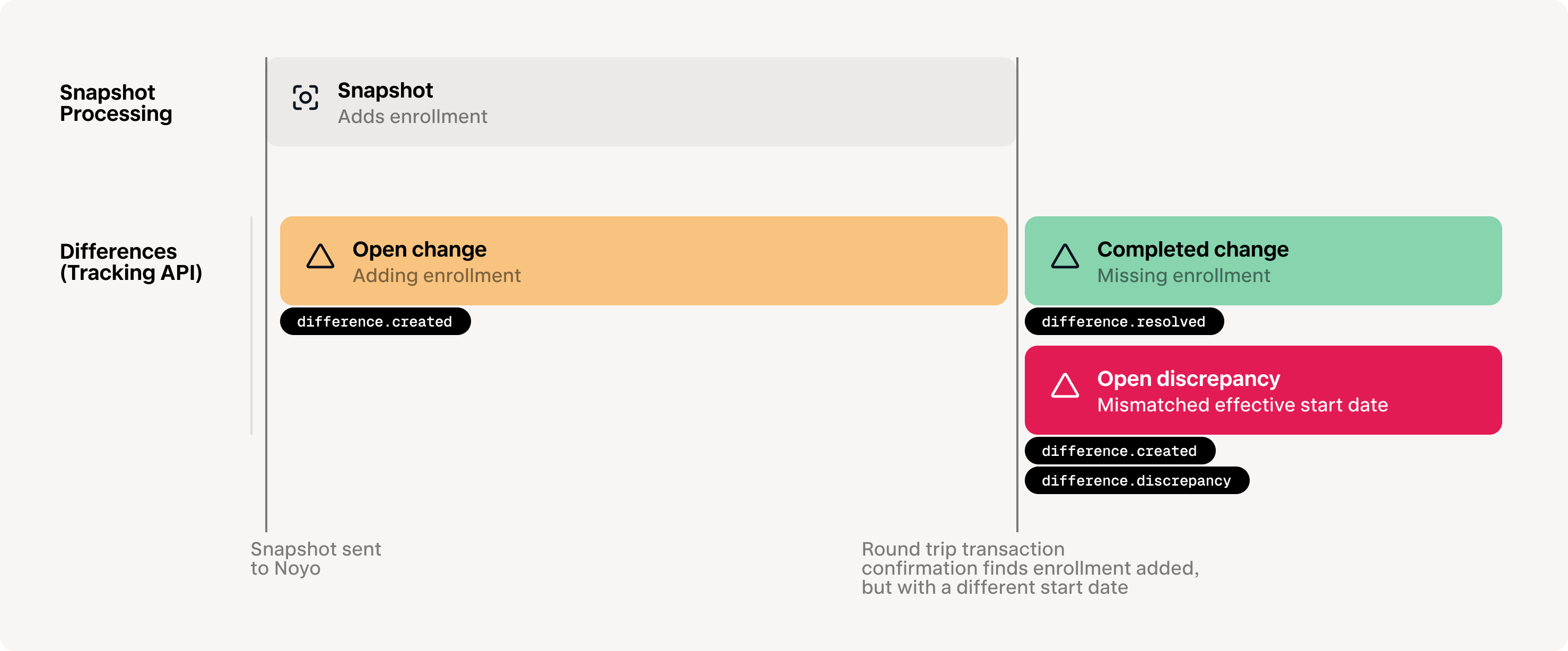
### Member Snapshot status changed
```json JSON theme={"system"}
{
"event": {
"id": "fbec86ad-ced9-48e5-9f77-4a3a00b522aa",
"type": "member_snapshot.status_change",
"created": 1719344385
},
"data": {
"id": "ea1b3077-b4f9-461b-80be-28023bc8ea19",
"status": "completed"
}
}
```
### Member Snapshot Fulfillment Summary updated
Read more about fulfillment summary [here](/docs/members/snapshot-workflow/snapshot-status).
```json theme={"system"}
{
"event": {
"created": 1719858674,
"id": "beb4e1b4-f1bd-4cbe-a361-a61bec3203e8",
"type": "member_snapshot_carrier_fulfillment_status.status_change"
},
"data": {
"carrier_id": "9a0a7437-4097-4251-9e71-85384c0eb1c9",
"member_snapshot_id": "815e92bc-33c1-4ed3-b658-4dc0e56cc38a",
"status": "sent"
}
}
```
### Difference created
For any snapshot sent to Noyo that contains changes, a `difference.created` event will be sent almost instantly after the snapshot is initially processed. This means you can save individual tracking identifiers for all field-level changes that are in-process.
Note that discrepancies found during carrier syncs will also initiate a `difference.created` event, so Noyo suggests calling [Get difference](/api-reference/tracking/get-differences) to populate all relevant details of the difference, such as its source.
```json theme={"system"}
{
"data": {
"id": "eb73184b-ae3c-4411-aa82-3c3bd877cf78"
},
"event": {
"id": "3573d31d-15ab-42a3-aece-8f1e3a5c986f",
"created": 1714670277,
"type": "difference.created"
}
}
```
### Difference marked discrepancy
If we detect that a processing change has not been made by the carrier, or we find a data discrepancy during a sync, Noyo will send a `difference.discrepancy` event.
```json theme={"system"}
{
"data": {
"id": "eb73184b-ae3c-4411-aa82-3c3bd877cf78"
},
"event": {
"id": "98144317-718a-45cd-be96-0a400ecbc32e",
"created": 1714670277,
"type": "difference.discrepancy"
}
}
```
### Difference replaced
In cases where an open difference is replaced by another, Noyo will send an event that you can use to replace the association in your system.
```json theme={"system"}
{
"data": {
"id": "f50b03bb-c8ab-4dd9-92dc-5dcf77011e0c"
},
"event": {
"id": "2ba88657-8bcc-4380-abc9-bbff85326ab2",
"created": 1714670515,
"type": "difference.replaced"
}
}
```
### Difference resolved
When a change is completed successfully by the carrier or a discrepancy is resolved (whether due to a subsequent snapshot, a sync, or a manual portal update, Noyo will send a `difference.resolved` event.
Once a difference is resolved, it cannot be reopened
```json theme={"system"}
{
"data": {
"id": "f50b03bb-c8ab-4dd9-92dc-5dcf77011e0c"
},
"event": {
"id": "6b1b42fc-fc79-4a28-b94a-a63d3c9a611b",
"created": 1714670515,
"type": "difference.resolved"
}
}
```
### Group Connection Request created
```json theme={"system"}
{
"event": {
"id": "1586f9b4-63f1-4c20-a965-6677beb04396",
"type": "group_connection_request.created",
"created": 1719343992
},
"data": {
"id": "2cfcf643-540e-45b7-9007-912ed53edc42",
"status": "processing"
}
}
```
### Group Connection Request status changed
```json theme={"system"}
{
"event": {
"id": "2586f9b4-63f1-4c20-a965-6677beb04396",
"type": "group_connection_request.status_change",
"created": 1719343992
},
"data": {
"id": "2cfcf643-540e-45b7-9007-912ed53edc42",
"status": "action_required"
}
}
```
### Group Disconnection Request created
```json theme={"system"}
{
"event": {
"id": "3586f9b4-63f1-4c20-a965-6677beb04396",
"type": "group_disconnection_request.created",
"created": 1719343992
},
"data": {
"id": "4cfcf643-540e-45b7-9007-912ed53edc42",
"status": "action_required"
}
}
```
### Group Disconnection Request status changed
```json theme={"system"}
{
"event": {
"id": "4586f9b4-63f1-4c20-a965-6677beb04396",
"type": "group_disconnection_request.status_change",
"created": 1719343992
},
"data": {
"id": "4cfcf643-540e-45b7-9007-912ed53edc42",
"status": "processing"
}
}
```
# Subscriptions
### Create a subscription
You can create webhook subscriptions in the Noyo web application by going to Developer > [Webhooks](https://app.noyo.com/developer/webhooks) and pressing "New subscription".
* Under "Destination", type the URL where you'd like to receive webhooks
* Under "Secret", type a string to use as a `secret` key. You should choose a random string of text with high entropy. You can use the webhook secret to limit incoming requests to only those originating from Noyo. You may optionally provide an API key name to assist in future key rotation
# Testing
Webhooks are not available for sandbox environments
### Send a test event for a subscription
You can send a test request to any subscription through the Noyo app.
The payload will resemble the following:
```json theme={"system"}
{
"data": {
"message": "Hello world!"
},
"event": {
"type": "test.hello_world",
"created": 1715203664,
"id": "beda9ea3-5136-4b7b-93be-37bf3fcc010a"
}
}
```
# Best Practices
## Event delivery and ordering
**New event types will be continuously added; it is up to you to decide which events you want to process and how, but your implementation of the event listener must be able to handle new event types without breaking.**
We guarantee *at-least-once delivery* of events, meaning webhook endpoints may occasionally receive duplicate events. All event requests include an event ID, which may be used to deduplicate webhook events.
We *do not* guarantee delivery of events in the order they happen. You should also use the Noyo REST APIs to fetch any missing data.
## Verification
**Authenticate all requests to your webhook endpoint.**
Noyo includes an HMAC signature with each outgoing webhook request in an `x-noyo-signature` HTTP header. Endpoints should verify each request by: computing an expected HMAC signature for the payload and verifying that the value contained in the `x-noyo-signature` header provided by the sender matches the expected signature. [Read more](/docs/introduction/webhooks/webhook-verification).
## Responding to webhooks
In order to prevent unnecessary retries, we recommend receiving webhook events and processing them in separate processes. Upon receiving the event, you should immediately respond with a **`200`** indicating that the event was successfully delivered.
### Subscription health and retries
* When an event fails to deliver, its queue will handle retrying with backoff 15 times over 3 days.
* When a webhook fails delivery, its subscription is moved into `unhealthy` status
* If an event succeeds, the status is changed back to `active`
* If an event comes in when a subscription has been unhealthy for 7 days, and that event fails, the subscription is changed to "failed." The subscription's queue is paused, which means that no other events will be attempted
# Verifying webhooks
Source: https://docs.noyo.com/docs/introduction/webhooks/webhook-verification
Maintain security with verified transmissions
To verify that a webhook was actually sent by Noyo, every payload is signed with a signature that is passed through as the HTTP header. Here's how to create a secret token and signature then confirm credentials.
You'll create your secret token when you create the subscription in the Noyo web application. You will not be able to retrieve this secret after creating it.
If your webhook key is compromised or accidentally made public, contact [support@noyo.com](mailto:support@noyo.com) as soon as possible
The signature is hex encoded and can be replicated by applying HMAC-SHA-256 to the body of the webhook with your webhook key.
```bash theme={"system"}
echo -n "{...}" | openssl dgst -sha256 -hmac "MY_WEBHOOK_KEY"
```
Webhook signatures are sent in the `x-noyo-signature` header. You can verify that Noyo sent the event by comparing the signatures.
```js JavaScript theme={"system"}
const express = require("express");
const { createHmac, timingSafeEqual } = require("crypto");
const PORT = 3000;
const app = express();
app.use(
express.json({
verify: (req, res, buf) => {
const hmac = createHmac("sha256", "NOYO_WEBHOOK_KEY");
const toHash = `${req.headers["x-noyo-timestamp"]}.${buf.toString()}`;
hmac.update(toHash);
const signatures = req.headers["x-noyo-signature"].split(",").map(Buffer.from);
digest = Buffer.from(hmac.digest("hex"));
for (noyoSignature of signatures) {
if (noyoSignature.length === digest.length && timingSafeEqual(noyoSignature, digest)) {
return;
}
}
throw new Error("Invalid signature");
},
})
);
app.post("/", (req, res) => {
res.send("OK :)");
});
app.listen(PORT, () => {
console.log(`Listening on port ${PORT}`);
});
```
# COBRA
Source: https://docs.noyo.com/docs/members/complex-changes/cobra
COBRA Enrollments and Terminations
Many carriers have special handling for [COBRA](https://www.dol.gov/general/topic/health-plans/cobra) enrollments or modifications, and it’s important that requests to Noyo are properly flagged as relating to COBRA members. It's best practice to provide all COBRA details whenever a request includes a member enrolled in COBRA.
**Not all carriers are able to support COBRA enrollments via Noyo**
Before sending COBRA enrollments, check the carrier-specific documentation in the Noyo web application. Individual carriers may also have more detailed requirements for COBRA requests.
Each member snapshot should contain a `cobra_details` block, as shown below. Full details for COBRA submissions can be found in the [Member Snapshot API Reference](/api-reference/snapshots/create-member-snapshot).
```json theme={"system"}
"cobra_details": {
"cobra_enrolled": True,
"qualifying_event_reason": "termination_of_employment",
"qualifying_event_date": "2023-11-15",
"eligibility_start_date": "2023-12-01",
"eligibility_end_date": "2025-05-31",
"election_notice_date": "2023-11-20"
}
```
To ensure a carrier is able to process your COBRA requests correctly, all COBRA enrollments must be sent with `cobra_enrolled= true`, an `eligibility_start_date`, and an `eligibility_end_date`.
Noyo recommends always including the `qualifying_event_reason` and `qualifying_event_date` when available, as some carriers may request it. Some carriers may also request `election_notice_date`, the date the group's plan administrator sent the COBRA election notice to the qualified beneficiary.
### Enrolling a member in COBRA coverage
* The `cobra_details.eligibility_start_date` field should be the first day without regular coverage, as COBRA coverage must be continuous with regular coverage. For example, if a member’s regular coverage ends 11/30, the COBRA coverage would start on 12/1.
* The `cobra_details.eligibility_end_date` should reflect the final day of the member’s maximum COBRA-eligible period (usually 18 months).
* The `cobra_details.election_notice_date` field should be the date the plan administrator sent the COBRA election notice, when known. This is not the employment termination date or the qualifying event date.
* The `enrolled_member.effective_start_date` field should reflect the start date prior to COBRA coverage unless otherwise indicated by carrier requirements.
* The `enrolled_member.effective_end_date` field should be sent as datemax (`9999-12-31`).
* The `enrolled_member.latest_change_effective_date` field should reflect the member's first day of COBRA coverage.
### Terminating a member from COBRA coverage
* The `cobra_details.cobra_enrolled` field should remain `= true`.
* The `enrolled_member.effective_end_date` field should reflect the last day of the member's COBRA coverage.
* The `cobra_details.eligibility_end_date` field should be updated if the member is no longer eligible for COBRA.
### Re-enrolling in Active coverage (following a previous enrollment in COBRA)
* Omit the `cobra_details` element.
* The `enrolled_member.effective_start_date` field should reflect the start of the new active (non-COBRA) coverage period.
* The `enrolled_member.effective_end_date` field should be sent as `datemax` (`9999-12-31`).
### Other COBRA requirements and notes
* Some carriers may require the COBRA QLE date. Unless otherwise indicated by carrier requirements, this will be the date that the member experienced their COBRA-qualifying event, which may fall prior to their last day of active coverage as an employee. For example, a member may experience a COBRA-qualifying event the day they end their employment or move from full-time to part-time, but their coverage as an active employee may remain through the end of the month.
* Members cannot be simultaneously enrolled in COBRA and non-COBRA for the same coverage. Member snapshots that attempt to add overlapping coverage for a member will be rejected.
* In the case that not all family members are enrolled in COBRA but all changes are being communicated within the same member snapshot, active (non-COBRA) coverage and COBRA coverage should be sent as two separate coverage blocks.
# Evidence of Insurability (EOI)
Source: https://docs.noyo.com/docs/members/complex-changes/eoi
[EOI](https://www.bamboohr.com/resources/hr-glossary/evidence-of-insurability) may be required before carriers will approve certain coverages or changes to coverage. Typically, the carrier will reach out directly to employees if EOI is needed, and employees can submit paperwork through their ben-admin platform or the carrier’s portal.
In Noyo, a coverage change or election that is pending EOI will appear as a discrepancy, either because the requested coverage is missing, the employee is missing altogether (if the affected coverage was their only line), or the volume amount is different between the ben-admin’s and carrier’s system. These discrepancies will be tagged with an “EOI scenario” note that is visible in the Noyo web application.
When EOI has been accepted by the carrier and their system is updated, the next data sync will pull in the new coverage or amount and the discrepancy will automatically resolve.
There are some cases where the carrier does not approve the EOI or accepts one part of the request but not another. We are currently building handling for these scenarios, and questions about EOI can be sent to our Support team in the meantime.
# Primary Care Provider Data
Source: https://docs.noyo.com/docs/members/complex-changes/pcp
Primary Care Provider (PCP) information is often required by carriers for enrollment in medical and dental HMO plans. These plans route all care through a single primary care provider, and carriers sometimes require details of that provider before they will issue coverage.
Please note that some carriers do not accept changes to PCP data sent by the employer group following initial enrollment, and instead require all PCP changes to be submitted by the member directly. In these cases, you can still send PCP information to Noyo but the data will not be updated in the carrier’s system.
If you are managing groups with HMO plans through Noyo, be sure to check carrier-specific documentation in the Noyo web application for additional requirements around PCP information. In general, it’s a best practice to provide PCP information for members enrolled in these plans whenever it’s available.
When needed, PCP data can be sent in the `primary_care_providers` block as shown below. See the full details of PCP data payloads in the [Member Snapshot API Reference](/api-reference/snapshots/create-member-snapshot).
```json theme={"system"}
"primary_care_providers": [
{
"entity_identifier_code": "PCP",
"entity_type": "person",
"identification_code_type": "NPI",
"identification_code": "1234567890",
"last_name_org": "McCoy",
"first_name": "Leonard",
"middle_name": "H",
"patient_relationship_code": "unknown"
}
]
```
# Rehires and Reinstatements
Source: https://docs.noyo.com/docs/members/complex-changes/rehires
Many carriers have special handling for cases where members were removed from coverage and then re-added. This can happen after a mistake is corrected, a member is rehired, or a formerly active member opts back into coverage via open enrollment or qualifying life event.
To be sure that all carriers have enough information to process rehires/reinstatements accurately, requests must follow these guidelines:
* For all reinstated and rehired members, coverages in the snapshot should include the new effective start date of their most recent coverages, and not the start date of any previously terminated coverages. This applies even if the members are intended to be enrolled without any gap between old coverage and new, and even if the new coverage is meant to correct a mistaken termination. For example, a member whose coverage was mistakenly terminated as of June 30th must have the reinstated coverage sent beginning July 1. Sending an earlier start date may cause requests to be rejected by the carrier.
* For rehired members only, the first request meant to re-enroll the member must include an event reason of rehire. The event date must also be equal to the member’s rehire date. For that first request and all future requests, rehired members must always have both a `hire_date` and a `rehire` date. The `hire_date` should reflect the member’s original hire date, while the `rehire` date should reflect their new, most recent hire date.
## Examples
Reinstate terminated coverage for a terminated employee
Add a rehired employee back to employment and active coverage
# Waiving/Canceling Coverage
Source: https://docs.noyo.com/docs/members/complex-changes/waives
Waiving coverage is done differently depending on the circumstances and history
1. **Waiving/canceling previously active or upcoming coverage**
If a member has active or upcoming coverage, termination/cancellation of that coverage must be explicit and any plan switches or waives must explictly terminate the previous coverage
2. **Waiving with no existing coverage**
If a coverage has *never* been in the system, it will be implictly waived. Empty coverage blocks are not required for carriers without coverage for a given household.Even if you have not previously sent a coverage, it may have been pulled from the carrier system. Read more about [omitted coverage handling](/docs/members/using-snapshots/omitted-coverage-handling) or using the [Tracking API](/docs/members/tracking/the-tracking-api) to pull `missing_from_platform` enrollments.
### Example Snapshots
Move a member and their dependents from one plan to another
Remove a coverage as if it were never active, either to correct a mistake or reflect a changed decision
Remove a dependent from coverage while the rest of the family remains active
## During an Open Enrollment Period
For upcoming elections, you do not generally need to provide "empty" coverage blocks for coverages that a member does not choose, whether they are choosing one carrier over another, waiving an entire line of coverage, or waiving coverage for a dependent.
### When using `continue-on-omission`
When your [omitted coverage policy](/docs/members/using-snapshots/omitted-coverage-handling) is set to `continue`, it is important that you provided an `effective_end_date` for each coverage you want to terminate. Because this setting allows you to omit active coverages from a snapshot, it is posible to end up with unexpected surplus coverage. Enrolling a member in a new coverage will not automatically terminate their previous coverage.
### When using `terminate-on-omission`
When your [omitted coverage policy](/docs/members/using-snapshots/omitted-coverage-handling) is set to `terminate`, any coverages not included in the snapshot will be terminated.
**Terminate by omission is not generally recommended except in very specific use cases.** Please consult with Noyo before using this option.
## Waiving/canceling previously active or upcoming coverage
If you need to waive or cancel coverage for a member *after* you've already sent that coverage in a previous snapshot (or the coverage was already pulled from the carrier system), set the `effective_end_date` to one day before the `effective_start_date`. This is often used to correct a mistake or reflect a member's changed decision.
Ensure that you add a [relevant event](/docs/members/using-snapshots/event-reasons) to the `events` array to reflect the nature of the change.
```javascript {15-16, 23-24} [expandable] lines theme={"system"}
{
"snapshot_mode": "current_open",
"employee": {}, // omitted for brevity
"dependents": [], // omitted for brevity
"coverages": [
{
"carrier_id": "2d370e0e-fd73-45e0-8828-796d2cacaeef",
"line_of_coverage": "dental",
"plan_id": "84a6c0a6-4ae9-484b-ab8d-af1ab6551efe",
"enrolled_members": [
{
"custom_individual_id": "150D001",
"individual_type": "employee",
"event_id": "10002",
"effective_start_date": "2023-04-01",
"effective_end_date": "2023-03-31",
"latest_change_effective_date": "2023-03-20"
},
{
"custom_individual_id": "150D0C2",
"individual_type": "dependent",
"event_id": "10002",
"effective_start_date": "2023-04-01",
"effective_end_date": "2023-03-31",
"latest_change_effective_date": "2023-03-20"
}
]
}
],
"events": [
{
"id": "10002",
"date": "2023-03-20",
"type": "coverage",
"reason": "offline_change"
}
]
}
```
# Uploading Error Reports
Source: https://docs.noyo.com/docs/members/issues/edi-errors
Upload carrier EDI error reports and create Issues—one, standard error format across all carriers.
## Process
Upload the document to Noyo
Tell Noyo which series of reports i.e. [document stream](#document-streams) the report belongs to.
Noyo compares the document with previous documents in the same stream to create or update [Issues](https://docs.noyo.com/docs/members/issues/overview).
## Supported file types
Carrier error reports are not standardized and come in a variety of formats. Noyo supports all carriers and most file types, including **PDFs**, **Excel** files (`xlx`, `xlsx`), text-based files (`csv`, `json`, `txt`), and images (`png`, `jpg`).
## Document streams
A **document stream** is a series of related EDI error reports for a carrier connection. Noyo compares each new report with previous ones in that stream to create and resolve Issues.
### **Why streams matter**
Most carriers provide one, weekly error report file for a given feed. However, some split errors across multiple types of reports—for example, by line of coverage, population, or error type.
Streams tell Noyo which types of reports should be compared. For example, a dental error report should not be compared with a medical error report. Keeping them in separate streams prevents Issues from being incorrectly created or resolved.
### **When you need more than one stream**
In most cases, a connection only needs **one stream**. Create additional streams when a carrier provides a separate, recurring series of report files that should be evaluated independently.
Common examples include:
* **By line of coverage** — e.g. separate error files for medical vs. dental
* **By error type** — e.g. different categories of errors in separate reports
* **By population** — e.g. separate error files for active employees vs. COBRA
**Example**
A carrier sends one medical error report and one dental error report each week. Create two streams, such as **“Cigna Med Errors”** and **“Cigna Dental Errors.”**
Noyo will compare each new medical report only with previous medical reports, and each dental report only with previous dental reports.
If the carrier includes **all coverages in a single report**, one stream is sufficient.
### **How to set up a stream**
1. Upload an error report.
2. Select "create stream" for that report series and give it a clear name, such as **“Cigna Med Errors.”**
3. For future reports in the same series, select the existing stream. If only one stream exists, Noyo will automatically select it.
4. Complete the upload to generate Issues
## Retrieving issues
Issues can be retrieved via the API, but uploads are only available in-app.
See [this page](/docs/members/issues/overview) for more information on managing and retrieving issues.
Overview
`GET issues`
`GET issues/{issue_id}`
# Issues
Source: https://docs.noyo.com/docs/members/issues/overview
Issues is the primary system for tracking and resolving enrollment problems in Noyo. It provides a system of record and tools to manage reconciliation work.
![issues_screenshot.png]() An Issue is a record of a problem with a member's coverage, eligibility, or demographic data. It is often raised by a carrier or partner and requires action to resolve.
### What's in an Issue
**Category:** Each Issue is assigned a category based on the type of problem it represents.
**Summary**: At-a-glance analysis of what has happened, and its potential impact.
**Resolution Guidance**: Clear, actionable guidance for how to resolve the issue with Noyo or the carrier.
**Tracked Action**: Record what action was taken to resolve the issue, such as updating data in the benefits administration system or reaching out to the carrier. Taking an action moves the issue into Pending Resolution status, this helps teams keep track of actions they've taken, but does not impact resolution. Issues are [automatically marked as resolved](https://docs.noyo.com/docs/members/issues/overview#issue-matching-and-resolution) when Noyo confirms the issue is no longer detected.
**Notes**: Leave comments for other users with any additional context on this issue.
**History**: Review when this issue first occurred, and all past instances that have been detected. For EDI error reports, view more details about the upload that created the issue and download the original document received from the carrier. For issues from API sources, dive into the Snapshot details where the Issue was found.
# Lifecycle
### Origination
Issues can be detected across all carriers in our network, however they originate from a variety of sources:
* [**EDI error reports**](/docs/members/issues/edi-errors)
* **Carrier API responses**
* **Noyo tracking and confirmation**
* **Validation errors from [Snapshot Fulfillment Summary](https://docs.noyo.com/docs/members/snapshot-workflow/snapshot-status#snapshot-fulfillment-summary)**
* **Manually by Noyo Operations**
The following categories of enrollment problems are currently addressed by Issues:
* **COBRA Status Conflict** — COBRA enrollments are submitted for carriers or workflows that don’t support them
* **Coverage Date Conflict** — Coverage dates violate rules (e.g., overlaps, before hire/birth, outside plan/account timelines, misaligned with subscriber)
* **Duplicate Member** — Duplicate employee or dependent records exist (e.g., same SSN, name/DOB) causing conflicts
* **Enrollment Conflict** — Enrollment structure is invalid (e.g., duplicate records, conflicting elections, too many dependents, missing required coverages)
* **EOI Pending** — Enrollment is blocked pending Evidence of Insurability submission
* **Event Conflict** — Employment or lifecycle events (e.g., termination) don’t align with coverage data or required dates
* **Future Change** — Requested effective dates exceed carrier-supported future limits
* **Invalid Address** — Address data is invalid, incomplete, or incompatible with plan/service area requirements
* **Invalid Carrier Config** — Submitted data doesn’t align with required carrier configuration (e.g., IDs, bill groups, classes, account structures, etc.)
* **Invalid Coverage** — Coverage selection is invalid, unsupported, or cannot be matched to a specific plan
* **Invalid Demographic Info** — Member demographic data (e.g., name, DOB, SSN, hire date) is invalid, inconsistent, or fails validation rules
* **Invalid Volume** — Volume values are included for coverages that don’t support them
* **Missing Coverage** — Expected active coverages are omitted without proper termination or handling
* **Overage Dependent** — Dependent exceeds eligibility rules (typically age limits) for coverage
* **Retro Change** — Requested changes fall outside the carrier’s allowed retroactive window
### Member Matching
Issues are also automatically matched to employees and dependents in Noyo. When the issue source is a carrier-provided document that doesn't use Noyo IDs or the `custom_individual_id` field, members are matched using their name, date of birth, and other identifying information like carrier-assigned ID or SSN.
### Issue Matching and Resolution
Issues are automatically matched to previous issues to update or resolve them. If the same issue is found in a new upload or transmission, it will not be duplicated. If the issue is no longer found, it will be automatically resolved.
### Dismissing Issues
If an issue doesn't need to be addressed, it can be dismissed. Dismissed issues are filtered from default views in the app, but can still be returned by the API when not filtered. Dismissed issues are still tracked by Noyo and will be moved to resolved only when they are no longer detected.
# Roadmap
We are actively working on expanding the feature set for Issues, including:
* Generate issues from more sources (e.g. expanding coverage of carrier-specific API responses and tracking/confirmations)
* Field-level context to understand and action Issues faster (in-app only)
* AI-enabled dashboards, analytics, and recommendations
* Improved workflow management (e.g. assignment, collaboration, prioritization)
# API Reference
The Issues API is currently in beta. As this product evolves, fields returned are subject to change.
`GET issues`
`GET issues/{issue_id}`
# Snapshot & Tracking
Source: https://docs.noyo.com/docs/members/snapshot-workflow/basic-snapshot-tracking
Track the outstanding updates from a snapshot, along with any discrepancies that result
Here we explore a simplified sample workflow for identifying the status of a snapshot's changes using the tracking endpoint(s).
First, send a snapshot to Noyo:
```sh Request theme={"system"}
curl --request POST \
--url https://fulfillment.noyo.com/api/v1/groups/{group_id}/member_snapshots
```
You'll receive the ID of the created snapshot:
```json Response {2} theme={"system"}
{
"id": "7bea80ac-499d-560b-5512-60be9e2349cb",
"created": 1656030390,
...
}
```
If you use webhooks, you'll receive `difference.created` events for every change or update in the snapshot.
An Issue is a record of a problem with a member's coverage, eligibility, or demographic data. It is often raised by a carrier or partner and requires action to resolve.
### What's in an Issue
**Category:** Each Issue is assigned a category based on the type of problem it represents.
**Summary**: At-a-glance analysis of what has happened, and its potential impact.
**Resolution Guidance**: Clear, actionable guidance for how to resolve the issue with Noyo or the carrier.
**Tracked Action**: Record what action was taken to resolve the issue, such as updating data in the benefits administration system or reaching out to the carrier. Taking an action moves the issue into Pending Resolution status, this helps teams keep track of actions they've taken, but does not impact resolution. Issues are [automatically marked as resolved](https://docs.noyo.com/docs/members/issues/overview#issue-matching-and-resolution) when Noyo confirms the issue is no longer detected.
**Notes**: Leave comments for other users with any additional context on this issue.
**History**: Review when this issue first occurred, and all past instances that have been detected. For EDI error reports, view more details about the upload that created the issue and download the original document received from the carrier. For issues from API sources, dive into the Snapshot details where the Issue was found.
# Lifecycle
### Origination
Issues can be detected across all carriers in our network, however they originate from a variety of sources:
* [**EDI error reports**](/docs/members/issues/edi-errors)
* **Carrier API responses**
* **Noyo tracking and confirmation**
* **Validation errors from [Snapshot Fulfillment Summary](https://docs.noyo.com/docs/members/snapshot-workflow/snapshot-status#snapshot-fulfillment-summary)**
* **Manually by Noyo Operations**
The following categories of enrollment problems are currently addressed by Issues:
* **COBRA Status Conflict** — COBRA enrollments are submitted for carriers or workflows that don’t support them
* **Coverage Date Conflict** — Coverage dates violate rules (e.g., overlaps, before hire/birth, outside plan/account timelines, misaligned with subscriber)
* **Duplicate Member** — Duplicate employee or dependent records exist (e.g., same SSN, name/DOB) causing conflicts
* **Enrollment Conflict** — Enrollment structure is invalid (e.g., duplicate records, conflicting elections, too many dependents, missing required coverages)
* **EOI Pending** — Enrollment is blocked pending Evidence of Insurability submission
* **Event Conflict** — Employment or lifecycle events (e.g., termination) don’t align with coverage data or required dates
* **Future Change** — Requested effective dates exceed carrier-supported future limits
* **Invalid Address** — Address data is invalid, incomplete, or incompatible with plan/service area requirements
* **Invalid Carrier Config** — Submitted data doesn’t align with required carrier configuration (e.g., IDs, bill groups, classes, account structures, etc.)
* **Invalid Coverage** — Coverage selection is invalid, unsupported, or cannot be matched to a specific plan
* **Invalid Demographic Info** — Member demographic data (e.g., name, DOB, SSN, hire date) is invalid, inconsistent, or fails validation rules
* **Invalid Volume** — Volume values are included for coverages that don’t support them
* **Missing Coverage** — Expected active coverages are omitted without proper termination or handling
* **Overage Dependent** — Dependent exceeds eligibility rules (typically age limits) for coverage
* **Retro Change** — Requested changes fall outside the carrier’s allowed retroactive window
### Member Matching
Issues are also automatically matched to employees and dependents in Noyo. When the issue source is a carrier-provided document that doesn't use Noyo IDs or the `custom_individual_id` field, members are matched using their name, date of birth, and other identifying information like carrier-assigned ID or SSN.
### Issue Matching and Resolution
Issues are automatically matched to previous issues to update or resolve them. If the same issue is found in a new upload or transmission, it will not be duplicated. If the issue is no longer found, it will be automatically resolved.
### Dismissing Issues
If an issue doesn't need to be addressed, it can be dismissed. Dismissed issues are filtered from default views in the app, but can still be returned by the API when not filtered. Dismissed issues are still tracked by Noyo and will be moved to resolved only when they are no longer detected.
# Roadmap
We are actively working on expanding the feature set for Issues, including:
* Generate issues from more sources (e.g. expanding coverage of carrier-specific API responses and tracking/confirmations)
* Field-level context to understand and action Issues faster (in-app only)
* AI-enabled dashboards, analytics, and recommendations
* Improved workflow management (e.g. assignment, collaboration, prioritization)
# API Reference
The Issues API is currently in beta. As this product evolves, fields returned are subject to change.
`GET issues`
`GET issues/{issue_id}`
# Snapshot & Tracking
Source: https://docs.noyo.com/docs/members/snapshot-workflow/basic-snapshot-tracking
Track the outstanding updates from a snapshot, along with any discrepancies that result
Here we explore a simplified sample workflow for identifying the status of a snapshot's changes using the tracking endpoint(s).
First, send a snapshot to Noyo:
```sh Request theme={"system"}
curl --request POST \
--url https://fulfillment.noyo.com/api/v1/groups/{group_id}/member_snapshots
```
You'll receive the ID of the created snapshot:
```json Response {2} theme={"system"}
{
"id": "7bea80ac-499d-560b-5512-60be9e2349cb",
"created": 1656030390,
...
}
```
If you use webhooks, you'll receive `difference.created` events for every change or update in the snapshot.
We then call the tracking endpoint to retrieve a field-level list of differences associated with the snapshot. These differences will either be pending changes introduced by the snapshot, or discrepancies raised during round-trip confirmation. They can be pulled at any time and will always reflect their real-time status.
For this example, we'll assume your snapshot included one new item– enrolling a dependent in vision coverage.
Call the differences endpoint using the snapshot ID as a query parameter:
```sh Request theme={"system"}
curl --request GET \
--url https://tracking.noyo.com/api/v1/differences?member_snapshot_id=7bea80ac-499d-560b-5512-60be9e2349cb
```
The response returns one difference (pending change)– the carrier doesn't have an enrollment in the snapshot *(that's what is being processed)*
```json Response lines theme={"system"}
[
{
"id": "da5ec83e-450f-4eee-ad6c-8b6d60d41b88",
"resolved": null,
"discrepancy_time": null,
"group_id": "a1b6fe36-ccc5-41e3-bcc0-e6488d7e031e",
"carrier_id": "2d370e0e-fd73-45e0-8828-796d2cacaeef",
"employee_id": "a9c01d76-019c-4c44-b414-a832246c014d",
"object_type": "dependent",
"object_id": "d0e180e6-fafc-441e-8ac4-08d9a9fe4657",
"impact_score": 5,
"difference_classification": "missing_from_carrier",
"difference_type": "missing_ie",
"sources": [],
"fields": [
{
"key": "object",
"platform_value": {
"individual_id": "d0e180e6-fafc-441e-8ac4-08d9a9fe4657",
"line_of_coverage": "vision",
"member_first_name": "Jade",
"member_last_name": "Cornwall",
"member_type": "dependent",
"plan_id": "9302a1db-bed5-4be6-96f5-c51371cc96a3"
},
"carrier_value": null
}
]
}
]
```
Fast forward a day or two. The carrier has enrolled the dependent successfully, but with a later effective date due to their rules and limitations. The tracking endpoint will surface this information. Let's call it again:
```sh Request theme={"system"}
curl --request GET \
--url https://tracking.noyo.com/api/v1/differences?member_snapshot_id=7bea80ac-499d-560b-5512-60be9e2349cb
```
We now get an updated response. The original difference is now marked as resolved, meaning the carrier successfully enrolled the dependent. There's a new discrepancy raised noting the difference in effective start date. *(some payload fields omitted for brevity)*
```json Response lines theme={"system"}
[
{
"id": "da5ec83e-450f-4eee-ad6c-8b6d60d41b88",
"resolved": 1708295864,
"discrepancy_time": null,
"impact_score": 5,
"difference_classification": "missing_from_carrier",
"difference_type": "missing_ie",
"fields": [
{
"key": "object",
"platform_value": {
"individual_id": "d0e180e6-fafc-441e-8ac4-08d9a9fe4657",
"line_of_coverage": "vision",
"member_first_name": "Jade",
"member_last_name": "Cornwall",
"member_type": "dependent",
"plan_id": "9302a1db-bed5-4be6-96f5-c51371cc96a3"
},
"carrier_value": null
}
]
},
{
"id": "95b8611b-15f6-46c6-8bb1-353dcd52e3fb",
"resolved": null,
"discrepancy_time": 1703098579,
"impact_score": 4,
"difference_classification": "field_mismatch",
"difference_type": "ie_effective_start_date",
"fields": [
{
"key": "effective_start_date",
"platform_value": "2024-08-22",
"carrier_value": "2024-09-01"
}
]
}
]
```
If you use webhooks, you will have received a few events along the way:
* For the dependent enrollment, a `difference.resolved`event (in addition to the original creation event)
* For the effective date discrepancy, both a `difference.created` and `difference.discrepancy` event
* For the snapshot, both a `member_snapshot.status_change` event and a `member_snapshot_carrier_fulfillment_status.status_change` event
# Feeds and Feed Runs
Source: https://docs.noyo.com/docs/members/snapshot-workflow/feeds-feed-runs
Track EDI data delivery for Standard and Advanced carriers.
## Feeds
**Feeds** are how Noyo manages connections with carriers that require EDI file transmissions. Each feed record that contains information about how we generate and transmit files for that connection, such as the schedule and next expected delivery date.
Most groups will have a single feed to each carrier. Some groups may have multiple feeds, if the carrier requires the population be split (such as separating dental and vision coverage, or active and COBRA members).
## Feed Runs
A feed run is a single, specific instance that the feed has generated and transmitted a file to the carrier. The feed run record contains information unique to that file transmission, such as its delivery date and content. Each feed will have a history of many associated feed runs.
## Getting Feeds and Feed Runs
You can reference feed and feed run data to know the status of the group’s connection with the carrier, know what files have been sent and when, and know when files are scheduled to be sent in the future.
You can get feed data for both a single feed, and filterable lists of feeds.
* [Get a single feed based on feed id](http://docs.noyo.com/api-reference/groups/feeds/get-feed)
* [Get list of feeds](http://docs.noyo.com/api-reference/groups/feeds/get-feed-list)
* Common parameters: by group, by carrier, by group & carrier
You can also get feed run data for both a single feed run, and filterable lists of feed runs. Lists of feed runs return results sorted by most recent first.
* [Get a single feed run based on the feed run id](http://docs.noyo.com/api-reference/groups/feed-runs/get-feed-run)
* [Get list of feed runs](http://docs.noyo.com/api-reference/groups/feed-runs/get-feed-run-list)
* Common parameters: by feed, by group, by carrier
# Snapshot Statuses
Source: https://docs.noyo.com/docs/members/snapshot-workflow/snapshot-status
Understanding change fulfillment and tracking
Depending on your needs, there are several ways to get and track the status of snapshots and their processing. Each is available via API, webhooks, and in the Noyo web application.
* Most general: **Snapshot Status**
* Per-carrier validation and fulfillment: **Snapshot Fulfillment Summary**
* Field-level tracking and diffing for enrollment changes: **Tracking API**
# Snapshot Status
As Noyo processes the requested changes, you can periodically poll for status by sending a call to [get a single snapshot](/api-reference/snapshots/get-member-snapshot). This endpoint returns a copy of one member snapshot, including the current status and the full contents of what was submitted.
You can also get data about all snapshots for a given group with the [group snapshots endpoint](/api-reference/snapshots/get-member-snapshots-for-group-list).
This endpoint returns a paginated list of snapshot records associated with employees in a group. Each result in the list contains metadata about the snapshot request, including the unique ID and the associated employee ID, but not the complete snapshot payload. Results will default to descending order by date created, so the most recently created snapshots will be in the first page of results. This endpoint also supports an optional `employee_id` query param to filter all snapshots for a specific employee.
When Noyo has finished making all requested changes at the carrier, the status of the member snapshot will change to `completed`. For changes going to Send carriers, the status will be `completed` once the file has been sent. If a member snapshot contains changes for both Sync and Send carriers, the Sync transactions will be completed first but the snapshot will only move to `completed` when the file has been sent.
Member snapshots can have one of five statuses:
| Status | Description |
| :- | :- |
| `submitted` | The member snapshot has been submitted to Noyo and we have run initial processing and validation. |
| `processing` | We are identifying transactions and queuing them up to send to the right carrier(s) **or** there are still transactions contained in this snapshot that are being processed by the carrier(s). |
| `completed` | All member transactions have been confirmed complete (Premier connections) **or** the request has been successfully transmitted (Standard & Advanced connections) |
| `canceled` | The request was canceled and no changes have been sent to the carrier. |
| `replaced` | The member snapshot was overridden by a subsequent snapshot while in the processing status. Noyo will no longer attempt to fulfill this request in favor of more recent requests. |
The `replaced` status applies to snapshots which were in progress, but were not completed before a new snapshot was received for the same employee. Noyo will only try to process and confirm the latest snapshot received, on the assumption that the latest snapshot contains the most up-to-date information.
When the snapshot status is `completed`, Noyo schedules the second of our round-trip confirmation checks, which queries the carrier's system on the change's effective date to ensure that it still happens as expected.
# Snapshot Fulfillment Summary
Many snapshots have information and enrollments that span multiple carriers. Whenever possible, Noyo does not block well-formed snapshots from processing at Carrier A if there are issues with the input(s) for Carrier B. These mechanics ensure a fast, accurate fulfillment process but introduce nuance in the idea of a snapshot's "status."
Here are two examples of scenarios where the overall snapshot status may *not* be particularly useful:
* **There are blocking issues for one carrier but not another**
The provided body has validation issues that only affect one of the carriers but don't affect another (e.g. omitted enrollments)
* **One or more carriers are Send**
For example, a snapshot's updates have been sent to three carriers but the fourth is a Send carrier, meaning the update is scheduled for the future but not yet sent
To get the per-carrier status of a snapshot, you can use *Snapshot Fulfillment Summary*. This field includes an array of summary objects; one per carrier in the snapshot. This field will be included in the API response on the successful creation of a snapshot. As Noyo processes the requested changes, you can periodically poll for updates to Fulfillment Summary by sending a call to [**get a single snapshot**](/api-reference/snapshots/get-member-snapshot). Corresponding [webhooks](/docs/members/tracking/the-tracking-api#using-webhooks-to-track-enrollment-changes) are also available.
```json theme={"system"}
{
"status": "processing",
"fulfillment_summary": [
// one per carrier
{
"carrier_id": "",
"status": "sent", // terminal state
},
{
"carrier_id": "",
"status": "invalid", // for invalid data, instead of 422
"errors": [""] // provide errors
},
{
"carrier_id": "",
"status": "scheduled", // for Send
"next_transmission": "" // for Send
}
]
}
```
This example can be read as "The Beam updates were sent, the Cigna ones scheduled, and the Guardian ones had a validation issue that needs to be fixed."
This field will be included in the API response on the successful [creation of a snapshot](/api-reference/snapshots/create-member-snapshot), along with subsequent calls to [get the snapshot](/api-reference/snapshots/get-member-snapshot). The fulfillment summary items are updated as processing happens, and stop updating once they reach a state of `sent`, `invalid`or `replaced`.
Because Snapshot Fulfillment Summary includes one object per carrier, it won't include any field-level granularity or discrepancy information. It also won't update with the results of round-trip confirmation. For that level of detail, use the [Tracking API](/docs/members/tracking/the-tracking-api).
| Fulfillment Summary Status | Description |
| :- | :- |
| `processing` | We are identifying changes and queuing them up to send to the right carrier(s). |
| `sent` | All changes for a given carrier have been sent successfully. |
| `not_connected` | A given carrier does not have a live connection through Noyo; no changes were sent to that carrier. |
| `invalid` | We have identified an issue with the snapshot data and were unable to transmit changes to a carrier. Some errors will be detected immediately (such as formatting and missing data errors) while others will begin in `processing` and move to`invalid`when the error is detected. |
| `scheduled` | All changes that must be included on a scheduled transmissions are queued and ready. |
| `no_changes` | No changes identified from the snapshot for the carrier. |
| `replaced` | Processing changes have been overridden by a subsequent snapshot. |
# Tracking
For live, detailed, field-level information, use the [Tracking API](/docs/members/tracking/the-tracking-api).
When you send a snapshot, Noyo calculates the diff from the previous snapshot to derive which changes need to be made with each carrier. That may be adding an enrollment or dependent or changing an address. Oftentimes it'll be many of them across multiple carriers. For each change, a difference is created and exposed in the Tracking API. Differences are automatically de-duplicated and are associated with all snapshots that include the change before it's reflected in the carrier system.
When that change is made at the carrier, regardless of where it's confirmed, it is resolved. If the process of making the change is completed (usually a transaction, which is discussed below), but the carrier system still does not correctly represent the change, the difference is escalated from change to discrepancy.
Tracking is particularly useful for highlighting situations where a change was mostly fulfilled, but with a field-level discrepancy, such as when an enrollment is added but with an effective date 15 days later than requested; or when the requested volume requires evidence of insurability (EOI) and the issued volume is lower. In these cases, the pending change of "adding enrollment" will resolve, but a new discrepancy for the specific field will be opened. This functionality is unmatched in the industry.
If you require (or desire) field-level tracking and confirmation, you may alternatively be considering your own logic to compare snapshots against the member data endpoints. [Here](/docs/members/tracking/the-tracking-api#let-noyo-do-the-diffing-for-you) we explain the advantages of using Tracking rather than building your own logic.
# Transactions (Legacy)
Each snapshot request may contain multiple member transactions, which represent smaller sub-operations being carried out at carrier partners. Particularly when migrating from Member Requests, it's important to note that Noyo does not recommend using transactions to track changes or perform confirmations. Read more [here](/docs/members/snapshot-workflow/snapshot-transactions).
# The Snapshot Workflow
Source: https://docs.noyo.com/docs/members/snapshot-workflow/the-member-change-workflow
What's happening behind the scenes when you send a snapshot
This section walks you through the complete member change workflow: creating the snapshot, checking its status, and confirming changes (if available).
![]() # Steps
Submit a snapshot for an employee and their family using `POST /api/v1/groups/:group_id/member_snapshots`.
Populate the Employee section with your `custom_individual_id` and the employee's classifications. Set the Employment information and Employment Dates. Send as much demographic information as possible in the Person and Dependent sections.
Populate the Coverages list by adding a block for each plan or coverage the member and their dependent(s) should be enrolled in:
* Set the `line_of_coverage` and `plan_id` to the linked Noyo plan
* Set the `carrier_config` block to the member's chosen account structure option(s) *(this section may be blank, or be populated according to individual carrier requirements)*
* Set the `individual_type` and `custom_individual_id` to match your employee record
* Set the `effective_start_date` and `effective_end_date` of the coverage. (If a user hasn't requested to terminate coverage, use datemax of 9999-12-31 for the end date.)
Populate the Events section with the `event_id`, reason, and date for the relevant event.
With this data, a member snapshot should be ready to send. Check out our special cases documentation for specific examples of how to formulate a member snapshot for different scenarios:
* [COBRA enrollments](/docs/members/complex-changes/cobra)
* [Evidence of Insurability (EOI)](/docs/members/complex-changes/eoi)
* [Primary Care Provider (PCP) selection](/docs/members/complex-changes/pcp)
* [Rehires](/docs/members/complex-changes/rehires)
If successful, you should get a response with a new unique ID for the snapshot, the original contents of the snapshot, and an initial status of `submitted`. Your system should record the new snapshot ID to check on the status (see below).
A more specific breakdown of the snapshot format can be found in [the API Reference](/api-reference/snapshots/create-member-snapshot).
Noyo validates the request for content and uses encoded carrier logic to ensure it has a chance to be processed by the carrier. For full detail on possible responses, see [Snapshot Responses](/docs/members/using-snapshots/snapshot-responses).
Noyo will process the snapshot contents, break the snapshot into [transactions](/docs/members/snapshot-workflow/snapshot-transactions), generate the correct payload to each target carrier, and determine what queuing might need to happen to conform to the carrier's requirements.
The carrier makes the submitted changes in their system. Most changes for Sync carriers are completed in seconds. **The next steps depend on whether you are sending changes for a Sync or Send carrier.**
We'll check that the transmission was successful by immediately checking the carrier's system to see that their data has been updated to match the request and they are done processing the data. This is the first step of our round-trip confirmation process to ensure that member data is accurate across systems.
Important note: A carrier may finish processing a transaction but not actually update the data in their system correctly. In this case, we will detect the mismatch and raise it as a discrepancy in the Noyo web application. The transaction (and the member snapshot it belongs to) will have a status of `completed` in our system.
We recommend reading [Snapshot Statuses](/docs/members/snapshot-workflow/snapshot-status) to see your options for detailed status tracking
Any time after a snapshot has been accepted, you can poll Noyo for its status. See [Snapshot Statuses](/docs/members/snapshot-workflow/snapshot-status) for full details. In short, the statuses returned for Sync carriers can mean:
* One or more transactions in the snapshot have not been completed by the carrier yet (`processing`)
* All transactions in the snapshot have been completed by the carrier (`completed`)
* The request was canceled and no change was sent to the carrier (`canceled`)
* We received a newer snapshot for this family (`replaced`)
As soon as the carrier has made the requested changes and no discrepancies are detected, Noyo updates our system to reflect the new data. This will happen at the same time the snapshot status reaches `complete`. If any transactions had an effective date in the future, our second round-trip confirmation check validates the data with the carrier again on that date.
**Snapshots with Premier and Standard/Advanced changes**\
If your member snapshot contains changes being sent via both Premier and Standard connections, it's likely that the Premier requests will complete quickly while the Standard requests wait to be sent. The status of the snapshot will remain in `processing` until all changes are successfully transmitted for all connections.
You can use our [member data endpoints](/docs/data/member-data-endpoints) to pull back the latest info into your own system. If desired, you can use this data for reconciliation, or to support your own internal tooling.
We offer out-of-the-box discrepancy management in the UI or via the [Tracking API](/docs/members/snapshot-workflow/basic-snapshot-tracking), where you can understand and manage discrepancies, including seeing a side-by-side field comparison between what you submitted and what the carrier has.
### Premier Connection flow
# Steps
Submit a snapshot for an employee and their family using `POST /api/v1/groups/:group_id/member_snapshots`.
Populate the Employee section with your `custom_individual_id` and the employee's classifications. Set the Employment information and Employment Dates. Send as much demographic information as possible in the Person and Dependent sections.
Populate the Coverages list by adding a block for each plan or coverage the member and their dependent(s) should be enrolled in:
* Set the `line_of_coverage` and `plan_id` to the linked Noyo plan
* Set the `carrier_config` block to the member's chosen account structure option(s) *(this section may be blank, or be populated according to individual carrier requirements)*
* Set the `individual_type` and `custom_individual_id` to match your employee record
* Set the `effective_start_date` and `effective_end_date` of the coverage. (If a user hasn't requested to terminate coverage, use datemax of 9999-12-31 for the end date.)
Populate the Events section with the `event_id`, reason, and date for the relevant event.
With this data, a member snapshot should be ready to send. Check out our special cases documentation for specific examples of how to formulate a member snapshot for different scenarios:
* [COBRA enrollments](/docs/members/complex-changes/cobra)
* [Evidence of Insurability (EOI)](/docs/members/complex-changes/eoi)
* [Primary Care Provider (PCP) selection](/docs/members/complex-changes/pcp)
* [Rehires](/docs/members/complex-changes/rehires)
If successful, you should get a response with a new unique ID for the snapshot, the original contents of the snapshot, and an initial status of `submitted`. Your system should record the new snapshot ID to check on the status (see below).
A more specific breakdown of the snapshot format can be found in [the API Reference](/api-reference/snapshots/create-member-snapshot).
Noyo validates the request for content and uses encoded carrier logic to ensure it has a chance to be processed by the carrier. For full detail on possible responses, see [Snapshot Responses](/docs/members/using-snapshots/snapshot-responses).
Noyo will process the snapshot contents, break the snapshot into [transactions](/docs/members/snapshot-workflow/snapshot-transactions), generate the correct payload to each target carrier, and determine what queuing might need to happen to conform to the carrier's requirements.
The carrier makes the submitted changes in their system. Most changes for Sync carriers are completed in seconds. **The next steps depend on whether you are sending changes for a Sync or Send carrier.**
We'll check that the transmission was successful by immediately checking the carrier's system to see that their data has been updated to match the request and they are done processing the data. This is the first step of our round-trip confirmation process to ensure that member data is accurate across systems.
Important note: A carrier may finish processing a transaction but not actually update the data in their system correctly. In this case, we will detect the mismatch and raise it as a discrepancy in the Noyo web application. The transaction (and the member snapshot it belongs to) will have a status of `completed` in our system.
We recommend reading [Snapshot Statuses](/docs/members/snapshot-workflow/snapshot-status) to see your options for detailed status tracking
Any time after a snapshot has been accepted, you can poll Noyo for its status. See [Snapshot Statuses](/docs/members/snapshot-workflow/snapshot-status) for full details. In short, the statuses returned for Sync carriers can mean:
* One or more transactions in the snapshot have not been completed by the carrier yet (`processing`)
* All transactions in the snapshot have been completed by the carrier (`completed`)
* The request was canceled and no change was sent to the carrier (`canceled`)
* We received a newer snapshot for this family (`replaced`)
As soon as the carrier has made the requested changes and no discrepancies are detected, Noyo updates our system to reflect the new data. This will happen at the same time the snapshot status reaches `complete`. If any transactions had an effective date in the future, our second round-trip confirmation check validates the data with the carrier again on that date.
**Snapshots with Premier and Standard/Advanced changes**\
If your member snapshot contains changes being sent via both Premier and Standard connections, it's likely that the Premier requests will complete quickly while the Standard requests wait to be sent. The status of the snapshot will remain in `processing` until all changes are successfully transmitted for all connections.
You can use our [member data endpoints](/docs/data/member-data-endpoints) to pull back the latest info into your own system. If desired, you can use this data for reconciliation, or to support your own internal tooling.
We offer out-of-the-box discrepancy management in the UI or via the [Tracking API](/docs/members/snapshot-workflow/basic-snapshot-tracking), where you can understand and manage discrepancies, including seeing a side-by-side field comparison between what you submitted and what the carrier has.
### Premier Connection flow
![]() ### Advanced & Standard Connection flow
### Advanced & Standard Connection flow
![]() # Change Tracking and Discrepancies
Source: https://docs.noyo.com/docs/members/tracking/the-tracking-api
Track in-process changes and find out when something's gone wrong
For Premier connections, Noyo's Tracking API introduces an easy way for ben-admin platforms to closely track the progress of in-flight enrollment changes and see data discrepancies. You'll be able to tell whether a data difference between you and the carrier is inconsequential, worth keeping an eye on, or about to cause a major issue.
This API works by providing a granular view of the data differences between what you submitted and what the carrier has, and allows you to track a change more closely than you can with snapshot or transaction statuses alone.
The Tracking API is a companion to the member snapshot API and should be built after completing that integration. Member snapshots are idempotent and let you describe the current known state of a family's coverages; this is the key to dynamically tracking data differences as they move toward resolution.
## Let Noyo do the diffing for you
Data discrepancies are unavoidable during enrollment processing today. While we all wish carriers would perfectly apply each requested change, that's not always the case. Letting discrepancies go unresolved can lead to missed enrollments, access-to-care problems, and billing issues.
Whether you already do change confirmation as part of your workflow today\* or aspire to automatically distribute errors to your end customers to resolve, we recommend you build with our new Tracking API.
This API provides a unified, current view of individual field-level differences per carrier. Beyond reducing implementation time and cost, it leverages Noyo's ever-improving comparison logic. We built these new endpoints because successful data comparison against a carrier requires doing two things well:
1. Knowing how to compare the data
2. Knowing how to contextualize and prioritize the differences identified
Comparing data is not especially hard but can be tedious: you need to know which fields to map and how to normalize them. Contextualizing is more difficult because it requires a deep understanding of carrier systems, rules, undocumented operational idiosyncrasies, permissiveness of retroactive logic, and so on. At Noyo we are experts on these nuances, with the benefit of understanding them across a wide network of carriers. Plus, we dedicate significant resources to keeping all this information up to date in our system.
# When to use Tracking
* **You're new to Noyo and are in the process of building your integration**
Tracking is a recommended follow-on implementation for our partners who prioritize the ability to track and confirm changes.
* **You are trying to figure out how to compare sent snapshots with resulting member data**
If you're considering building internal system functionality to compare data pre- and post- change, we recommend using the Tracking API instead. It will not only save time by leveraging Noyo's built-in comparison logic, but it will include robust, dynamic analysis of each difference in the comparison and give you a clear sense of expected differences versus problematic ones.
* **You want to create your own tools for managing discrepancies**
Put discrepancy research and triage exactly where your end customers or internal teams need it most. The Tracking API makes it easy to pipe info on field-by-field differences into whatever interface you choose, and gives you detailed timelines, member data, and the ability to dismiss discrepancies that aren't important.
* **You want to leverage Noyo** [Webhooks](/docs/introduction/webhooks)
Tracking is only available for Premier connections.
# Core concepts
Tracking exposes the core type of a `difference`. A difference represents any field or fieldset that differs between your intended state and what the carrier has in their system.
A difference could reflect a pending field change that's still in progress. Or there could be an expected carrier-specific behavior that creates a small temporary field mismatch. A difference could start as a pending change but become a `discrepancy` if the carrier fails to apply it and stops attempting to. We also raise discrepancies during routine carrier syncs.
To summarize, a **difference** represents any field that is different in the carrier system than what you sent to Noyo as the intended state. Differences can either be:
* normal in-process changes or
* **discrepancies**, which have `completed` transactions (or no transactions) associated with them while fields are still mismatched.
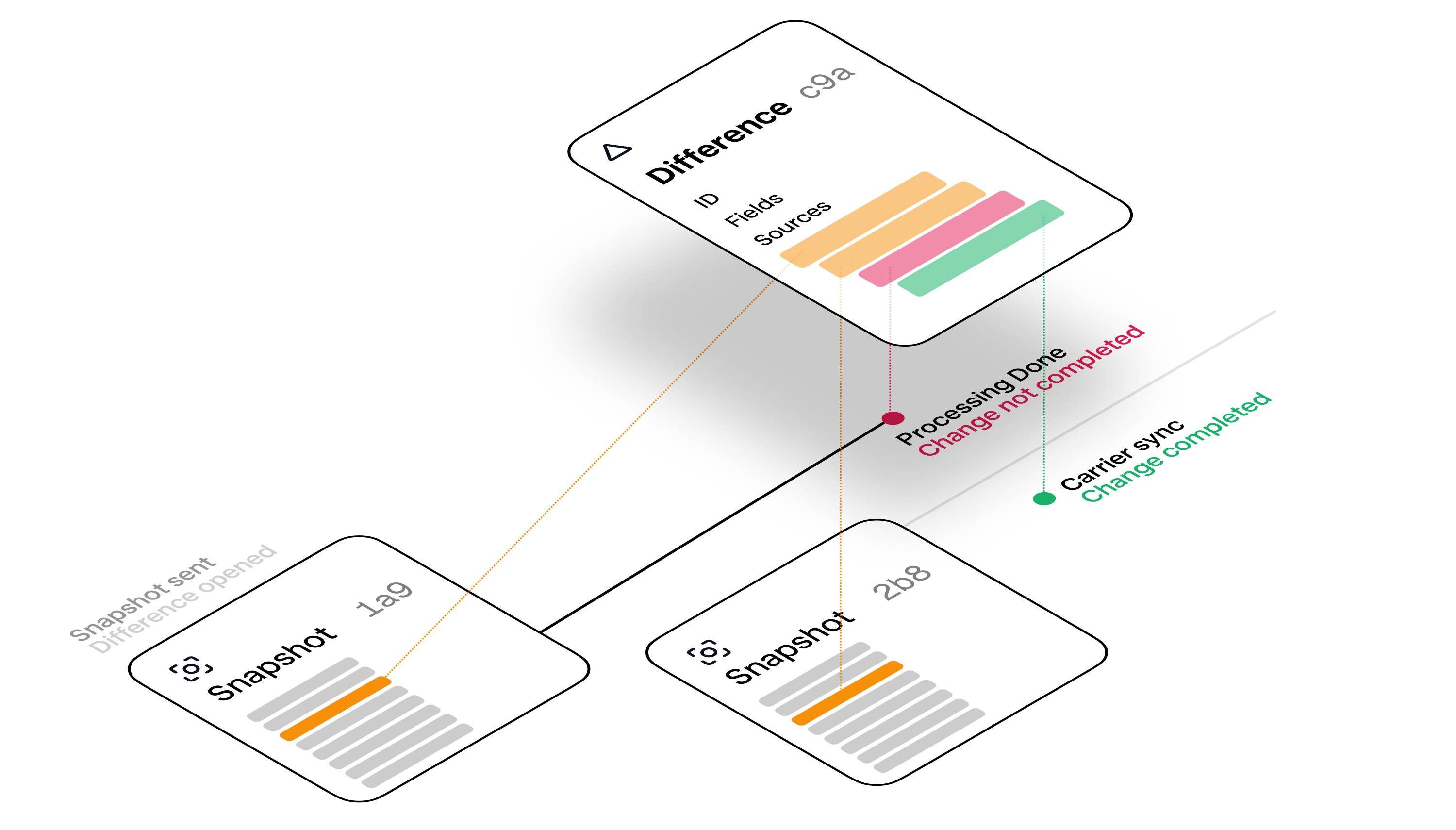
## The shape of a difference
```json expandable theme={"system"}
{
"id": "dd9a1813-34f7-4c7e-86bc-f041f2cbd9a1",
"carrier_id": "b825cf4f-12b8-442f-af90-4c4483766d42",
"difference_classification": "field_mismatch",
"difference_type": "mailing_address",
"impact_score": 4,
"object_type": "employee",
"object_id": "5200a894-81c5-4c41-8519-86c32e9a9965",
"group_id": "f833ac4b-36aa-46f4-826c-0badcfe27922",
"created": 1557329939,
"modified": 1557329939,
"discrepancy_time": 1641036540,
"resolved": 1641036640,
"fields": [
{
"key": "person.mailing_address.street_one",
"platform_value": "870 E 800 N",
"carrier_value": "#502"
},
{
"key": "person.mailing_address.zip_code",
"platform_value": "48097",
"carrier_value": "84604"
},
{
"key": "person.mailing_address.state",
"platform_value": "UT",
"carrier_value": "UT"
},
{
"key": "person.mailing_address.city",
"platform_value": "Provo",
"carrier_value": "Provo"
}
],
"sources": [
{
"carrier_fetch_time": 1557329939,
"difference_id": "75ed8e21-67b5-46d1-8c20-c0963cbc3695",
"discrepancy": false,
"last_seen": 1557329939,
"member_snapshot_id": "d8eb17d4-24bf-4d7b-8542-8084a6b934b8",
"object_id": "f603f552-7c77-45b1-a77d-b44281fd77af",
"object_type": "member_transaction",
"resolves_difference": false,
"stage": "member_snapshot_sent_to_noyo"
},
{
"carrier_fetch_time": 1557329939,
"difference_id": "75ed8e21-67b5-46d1-8c20-c0963cbc3695",
"discrepancy": true,
"last_seen": 1557329939,
"member_snapshot_id": "d8eb17d4-24bf-4d7b-8542-8084a6b934b8",
"object_id": "f603f552-7c77-45b1-a77d-b44281fd77af",
"object_type": "member_transaction",
"resolves_difference": false,
"stage": "member_snapshot_confirm"
},
{
"carrier_fetch_time": 1641036540,
"difference_id": "75ed8e21-67b5-46d1-8c20-c0963cbc3695",
"discrepancy": true,
"last_seen": 1641036540,
"member_snapshot_id": "a9c01d76-019c-4c44-b414-a832246c014d",
"object_id": "b6a1d883-394d-472d-a2d1-33b194b550ab",
"object_type": "member_transaction",
"resolves_difference": false,
"stage": "member_snapshot_sent_to_noyo"
},
{
"carrier_fetch_time": 1641036640,
"difference_id": "75ed8e21-67b5-46d1-8c20-c0963cbc3695",
"discrepancy": true,
"last_seen": 1641036640,
"object_id": "f603f552-7c77-45b1-a77d-fdsfsdfdsfdsfds",
"object_type": "group_audit",
"resolves_difference": true,
"stage": "group_audit_complete"
}
]
}
```
## Associated objects
A difference is always associated with another Noyo object– either an `employee`, `dependent`, or `individual_enrollment`. You can use the `object_type` and `object_id` fields to find the associated object.
* For `employee`, use the [GET Employee](/api-reference/members/employees/getemployee) endpoint.
* For `dependent`, use the [GET Dependent](/api-reference/members/dependents/getdependent) endpoint.
* For `individual_enrollment`, use the [GET Individual Enrollment](/api-reference/members/enrollments/getindividualenrollment) endpoint.
See [this list](/docs/members/tracking/tracked-differences) for which object types to expect for various types of differences.
## Classifications, types, and fields
There are three main **classifications** of differences: `field_mismatch`, `missing_from_carrier`, and `missing_from_platform`. **Field Mismatches** cover a wide array of general cases, and can represent any field on an individual or enrollment. **Missing From Platform** (your system) or **Missing From Carrier** can refer to an individual or an enrollment that is known to one system and not the other.
Difference **types** add specificity about what the mismatch is about or what type of thing is missing. In Field Mismatch cases this might be "address," where in "Missing From" cases it might be `missing_dependent`.
The exact **field** path(s), along with known values in your system versus the carrier system, are included in the `fields` array. While the Tracking API is generally "field-level tracking", some fields are grouped into a single difference for convenience, such as first/middle/last name or individual components of an address. Specific examples of these are provided [here](/examples/tracking/address-discrepancy).
### Important: Interpreting classifications and types
The classification and type use the factual nature of a difference to tell a story about where a change is in its lifecycle. It can require some interpretation to understand exactly what's happening with a given change. For example, let's look at a difference with the following fields:
```jsx theme={"system"}
{
"difference_classification": "missing_from_carrier"
"difference_type": "missing_ie" // missing enrollment
}
```
This table demonstrates how that difference should be interpreted across states:
| | discrepancy\_time | resolved | explanation |
| - | - | - | - |
| Pending change | *null* | *null* | The coverage is currently being added |
| Completed change | *null* | **set** | The coverage was added |
| Open discrepancy | **set** | *null* | Missing coverage in carrier system |
| Resolved discrepancy | **set** | **set** | Missing coverage issue was resolved |
Lastly, note that the classification, type, and field array all describe the original difference, not dynamically updating data. For a resolved difference, the data provided about the field values will not be updated to match.
## Sources
Member snapshots describe states that may require a change be initiated, but they do not prescribe changes. Multiple successive snapshots can also describe the same in-flight change. Because of these two dynamics, differences may span multiple snapshots or be resolved separately from processing a specific snapshot. Differences have their own lifecycle that aims to reflect the current state of the data in as close to real-time as possible.
Stages represent the part of the difference lifecycle where it was found. Noyo currently describes the following stages where creation, modification, discrepancy publishing, and closure can happen due to an event.
* **Snapshot sent to Noyo**
* `member_snapshot_sent_to_noyo`
* **Snapshot/transaction confirmation and completion**
* `member_snapshot_confirm`
* `member_snapshot_complete`
* **Carrier syncs**i.e. "Group Audits"
* `group_audit_complete`
The source array is dynamic and new events will be added as they happen until the difference is resolved/closed:
* A carrier sync that notices the difference's ongoing existence will add to the stage array.
* New member snapshots that describe a state involving the difference will add to the stage array.
* The event that eventually closes the difference will add to the stage array.
Each item in the source array contains fields for when it happened, whether it resolved the difference, whether (at the time) the difference was considered a discrepancy.
# Change Tracking and Discrepancies
Source: https://docs.noyo.com/docs/members/tracking/the-tracking-api
Track in-process changes and find out when something's gone wrong
For Premier connections, Noyo's Tracking API introduces an easy way for ben-admin platforms to closely track the progress of in-flight enrollment changes and see data discrepancies. You'll be able to tell whether a data difference between you and the carrier is inconsequential, worth keeping an eye on, or about to cause a major issue.
This API works by providing a granular view of the data differences between what you submitted and what the carrier has, and allows you to track a change more closely than you can with snapshot or transaction statuses alone.
The Tracking API is a companion to the member snapshot API and should be built after completing that integration. Member snapshots are idempotent and let you describe the current known state of a family's coverages; this is the key to dynamically tracking data differences as they move toward resolution.
## Let Noyo do the diffing for you
Data discrepancies are unavoidable during enrollment processing today. While we all wish carriers would perfectly apply each requested change, that's not always the case. Letting discrepancies go unresolved can lead to missed enrollments, access-to-care problems, and billing issues.
Whether you already do change confirmation as part of your workflow today\* or aspire to automatically distribute errors to your end customers to resolve, we recommend you build with our new Tracking API.
This API provides a unified, current view of individual field-level differences per carrier. Beyond reducing implementation time and cost, it leverages Noyo's ever-improving comparison logic. We built these new endpoints because successful data comparison against a carrier requires doing two things well:
1. Knowing how to compare the data
2. Knowing how to contextualize and prioritize the differences identified
Comparing data is not especially hard but can be tedious: you need to know which fields to map and how to normalize them. Contextualizing is more difficult because it requires a deep understanding of carrier systems, rules, undocumented operational idiosyncrasies, permissiveness of retroactive logic, and so on. At Noyo we are experts on these nuances, with the benefit of understanding them across a wide network of carriers. Plus, we dedicate significant resources to keeping all this information up to date in our system.
# When to use Tracking
* **You're new to Noyo and are in the process of building your integration**
Tracking is a recommended follow-on implementation for our partners who prioritize the ability to track and confirm changes.
* **You are trying to figure out how to compare sent snapshots with resulting member data**
If you're considering building internal system functionality to compare data pre- and post- change, we recommend using the Tracking API instead. It will not only save time by leveraging Noyo's built-in comparison logic, but it will include robust, dynamic analysis of each difference in the comparison and give you a clear sense of expected differences versus problematic ones.
* **You want to create your own tools for managing discrepancies**
Put discrepancy research and triage exactly where your end customers or internal teams need it most. The Tracking API makes it easy to pipe info on field-by-field differences into whatever interface you choose, and gives you detailed timelines, member data, and the ability to dismiss discrepancies that aren't important.
* **You want to leverage Noyo** [Webhooks](/docs/introduction/webhooks)
Tracking is only available for Premier connections.
# Core concepts
Tracking exposes the core type of a `difference`. A difference represents any field or fieldset that differs between your intended state and what the carrier has in their system.
A difference could reflect a pending field change that's still in progress. Or there could be an expected carrier-specific behavior that creates a small temporary field mismatch. A difference could start as a pending change but become a `discrepancy` if the carrier fails to apply it and stops attempting to. We also raise discrepancies during routine carrier syncs.
To summarize, a **difference** represents any field that is different in the carrier system than what you sent to Noyo as the intended state. Differences can either be:
* normal in-process changes or
* **discrepancies**, which have `completed` transactions (or no transactions) associated with them while fields are still mismatched.

## The shape of a difference
```json expandable theme={"system"}
{
"id": "dd9a1813-34f7-4c7e-86bc-f041f2cbd9a1",
"carrier_id": "b825cf4f-12b8-442f-af90-4c4483766d42",
"difference_classification": "field_mismatch",
"difference_type": "mailing_address",
"impact_score": 4,
"object_type": "employee",
"object_id": "5200a894-81c5-4c41-8519-86c32e9a9965",
"group_id": "f833ac4b-36aa-46f4-826c-0badcfe27922",
"created": 1557329939,
"modified": 1557329939,
"discrepancy_time": 1641036540,
"resolved": 1641036640,
"fields": [
{
"key": "person.mailing_address.street_one",
"platform_value": "870 E 800 N",
"carrier_value": "#502"
},
{
"key": "person.mailing_address.zip_code",
"platform_value": "48097",
"carrier_value": "84604"
},
{
"key": "person.mailing_address.state",
"platform_value": "UT",
"carrier_value": "UT"
},
{
"key": "person.mailing_address.city",
"platform_value": "Provo",
"carrier_value": "Provo"
}
],
"sources": [
{
"carrier_fetch_time": 1557329939,
"difference_id": "75ed8e21-67b5-46d1-8c20-c0963cbc3695",
"discrepancy": false,
"last_seen": 1557329939,
"member_snapshot_id": "d8eb17d4-24bf-4d7b-8542-8084a6b934b8",
"object_id": "f603f552-7c77-45b1-a77d-b44281fd77af",
"object_type": "member_transaction",
"resolves_difference": false,
"stage": "member_snapshot_sent_to_noyo"
},
{
"carrier_fetch_time": 1557329939,
"difference_id": "75ed8e21-67b5-46d1-8c20-c0963cbc3695",
"discrepancy": true,
"last_seen": 1557329939,
"member_snapshot_id": "d8eb17d4-24bf-4d7b-8542-8084a6b934b8",
"object_id": "f603f552-7c77-45b1-a77d-b44281fd77af",
"object_type": "member_transaction",
"resolves_difference": false,
"stage": "member_snapshot_confirm"
},
{
"carrier_fetch_time": 1641036540,
"difference_id": "75ed8e21-67b5-46d1-8c20-c0963cbc3695",
"discrepancy": true,
"last_seen": 1641036540,
"member_snapshot_id": "a9c01d76-019c-4c44-b414-a832246c014d",
"object_id": "b6a1d883-394d-472d-a2d1-33b194b550ab",
"object_type": "member_transaction",
"resolves_difference": false,
"stage": "member_snapshot_sent_to_noyo"
},
{
"carrier_fetch_time": 1641036640,
"difference_id": "75ed8e21-67b5-46d1-8c20-c0963cbc3695",
"discrepancy": true,
"last_seen": 1641036640,
"object_id": "f603f552-7c77-45b1-a77d-fdsfsdfdsfdsfds",
"object_type": "group_audit",
"resolves_difference": true,
"stage": "group_audit_complete"
}
]
}
```
## Associated objects
A difference is always associated with another Noyo object– either an `employee`, `dependent`, or `individual_enrollment`. You can use the `object_type` and `object_id` fields to find the associated object.
* For `employee`, use the [GET Employee](/api-reference/members/employees/getemployee) endpoint.
* For `dependent`, use the [GET Dependent](/api-reference/members/dependents/getdependent) endpoint.
* For `individual_enrollment`, use the [GET Individual Enrollment](/api-reference/members/enrollments/getindividualenrollment) endpoint.
See [this list](/docs/members/tracking/tracked-differences) for which object types to expect for various types of differences.
## Classifications, types, and fields
There are three main **classifications** of differences: `field_mismatch`, `missing_from_carrier`, and `missing_from_platform`. **Field Mismatches** cover a wide array of general cases, and can represent any field on an individual or enrollment. **Missing From Platform** (your system) or **Missing From Carrier** can refer to an individual or an enrollment that is known to one system and not the other.
Difference **types** add specificity about what the mismatch is about or what type of thing is missing. In Field Mismatch cases this might be "address," where in "Missing From" cases it might be `missing_dependent`.
The exact **field** path(s), along with known values in your system versus the carrier system, are included in the `fields` array. While the Tracking API is generally "field-level tracking", some fields are grouped into a single difference for convenience, such as first/middle/last name or individual components of an address. Specific examples of these are provided [here](/examples/tracking/address-discrepancy).
### Important: Interpreting classifications and types
The classification and type use the factual nature of a difference to tell a story about where a change is in its lifecycle. It can require some interpretation to understand exactly what's happening with a given change. For example, let's look at a difference with the following fields:
```jsx theme={"system"}
{
"difference_classification": "missing_from_carrier"
"difference_type": "missing_ie" // missing enrollment
}
```
This table demonstrates how that difference should be interpreted across states:
| | discrepancy\_time | resolved | explanation |
| - | - | - | - |
| Pending change | *null* | *null* | The coverage is currently being added |
| Completed change | *null* | **set** | The coverage was added |
| Open discrepancy | **set** | *null* | Missing coverage in carrier system |
| Resolved discrepancy | **set** | **set** | Missing coverage issue was resolved |
Lastly, note that the classification, type, and field array all describe the original difference, not dynamically updating data. For a resolved difference, the data provided about the field values will not be updated to match.
## Sources
Member snapshots describe states that may require a change be initiated, but they do not prescribe changes. Multiple successive snapshots can also describe the same in-flight change. Because of these two dynamics, differences may span multiple snapshots or be resolved separately from processing a specific snapshot. Differences have their own lifecycle that aims to reflect the current state of the data in as close to real-time as possible.
Stages represent the part of the difference lifecycle where it was found. Noyo currently describes the following stages where creation, modification, discrepancy publishing, and closure can happen due to an event.
* **Snapshot sent to Noyo**
* `member_snapshot_sent_to_noyo`
* **Snapshot/transaction confirmation and completion**
* `member_snapshot_confirm`
* `member_snapshot_complete`
* **Carrier syncs**i.e. "Group Audits"
* `group_audit_complete`
The source array is dynamic and new events will be added as they happen until the difference is resolved/closed:
* A carrier sync that notices the difference's ongoing existence will add to the stage array.
* New member snapshots that describe a state involving the difference will add to the stage array.
* The event that eventually closes the difference will add to the stage array.
Each item in the source array contains fields for when it happened, whether it resolved the difference, whether (at the time) the difference was considered a discrepancy.
![]() 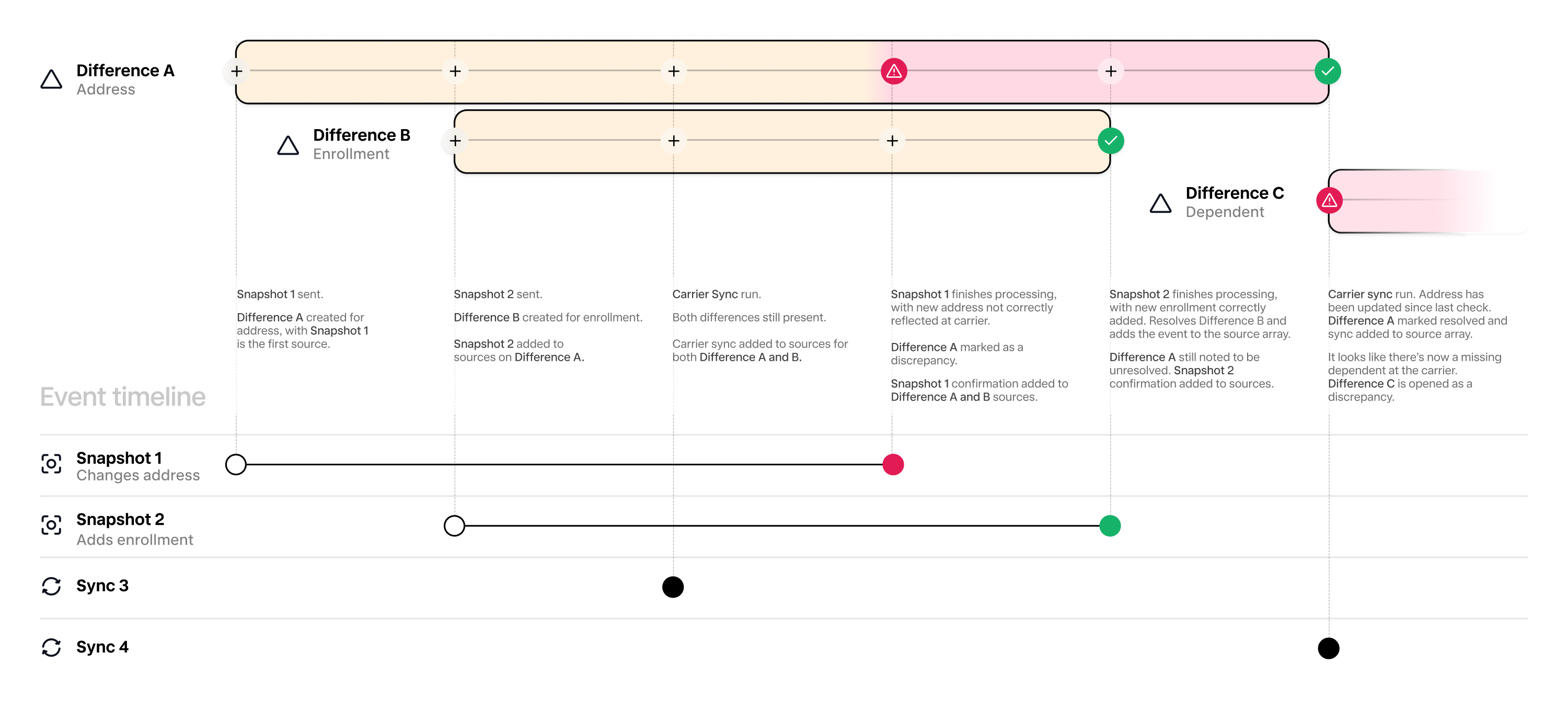
## Impact scoring
Noyo scores each difference to reflect its potential impact on the individual, group, and/or ben-admin platform. The impact score is a single number from 1 to 5, where 5 is considered the highest impact. In the Noyo web application, this score generates an "Impact" label:
| API Field | CC "Impact" Label |
| - | - |
| 5 | Urgent |
| 4 | High |
| 3 | Medium |
| 2 | Low |
| 1 | Info |
While impact scoring is dynamic and may be refined over time, characteristic examples include:
* A enrollment that is currently expected to be active but is completely missing in the carrier system will generally be scored `5`.
* An email address mismatch is currently scored at `1` , as these are usually a case of "work versus personal" address and do not affect deliverability.
As we work to continuously refine our scoring, more low-impact differences may be raised with newly offered carriers, specifically in areas like string capitalization, leading zeroes, and special characters. Expect carrier-specific normalization differences to decrease in frequency the longer a carrier is supported by Noyo.
For maximum flexibility, scoring is done independently of whether a difference has become a discrepancy. This allows you to use one without the other. For instance, you may choose to ignore Noyo's discrepancy determination and instead use your own duration-based logic. Or you may wish to do your own scoring but still rely on Noyo to separate pending changes from discrepancies.
### The Noyo scoring model
**Impact scoring is subject to change at any time.** Should you require specific and deterministic long-term mapping from discrepancy data to impact score, you are encouraged to implement custom scoring logic.
Specific scoring guidelines and logic are dynamically determined by Noyo and are not published. They reflect an ever-evolving understanding and analysis of carrier behavior and are not a stable mapping of simple type::impact pairings. Noyo periodically updates scoring logic and may re-score old differences to reflect the newest understanding of carrier-specific behavior.
## Dates
Each difference includes a collection of relevant date fields.
| Field | Explanation |
| - | - |
| created | When the difference was created (distinct from when it became a discrepancy) |
| modified | Last modified |
| discrepancy\_time | When the difference became a discrepancy. For some differences (e.g. those raised through carrier syncs), this will match created. For others (e.g. those that started as an in-flight change), this will be later than created. |
| resolved | When the difference was resolved |
| dismissed | If you have dismissed the difference, the timestamp of dismissal |
Differences can represent field-level diffs at various stages of lifecycle. To determine whether a difference refers to a field that is currently being applied at the carrier or a discrepancy that is live, you can check for the existence of the `discrepancy_time` field.
If you want to determine whether a difference has been resolved or is otherwise no longer seen (agnostic of discrepancy status), we use `resolved`. This field provides a Unix timestamp of the resolution moment if resolved, and returns nothing if the difference is still open.
## Dismissal
***Dismissal*** is an action performed by your team in the Noyo app. Dismiss a discrepancy if you no longer want to see it raised at its original prominence in the UI. The difference will still be available to you, but it may require additional filters in order to be included in responses. This is especially helpful if you'd like to raise dismissable notifications to individual end users.
Dismissal does not modify impact scoring.
# Listing and filtering differences
The Tracking API currently supports pulling differences with the following filters:
* Employee
* Group
* Transaction ID
* Snapshot ID
* Impact score (min, max)
* Open vs. resolved
* Discrepancies only vs. all differences
# Resolving differences and discrepancies
Currently, differences cannot be resolved or closed through the Tracking API. They are **only** resolved when a) you update data in your system and send a new member snapshot that brings the data into alignment or b) the carrier makes an update in their system that brings the data into alignment.
We are actively working to bring resolution into our API, and plan to release webhooks soon that enable features like data editing and closing discrepancies. Our team will share more info as it becomes available, but we recommend keeping this in mind as you build.
# In the Noyo UI
**Details on how the Noyo UI uses Noyo’s API is subject to change at any time.** Like with other core Noyo concepts, the UI may provide additional context for differences (including explanations of carrier-specific logic) that are not available via API.
To replicate the default list of discrepancies displayed by the Noyo UI, filter for `impact score ≥ 3` and `is_discrepancy=true`. Discrepancies are also shown at the member level in the UI - they will be flagged on a member's page above their change history.
# Webhooks
Read more about Tracking Webhooks
# Examples and Recipes
The list of classifications, types, and objects
Example differences/discrepancies for various types
# API Reference
`GET differences`
`GET groups/{group_id}/differences`
`GET employees/{employee_id}/differences`
`GET differences/{difference_id}`
`PUT differences/{difference_id}/dismiss`
`PUT differences/{difference_id}/reopen`
# Tracked Differences
Source: https://docs.noyo.com/docs/members/tracking/tracked-differences
The list of possible differences raised by Noyo and their associated fields
| **Label** | Type | Classification | Object Type(s) |
| - | :- | :- | :- |
| **COBRA enrollment** | `ie_cobra_enrollment` | `field_mismatch` | `individual_enrollment` |
| **Contact method** | `preferred_contact_method` | `field_mismatch` | `employee`, `dependent` |
| **Custom identifiers** | `custom_identifiers` | `field_mismatch` | `employee` |
| **Date of birth** | `dob` | `field_mismatch` | `employee`, `dependent` |
| **Dependent relationship** | `dependent_relationship` | `field_mismatch` | `dependent` |
| **Effective end date** | `ie_effective_end_date` | `field_mismatch` | `individual_enrollment` |
| **Effective start date** | `ie_effective_start_date` | `field_mismatch` | `individual_enrollment` |
| **Email address** | `email_address` | `field_mismatch` | `employee` |
| **Employment status** | `employment_status` | `field_mismatch` | `employee` |
| **Enrollment configuration** | `ie_config` | `field_mismatch` | `individual_enrollment` |
| **Enrollment data** | `ie_enroll_data` | `field_mismatch` | `individual_enrollment` |
| **Enrollment status** | `ie_status` | `field_mismatch` | `individual_enrollment` |
| **Full name** | `full_name` | `field_mismatch` | `employee`, `dependent` |
| **Full-time start** | `full_time_start` | `field_mismatch` | `employee` |
| **Hire date** | `hire_date` | `field_mismatch` | `employee` |
| **Home phone** | `home_phone` | `field_mismatch` | `employee` |
| **Hours worked** | `employment_hours_worked` | `field_mismatch` | `employee` |
| **Individual type** | `ie_individual_type` | `field_mismatch` | `employee`, `dependent` |
| **Mailing address** | `mailing_address` | `field_mismatch` | `employee` |
| **Marital status** | `marital_status` | `field_mismatch` | `employee`, `dependent` |
| **Military info** | `military` | `field_mismatch` | `employee`, `dependent` |
| **Missing enrollment** | `missing_ie` | `missing_from_carrier`, `missing_from_platform` | `employee`, `dependent` |
| **Missing member** | `missing_member` | `missing_from_carrier`, `missing_from_platform` | `employee`, `dependent` |
| **Occupation** | `employment_occupation` | `field_mismatch` | `employee` |
| **Home address** | `home_address` | `field_mismatch` | `employee` |
| **Preferred language** | `preferred_language` | `field_mismatch` | `employee` |
| **Rehire date** | `rehire_date` | `field_mismatch` | `employee` |
| **Salary** | `salary` | `field_mismatch` | `employee` |
| **Sex** | `sex` | `field_mismatch` | `employee`, `dependent` |
| **SSN** | `ssn` | `field_mismatch` | `employee`, `dependent` |
| **Student status** | `student` | `field_mismatch` | `employee`, `dependent` |
| **Termination date** | `termination_date` | `field_mismatch` | `employee` |
| **Unavailable employee** | `unavailable_employee` | `unavailable_at_carrier` | `employee` |
| **Work phone** | `work_phone` | `field_mismatch` | `employee` |
| **Work state** | `work_state` | `field_mismatch` | `employee` |
# Effective End Dates
Source: https://docs.noyo.com/docs/members/using-snapshots/end-dates
Unless in cases of explicit termination, the effective end date should be sent as `datemax`
When sending a member snapshot, you will need to send an `effective_end_date` for each enrolled member for a given coverage block.
## Active coverages
While `effective_end_date` is a required field, a defined end date should only be provided if the member's coverage is expected to terminate on that specific date. Otherwise, the member's `effective_end_date` should be sent as `datemax` (`9999-12-31`).
Even if the *plan year* is scheduled to end on a specific date, it's common for coverage to continue into the next plan year uninterrupted, so a member's end date should remain at `datemax`.
```json [expandable] highlight={12} lines theme={"system"}
{
"coverages": [
{
"carrier_id": "2d370e0e-fd73-45e0-8828-796d2cacaeef",
"line_of_coverage": "dental",
"plan_id": "61b6d125-8bbf-483a-9920-f23d9442403d",
"enrolled_members": [
{
"individual_type": "employee",
"custom_individual_id": "1",
"effective_start_date": "2022-10-01",
"effective_end_date": "9999-12-31",
"latest_change_effective_date": "2022-10-01",
"event_id": "7"
}
],
}
]
}
```
For Open Enrollment elections, specifically plan switching scenarios, the member's `effective_end_date` should be sent as the plan end date and a separate coverage block should be created for the new plan.
### Splitting coverage blocks for continuous coverage
When splitting a coverage block into multiple due to a specific aspect of the configuration (e.g. benefit class), the `effective_end_date` should be set with a defined value even though the coverage is not ending. The second block takes care of signifying the open-ended nature of the coverage.
Ensure your coverage blocks do not have a gap in dates
```json [expandable] {10-11, 22-23} lines theme={"system"}
{
"coverages": [
{
"plan_id": "4655eed5-ee44-49e1-a0a9-aa3a6fd52aa5",
"carrier_config": {
"benefit_class": "511",
},
"enrolled_members": [
{
"effective_start_date": "2024-12-01",
"effective_end_date": "2024-12-31",
}
],
},
{
"plan_id": "4655eed5-ee44-49e1-a0a9-aa3a6fd52aa5",
"carrier_config": {
"benefit_class": "001",
},
"enrolled_members": [
{
"effective_start_date": "2025-01-01",
"effective_end_date": "9999-12-31",
}
],
}
],
}
```
## Waived/canceled coverages
If a coverage needs to be waived or canceled before it begins, the `effective_end_date` should be set to one day before the `effective_start_date`.
```json [expandable] highlight={13} lines theme={"system"}
{
"coverages": [
{
"carrier_id": "2d370e0e-fd73-45e0-8828-796d2cacaeef",
"line_of_coverage": "dental",
"plan_id": "61b6d125-8bbf-483a-9920-f23d9442403d",
"enrolled_members": [
{
"custom_individual_id": "150D001",
"individual_type": "employee",
"event_id": "10002",
"effective_start_date": "2023-04-01",
"effective_end_date": "2023-03-31",
"latest_change_effective_date": "2023-03-20"
}
],
}
]
}
```
Read more
## Terminated or future-terminating coverages
When a coverage is terminated after having been active, the `effective_end_date` should be set to the last day of coverage.
If you know in advance that a coverage will terminate on a specific date (due to cessation of employment, the end of a plan, or another reason), set that date as the `effective_end_date` as soon as you know it.
If the coverage termination is due to an employment termination and your platform supports COBRA, this field requires special handling. Please see the [COBRA](/docs/members/complex-changes/cobra) documentation for more information.
Code example
Read more
# Using Events
Source: https://docs.noyo.com/docs/members/using-snapshots/event-reasons
Improve accuracy and carrier processing times
Each member snapshot should include a block describing the event(s) associated with the member's activities in your system. During onboarding, you'll map your system's member flows/options to Noyo's events.
If we detect that a member snapshot contains changes to coverage and send those changes to the carrier, they're more likely to be processed quickly and successfully if they are associated with an event. **Though events are not always required, it's best practice to send them any time you have them.**
An event can be tied to a specific enrollment in the snapshot payload, which means it's possible to send multiple events in a single snapshot. For instance, a snapshot could remove spousal coverage due to a `divorce` event at the same time that child coverage is added due to an `adoption` event. You should plan to include the last 60 days’ worth of events in each snapshot for a member, adding new events when they occur.
Each event block includes an event `date`, `reason`, `type`, and `id`. See the [member snapshot API reference](/api-reference/snapshots/create-member-snapshot) for full detail.
Importantly, the event date should always reflect the actual date of the relevant event. Sending other dates for events could cause denied coverage or unexpected coverage dates. See each event type below for details.
```json theme={"system"}
"events": [
{
"date": "2022-01-01",
"id": "1",
"reason": "open_enrollment",
"type": "coverage"
}
]
```
If multiple event reasons could be associated with a single enrollment for a member, select the single most relevant event (such as `open_enrollment`). This will rarely impact processing.
Events are required for all snapshots containing coverages with Beam Benefits and/or Principal Fianancial Group.
### Open enrollment events
An `open_enrollment` reason is **highly recommended** for any member snapshots containing selections made on or around the group's Open Enrollment period. Many carriers process open enrollments differently from other changes, and omitting this reason can cause major delays.
For `open_enrollment` events, the event date is the effective date of the group's Open Enrollment, **not** the date when the member elects coverage.
### Termination events
Most event reasons can be sent with any valid snapshot payload. The only exception is `termination` events, where Noyo requires that an employment termination date is also included in the snapshot.
## Event reasons
The following are the most common event reasons, but there is a wider variety available if you require them for your system (see the [API reference](https://docs.noyo.com/api-reference/snapshots/create-member-snapshot) for the full list).
| **Value** | Description |
| - | - |
| `cobra_enrollment` | Used when enrolling members in COBRA coverage. See [the COBRA section](/docs/members/complex-changes/cobra) for more detail. |
| `cobra_termination` | Used when terminating members from COBRA coverage. See [the COBRA section](/docs/members/complex-changes/cobra) for more detail. |
| `demographic_change` | Used for demographic or employment data changes that do not impact coverage eligibility. |
| `new_hire` | Used for coverage decisions being made after being hired. |
| `open_enrollment` | Used for coverage decisions made during the group's open enrollment. |
| `termination` | Used for most cases of employment termination. Voluntary/involuntary terminations are generally treated identically. In most cases of termination, the event date/termination date is equal to the last day of work for the member. |
| **QLEs** | |
| `adoption` | Applies in the event that a member is looking to either add or remove coverage as a result of an adoption. |
| `change_to_full_time` | Often tied to benefit class or time status changes. |
| `change_to_part_time` | Often tied to a reduction of hours or a benefit class change. |
| `death` | Applicable to employee or dependent deaths and can be passed when adding or removing coverage due to death. Sending this is useful clarification in survivorship scenarios. |
| `disability_status_change` | Used when adding or removing coverage due to changes in disability status. |
| `divorce` | This applies in the event that a member is looking to either add or remove coverage as a result of a divorce. |
| `immigration_status_change` | Refer to cases in which the spouse becomes newly eligible for coverage (e.g., by obtaining legal resident status) and is then added to member's coverage. |
| `lost_coverage` | Used when a member is losing coverage for a reason not otherwise specified in this list. For instance, when adding someone to coverage due to lost coverage elsewhere and also when removing them from coverage. |
| `marriage` | Applies in the event that a member is looking to either add or remove coverage as a result of a marriage. |
| `moved` | Most often used when an address change makes someone either eligible or ineligible for coverage. |
| `newborn` | Applies in the event that a member is looking to either add or remove coverage as a result of the birth of a child. |
| `rehire` | When member is being added back to coverage after being hired again at a company where they were previously employed. Many carriers will not issue coverage promptly if rehires are sent as generic new hires, see [Special Cases](/docs/members/complex-changes/rehires) for full details. |
| `reinstatement` | When a member is being added back to coverage as if they had never been terminated. Reinstatements differ from rehires, see [Special Cases](/docs/members/complex-changes/rehires) for full details. |
| `retirement` | Used to send coverage changes made in connection with retirement. |
# Inferred Plan Switching
Source: https://docs.noyo.com/docs/members/using-snapshots/inferred-plan-switching
How Noyo automatically handles plan switches when existing coverage is omitted from a snapshot
When a member snapshot omits an existing active coverage but includes a different active coverage for the same line, Noyo can automatically detect that a plan switch occurred. This is called **inferred plan switching**. Instead of rejecting the snapshot, Noyo handles the old coverage automatically.
## When does inferred plan switching apply?
Inferred plan switching applies when all of the following are true:
1. An active coverage exists in Noyo for a member
2. That coverage is **not included** in the incoming snapshot
3. The snapshot **does include** a different active coverage for the same line of coverage and member
## How Noyo matches coverages
For Noyo to infer a plan switch, the new coverage in the snapshot must match the existing coverage on:
* **Individual**: Same member (employee or specific dependent)
* **Line of coverage**: Same line (e.g., both `medical`, both `dental`)
* **Overlapping effective dates**: The coverage periods must share at least one day in common. Since active coverages typically use `9999-12-31` as the `effective_end_date`, this condition is met in most plan switch scenarios. However, if there is a gap between the old coverage's end date and the new coverage's start date (e.g., old ends `2024-06-30` and new starts `2025-01-01`), Noyo will not treat it as a plan switch.
The new and old coverages do not need to be from the same carrier.
### Plan type matching
For **medical**, **dental**, and **vision**, any plan type can switch to any other (e.g., HMO to PPO).
For all other lines of coverage — `life`, `add`, `std`, `ltd`, `accident`, `critical_illness`, `cancer`, `health_fund`, `hospital_indemnity`, `pharmacy`, `wellness` — plan types must match. For example, basic life cannot switch to voluntary life.
If multiple possible matches are found for a single omitted coverage, Noyo will not infer a plan switch and the coverage will be treated as missing. Ensure that only one active coverage per line of coverage per member is included in the snapshot.
## How the old coverage is handled
The action Noyo takes on the old coverage depends on the timing of the new coverage relative to the old.
### Terminated when the new coverage starts later
If the new coverage starts **after** the old coverage's start date, the old coverage is terminated with an `effective_end_date` set to one day before the new coverage's `effective_start_date`.
**Example:** An employee is switching dental plans during open enrollment.
* Old dental plan: `effective_start_date` of `2024-01-01`
* New dental plan: `effective_start_date` of `2025-01-01`
* **Result:** Old dental plan is terminated with an `effective_end_date` of `2024-12-31`
### Waived/canceled when the new coverage starts at the same time or earlier
If the new coverage starts **on or before** the old coverage's start date, the old coverage is waived/canceled as if it never took effect.
**Example:** A member's upcoming dental coverage is being replaced before it starts.
* Old dental plan: `effective_start_date` of `2025-01-01`
* New dental plan: `effective_start_date` of `2025-01-01`
* **Result:** Old dental plan is waived/canceled
## Snapshot warnings
When Noyo infers a plan switch, the snapshot response will include an `InferredPlanSwitchWarning` indicating which coverage was terminated or waived/canceled and the resulting end date. You can use these warnings to confirm that the inferred behavior matches your expectations.
## Open enrollment example
An employee is currently enrolled in Dental Plan A (started `2024-01-01`) and you want to switch them to Dental Plan B for the new plan year. With inferred plan switching, you only need to send the new plan:
```json [expandable] theme={"system"}
{
"snapshot_mode": "current_open",
"employee": {},
"dependents": [],
"coverages": [
{
"carrier_id": "2d370e0e-fd73-45e0-8828-796d2cacaeef",
"line_of_coverage": "dental",
"plan_id": "40fdcb25-0fb3-43db-8dda-28180692854d",
"enrolled_members": [
{
"individual_id": "52b8ff36-388a-4faf-bc42-df446f13b89a",
"individual_type": "employee",
"effective_start_date": "2025-01-01",
"effective_end_date": "9999-12-31",
"event_id": "2001",
"latest_change_effective_date": "2024-11-15"
}
]
}
],
"events": [
{
"id": "2001",
"date": "2025-01-01",
"type": "coverage",
"reason": "open_enrollment"
}
]
}
```
Noyo will automatically terminate the member's enrollment in Dental Plan A with an `effective_end_date` of `2024-12-31` and process the new enrollment in Dental Plan B.
## Inferred vs. explicit plan switching
You can always [explicitly switch plans](/examples/switch-plans) by including both the old coverage (with a termination end date) and the new coverage in the same snapshot. Inferred plan switching provides an alternative when your system does not track or send the old coverage.
| Aspect | Explicit plan switch | Inferred plan switch |
| :- | :- | :- |
| Old coverage in snapshot? | Yes, with an `effective_end_date` | No |
| New coverage in snapshot? | Yes | Yes |
| Control over termination date? | Full control | Automatically set to one day before new start date |
If you include the old coverage with an explicit termination date, Noyo will use your specified date and inferred plan switching will not apply.
## Relationship to omitted coverage handling
Inferred plan switching and [omitted coverage handling](/docs/members/using-snapshots/omitted-coverage-handling) both address active coverages missing from a snapshot, but they serve different purposes:
* **Inferred plan switching** handles cases where a replacement coverage is present
* **Omitted coverage handling** handles cases where no replacement is present
Inferred plan switching is always evaluated first. If a match is found, the coverage is handled as a plan switch. Any remaining missing coverages are then subject to your `omitted_coverage_handling` policy (`reject`, `continue`, or `terminate`).
Code example
Read more
Read more
Read more
# Omitted Coverage Handling
Source: https://docs.noyo.com/docs/members/using-snapshots/omitted-coverage-handling
Tell us how to handle any active coverages not included in a snapshot.
By default, Noyo expects a member snapshot to include every active coverage Noyo can find at the carrier for a given family. If an active line of coverage is missing from a snapshot, Noyo will cancel the related changes that are being requested (or cancel the entire snapshot if only one carrier is involved).
Sometimes, like in the case of an older plan not being terminated, the carrier may show an active coverage that you omitted from your snapshot. To more seamlessly handle these scenarios, we've added an optional `omitted_coverage_handling` block to member snapshots that gives you the power to specify our system's behavior.
You can tell our system how to handle omitted coverages by passing one of the following values in the new `policy` field:
| Value | Description |
| :- | :- |
| `reject` | This is the default behavior if no other behavior is specified. Snapshots with omitted coverages will continue to be canceled. |
| `continue` | Noyo will behave as if these coverages were included in the snapshot, and take no action to terminate them at the carrier. |
| `terminate` | This will create a termination transaction for the omitted coverage using the end date specified by the `termination_rule`. |
## Default behavior: `Reject`
Sending a `policy` of `reject` will replicate the default behavior of member snapshots, where the member's changes or the entire snapshot are rejected with information about the missing coverage. The failure will not be returned as an API (4xx) error, but will be included in the [snapshot fulfillment summary](/docs/members/snapshot-workflow/snapshot-status#snapshot-fulfillment-summary).
```json theme={"system"}
"omitted_coverage_handling": {
"policy": "reject"
}
```
## `Continue` on omission
Sending a `policy` of `continue` allows you to keep sending member snapshots with the member's current coverages without making explicit changes to any that are omitted. Noyo will return warnings for specific coverages or members missing from the snapshot, so you'll be alerted to omitted coverages and can pass these warnings along to Operational or client-facing teams who can resolve issues.
Typically, this will result in no changes to the omitted coverages; however, in scenarios that impact all coverages for the family (such as changing from one division or subgroup to another), these coverages will be included as part of the change.
```json theme={"system"}
"omitted_coverage_handling": {
"policy": "continue"
}
```
## `Terminate` on omission
**Terminate by omission is not generally recommended except in very specific use cases.** Please consult with Noyo before using this option.
Sending a `policy` of `terminate` allows you to terminate any unexpected coverages found at the carrier. This policy requires that a `termination_rule` also be passed so we can calculate a termination date for the omitted coverage.
#### Available termination rules
| Value | Description |
| :- | :- |
| `end_of_current_month` | The last day of the current month. If sent on July 4, this would create a termination date of July 31st. |
| `end_of_prior_month` | The last day of the previous month. If sent on July 4, this would create a termination date of June 30th. |
| `custom` | This allows a custom termination date to be sent. It requires including the `effective_end_date` field, which accepts a date format of `yyyy-mm-dd`. |
```json End of Prior Month theme={"system"}
"omitted_coverage_handling": {
"policy": "terminate",
"termination_rule": "end_of_prior_month"
}
```
```json End of Current Month theme={"system"}
"omitted_coverage_handling": {
"policy": "terminate",
"termination_rule": "end_of_current_month"
}
```
```json Custom theme={"system"}
"omitted_coverage_handling": {
"policy": "terminate",
"termination_rule": "custom",
"custom": {
"effective_end_date": "2023-11-30"
}
}
```
# Identifying Plans
Source: https://docs.noyo.com/docs/members/using-snapshots/plans
How to send plan info in member snapshots
When sending information about coverages in member snapshots, the `plan_id`, `plan_name` and `custom_plan_id` fields can be used in different combinations depending on how you're building to Noyo.
If you are using **dynamic config**, we'll take care of matching your plan data to specific plans the carrier has. This means your snapshots can identify plans using:
* Your` custom_plan_id` plus your `plan_name`
* Your` plan_name` only
If you are using **explicit config**, you'll need to fetch the plans from Noyo after the group connection is completed and store the `plan_id`in your system to reference the correct plan on snapshots. You can include your own IDs or names for the plan to help with mapping in your system:
* The Noyo `plan_id` only
* The Noyo `plan_id` plus your `custom_plan_id`
* The Noyo `plan_id` plus your or the carrier's `plan_name`
# Responses and Errors
Source: https://docs.noyo.com/docs/members/using-snapshots/snapshot-responses
Learn which responses and errors you may get, and why
Noyo validates snapshot requests based on format, as well as a set of basic business rules. If the snapshot fails any validations, Noyo will return a response with a 4xx status code and body with a description of any errors.
## HTTP responses
If the snapshot is valid and created successfully, you will receive a response with a `201` status code and a unique ID for the snapshot record. If any new members were created in the Noyo system, the snapshot contents in the response body will include any Noyo-generated ID values to save and associate with your copy of the member going forward. The response will also include any newly-associated custom IDs that have been linked to members.
| **Code** | **Description** |
| - | - |
| `200` | OK. Successful API call. |
| `201` | Created. Successful resource creation. |
| `204` | No content. Used most commonly for deletions. |
| `400` | Bad or invalid request. For example, the request body JSON is malformed. |
| `401` | Unauthorized. Missing or invalid API token. See the [authentication guide](/docs/introduction/getting-started/authentication). |
| `404` | Not found. The resource you are looking for does not exist or your API token is not authorized to access it. |
| `409` | Conflict. A duplicate to an existing resource has been submitted. |
| `500` | Server error. |
| `502` | Bad gateway. There is an issue with the Noyo system. |
| `503` | Service unavailable. One or more Noyo APIs are down. For an expected downtime, we will return a Retry-After HTTP response header in accordance with the [MDN docs](https://developer.mozilla.org/en-US/docs/Web/HTTP/Headers/Retry-After). |
See [the API reference](/api-reference/introduction#create-member-snapshot) for full details.
## 4xx errors for member snapshots
Below are error responses unique to the [Create Member Snapshot](/api-reference/introduction#create-member-snapshot) endpoint.
| Code | Error Message | Reason | Recommendation |
| :- | :- | :- | :- |
| `400` | Invalid request: Member snapshot cannot be created because member has no active coverages | The member has no active coverages | Verify that the member has active coverages before creating a snapshot |
| `400` | Error creating employee. Existing employee has matching name and date of birth: `{employee_id}` | A new employee was sent who is a duplicate of a current Noyo employee by first name, last name, and date of birth combination within a single group. | The employee in Noyo's system may have originated at the carrier. Check other attributes of the employee in Noyo's system. If it is the same person, pull the Noyo employee ID and send it with the next snapshot. This only happens if the custom\_individual\_id differs between the record being sent and what is in Noyo's system. |
| `400` | Error creating dependent. Existing dependent has matching name and date of birth: `{dependent_id}` | A new dependent was sent who is a duplicate of a current Noyo dependent by first name, last name, and date of birth combination within a single employee. | The employee's dependent in Noyo's system may have originated at the carrier. Check other attributes of the dependent in Noyo's system. If it is the same person, pull the Noyo dependent ID and send it with the next snapshot. This only happens if the custom\_individual\_id differs between the record being sent and what is in Noyo's system. |
| `404` | Invalid carrier ID: `{carrier_id}` | Unknown Carrier ID provided in the coverages. | Please reference the Noyo web application for the correct carrier ID (UUID). |
| `404` | Carrier with Carrier ID: `{carrier_id}` is not supported for member snapshot | Invalid Carrier ID, Carrier ID provided in coverages is not set up to support member snapshot. | The given carrier does not yet support changes via member snapshot. Reference the Noyo web application to see which integration types are supported for each carrier. |
| `404` | Dependent with ID `{dependent_id}` does not have an associated employee. | Dependent ID provided belongs to a non-existent employee. | A dependent was sent with an existing Noyo ID, but the employee was not found in Noyo's system. Please double check the employee identifier used. |
| `422` | Dependent must have an ID. Either `id` or `custom_individual_id` is required \n \nor \n \nEmployee must have an ID. Either `id` or `custom_individual_id` is required | No `employee_id` or `custom_individual_id` was provided. | Make sure to use [your own identifier](/docs/groups/mapping/linking-members#how-to-link-members-between-your-system-and-noyo) or send the correct Noyo ID (UUID) for all members. |
| `422` | This group has coverage against a carrier not presently supported by member snapshots. Carrier ID: `{carrier_id}`; Group Enrollment ID: `{group_enrollment_id}` | Group has group enrollments with a carrier that does not yet support member snapshot. | All carriers used by the group must be supported by the member snapshot; please reach out to your Noyo account manager if you run into this error. |
| `422` | Coverage objects for the following lines of coverage: \[`{coverage_name}`, `{coverage_name}`] did not match a line of coverage offered by the group. | Provided coverage objects didn't match those that belong to the group. | A line of coverage was sent that doesn't align with plans on the group level. [Ensure that plans are correctly mapped](/api-reference/groups/plans/get-group-plan-list) before sending enrollments. |
| `422` | Plans with the following IDs and lines of coverage are not found: `plan_id`s and `line_of_coverage`s | Plan IDs with lines of coverage provided were not found. | The plan associated with either the plan name or ID was not found in Noyo's system. Please double-check the plan ID/name sent. |
| `422` | Event IDs in events array must be unique within the array | Events object cannot have duplicate event IDs. | Ensure all event objects have unique event IDs. |
| `422` | Event ID `{event_id}` cannot be found in the events array | Event IDs provided in the events array must exist in one of the passed-in objects (ie. employee, dependents, coverage). | Ensure that event IDs referenced elsewhere in the payload reference event objects by a matching ID. |
| `422` | Dependent IDs in dependents array must be unique | Dependent IDs provided must be unique. | The dependent IDs (Noyo UUIDs) used must be unique. Double-check the payload sent. |
| `422` | Dependent custom individual IDs in dependents array must be unique | Dependent custom individual IDs provided must be unique. | The dependent IDs (`custom_individual_id`) used must be unique. Double-check the payload sent. |
| `422` | Enrolled members in the same coverage block with matching Individual ID/type or Custom Individual ID/type combination cannot have overlapping effective dates | Enrolled members in the same coverage block can't have overlapping effective dates. | Multiple enrolled member blocks for one member are allowed, but the dates should not overlap. |
| `422` | A termination event was used to end coverage for this employee. A terminated employment date should be set matching the event date of `{event_date}`. | A coverage is ending because of a termination event, but no employee terminated date is set. | If you send a termination event you must also set `employee.employment.employment_dates.terminated` to match. |
| `422` | Coverage blocks with the same \[`carrier_id`, `line_of_coverage`, `plan_id`, `plan_name`, `carrier_config`, `cobra_enrolled`] cannot have enrolled members with matching Individual ID/type or Custom Individual ID/type combination and overlapping effective dates | There were coverage blocks passed in that had the same \[`carrier_id`, `line_of_coverage`, `plan_id`, `plan_name`, `carrier_config`, `cobra_enrolled`] and overlapping effective dates. | Ensure that coverage blocks do not have the same \[`carrier_id`, `line_of_coverage`, `plan_id`, `plan_name`, `carrier_config`, `cobra_enrolled`] and overlapping effective dates. |
| `422` | Enrolled member employee ID does not match employee's ID of `{employee_id}` | One or more coverage blocks has an enrolled member for the employee whose ID does not match the employee's listed ID. | Ensure that each coverage has enrolled member `individual_id`s (and `custom_individual_id`s, if provided) which match members specified under employee or dependents. |
| `422` | Enrolled member dependent ID of `{enrolled_member_id}` does not match any dependent ID | One or more coverage blocks has an enrolled member for a dependent whose ID does not match any dependent's listed ID. | Ensure that each coverage has enrolled member `individual_id`s (and `custom_individual_id`s, if provided) which match members specified under employee or dependents. |
| `422` | Enrolled member custom employee ID does not match employee's custom individual ID of `{employee_custom_id}` | One or more coverage blocks has an enrolled member for the employee whose custom individual ID does not match the employee's listed custom individual ID. | Ensure that each coverage has enrolled member `individual_id`s (and `custom_individual_id`s, if provided) which match members specified under employee or dependents. |
| `422` | Enrolled member dependent custom ID of `{enrolled_member_custom_id}` does not match any dependent custom ID | One or more coverage blocks has an enrolled member for a dependent whose custom individual ID does not match any dependent's listed custom individual ID. | Ensure that each coverage has enrolled member `individual_id`s (and `custom_individual_id`s, if provided) which match members specified under employee or dependents. |
| `422` | There is a member request in progress for this employee `{employee_id}`. Please wait until that member request is resolved before submitting a member snapshot. | A member snapshot is submitted when a member request for the employee is processing. | Wait until all open member requests for a member are finished processing before sending member snapshots. |
# Member Snapshots
Source: https://docs.noyo.com/docs/members/using-snapshots/using-snapshots
The easiest way to manage member eligibility
## What is a member snapshot?
[Member snapshots](/api-reference/snapshots/create-member-snapshot) are the way that **all** elections and ongoing member changes–like QLEs or demographic changes–are communicated to Noyo, regardless of carrier. Each member snapshot is a JSON payload that contains the full intended state of a covered family (the employee and all dependents). Noyo analyzes each snapshot, identifies whether any changes are being communicated, and transmits the necessary data to each relevant carrier.
Because a snapshot represents the full state of a family, the content will be the same regardless of the type of changes being requested. **You should make sure that every snapshot contains the maximum available information for each member, every time.**
For example, even though a carrier may not require volumes for life or disability coverage, each snapshot should include volume amounts (even when you are not intending to change these amounts).
Every snapshot should include:
* All demographic information for each family member
* All coverages that are currently active, as long as they aren’t terminated
* All coverages that are scheduled to become active in the future
* All coverages that are being terminated with this request (terminated coverages only need to be referenced once, even if terminated in the future)
* Any relevant event details that could affect processing (for example, if the request is being made for open enrollment)
**Missing information can affect enrollments.**
If information stored by the Noyo system isn’t included in the snapshot, Noyo may not accept the request. This prevents accidental deletion of active enrollments or members, but means that you must be careful that your submissions align with existing Noyo data.
Snapshots submitted with missing data can lead to unexpected outcomes and should be avoided. For instance, a request that attempts to terminate a family but leaves out a family member could lead to the request being rejected or the family remaining active. For that reason, Noyo will often reject a request which is missing a member we know is active in the carrier's records.
See the [full member snapshot format](/api-reference/snapshots/create-member-snapshot) in our API reference. An additional set of detailed example snapshot payloads and responses is also available as part of our integration support.
## When to send a member snapshot
### Initial census
The first time you activate a carrier connection for a group, you'll need to send an initial set of "census" snapshots. This establishes the member data in the Noyo system and allows us to populate the file (for Send connections) or run an initial comparison between your data and the carrier's to find discrepancies (for Sync connections).
### Ongoing snapshots
After the census, you should send a new snapshot each time an event in your system may trigger an update to a member. For example, an employee might log in to enroll as a new hire, add/change/waive coverages for themself and their family, then complete their session. At that point, your system would build a new snapshot which reflects the new state of the family and send it to Noyo, either in real time when the actions are taken or later with a periodic job that creates a new snapshot for any members with recent activity.
It’s not necessary for your system to track exactly which fields or coverages members are changing; we will determine this when snapshots come in and pick out the changes that need to be sent to carriers.
We also recommend sending snapshots for each group on a weekly cadence in addition to triggering snapshots immediately after changes. This helps us identify potential discrepancies faster and ensure that data stays aligned between your system and the carrier's. These snapshots may not necessarily be tied to a particular member event in your system, but it's still best practice to persist the most recent [event reason](https://docs.noyo.com/docs/members/using-snapshots/event-reasons#using-events)(s) in these snapshots.
### Rate limits
There is no formal rate limit for sending snapshots. However, multiple snapshot requests should not be sent concurrently for a single member, even with multiple auth tokens. Concurrent requests (within miliseconds of each other) for a single member may be rejected by Noyo.
# Volumes
Source: https://docs.noyo.com/docs/members/using-snapshots/volumes
When to include a volume amount in a snapshot
[The volume amount for each enrolled member in a snapshot](https://docs.noyo.com/api-reference/snapshots/create-member-snapshot#body-coverages-enrolled-members-volume) should be set according to the type of coverage the member has and the rules that govern the benefit’s payout.
* **Life**, **AD\&D**, **critical illness**, and **hospital indemnity** benefits pay out in lump sums, so the dollar amount in the snapshot should equal the full volume of the coverage.
* **Long-term disability** (LTD) pays out monthly, so the dollar amount in the snapshot should be equal to one months’ payout amount.
* **Short-term disability** (STD) pays out weekly, so the dollar amount in the snapshot should be equal to one weeks’ payout amount.
You should always send the relevant non-zero amount in dollars as an integer. For coverages that do not require volume, omit this field rather than sending `0` or `null`.
## How are volumes calculated?
Volume rules vary by carrier. When groups are connected with existing plans, we will pull down volume rules if the carrier makes them available; these rules can be viewed in our app or fetched from the [plans API](https://docs.noyo.com/api-reference/groups/plans/get-group-plan).
Carrier-specific policies on volume rules will be documented in the Noyo app on each carrier’s page.
### Age reductions
Send full, unadjusted volumes to Noyo, even when subject to age reduction.
## Changing a volume
When an employee enrolls in a new coverage or elects a different volume amount than they currently have, the new amount should be sent in a member snapshot. The carrier may award the new volume, award a different volume than what was requested according to their rules, or request [evidence of insurability](https://docs.noyo.com/docs/members/complex-changes/eoi#evidence-of-insurability-eoi) documentation from the employee.
If the awarded amount is different than what was sent in the member snapshot, we will create a discrepancy for your review.
# Authenticate to Noyo
Source: https://docs.noyo.com/examples/auth
Authenticate to our API so you can start using our endpoints
```python theme={"system"}
import base64
import json
import requests
client_id = ""
secret = ""
client_secret_base64 = base64.b64encode(
f"{client_id}:{secret}".encode("utf-8")
).decode("utf-8")
headers = {
"Content-Type": "application/json",
"Authorization": f"Basic {client_secret_base64}"
}
get_api_token_prod_url = "https://accounts.noyo.com/auth/public/token"
payload = json.dumps({
"grant_type": "client_credentials"
})
get_api_token_response = requests.post(
get_api_token_prod_url, headers=headers, data=payload
)
access_token = get_api_token_response.json()["access_token"]
```
```json Response theme={"system"}
{
"access_token": "",
"expires_in": 864000,
"token_type": "Bearer"
}
```
See our authentication guide for more details on this flow.
Use the `CLIENT_ID` and `CLIENT_SECRET` as the username/password combination for the Basic Authentication header.
Use appropriate GET /token URL and payload
Make API request to generate short-lived access token
# Change a Member's Salary
Source: https://docs.noyo.com/examples/change-salary
Update the salary for an employee
```javascript New Snapshot {16-19} theme={"system"}
{
"snapshot_mode": "current_open",
"employee": {
"id": "52b8ff36-388a-4faf-bc42-df446f13b89a",
"event_id": "4001",
"custom_individual_id": "1",
"classifications": {
"BranchName": "HQ",
"Department": "Sales"
},
"employment": {
"employment_status": "full-time",
"occupation": "Senior Analyst",
"hours_worked": 50,
"salary": {
"amount": 175000,
"unit": "annual",
"type": "salary",
"effective_date": "2022-03-01"
},
"employment_dates": {
"hire_date": "2021-12-20",
"full_time_start": "2022-01-01"
}
},
"person": {
"first_name": "Wile",
"middle_name": "E",
"last_name": "Runner",
"suffix": "Jr",
"home_address": {
"street_one": "1234 Home Ave",
"city": "San Francisco",
"state": "CA",
"zip_code": "94107",
"county": "San Francisco"
},
"date_of_birth": "1949-06-22",
"ssn": "123456789",
"sex": "M",
"marital_status": "married",
"contact": {
"home_phone": "+12065551234",
"work_phone": "+12065559876",
"email_address": "wile@testemail.com",
"email_address_type": "home",
"preferred_method": "email"
},
"mailing_address": {
"street_one": "1234 Home Ave",
"city": "San Francisco",
"state": "CA",
"zip_code": "94107",
"county": "San Francisco"
}
}
},
"dependents": [
{
"id": "110fef60-6e89-4341-892a-f6ff3f68c072",
"custom_individual_id": "2",
"relationship": "spouse",
"person": {
"first_name": "Road",
"middle_name": "",
"last_name": "Runner",
"suffix": "",
"date_of_birth": "1950-07-18",
"ssn": "987654321",
"sex": "F",
"marital_status": "married",
"maiden_name": "Yogi",
"home_address": {
"street_one": "1234 Home Ave",
"city": "San Francisco",
"state": "CA",
"zip_code": "94107",
"county": "San Francisco"
},
"mailing_address": {
"street_one": "1234 Home Ave",
"city": "San Francisco",
"state": "CA",
"zip_code": "94107",
"county": "San Francisco"
}
}
}
],
"coverages": [
{
"carrier_id": "2d370e0e-fd73-45e0-8828-796d2cacaeef",
"line_of_coverage": "dental",
"plan_id": "61b6d125-8bbf-483a-9920-f23d9442403d",
"enrolled_members": [
{
"individual_id": "52b8ff36-388a-4faf-bc42-df446f13b89a",
"individual_type": "employee",
"effective_start_date": "2022-01-01",
"effective_end_date": "9999-12-31"
}
]
}
],
"events": [
{
"id": "4001",
"date": "2022-03-01",
"type": "demographic",
"reason": "demographic_change"
}
]
}
```
```json Current State {14-17} theme={"system"}
{
"employee": {
"id": "52b8ff36-388a-4faf-bc42-df446f13b89a",
"custom_individual_id": "1",
"classifications": {
"BranchName": "HQ",
"Department": "Sales"
},
"employment": {
"employment_status": "full-time",
"occupation": "Senior Analyst",
"hours_worked": 50,
"salary": {
"amount": 155000,
"unit": "annual",
"type": "salary",
"effective_date": "2022-01-01"
},
"employment_dates": {
"hire_date": "2021-12-20",
"full_time_start": "2022-01-01"
}
},
"person": {
"first_name": "Wile",
"middle_name": "E",
"last_name": "Runner",
"suffix": "Jr",
"home_address": {
"street_one": "1234 Home Ave",
"city": "San Francisco",
"state": "CA",
"zip_code": "94107",
"county": "San Francisco"
},
"date_of_birth": "1949-06-22",
"ssn": "123456789",
"sex": "M",
"marital_status": "married",
"contact": {
"home_phone": "+12065551234",
"work_phone": "+12065559876",
"email_address": "wile@testemail.com",
"email_address_type": "home",
"preferred_method": "email"
},
"mailing_address": {
"street_one": "1234 Home Ave",
"city": "San Francisco",
"state": "CA",
"zip_code": "94107",
"county": "San Francisco"
}
}
},
"dependents": [
{
"id": "110fef60-6e89-4341-892a-f6ff3f68c072",
"custom_individual_id": "2",
"relationship": "spouse",
"person": {
"first_name": "Road",
"middle_name": "",
"last_name": "Runner",
"suffix": "",
"date_of_birth": "1950-07-18",
"ssn": "987654321",
"sex": "F",
"marital_status": "married",
"maiden_name": "Yogi",
"home_address": {
"street_one": "1234 Home Ave",
"city": "San Francisco",
"state": "CA",
"zip_code": "94107",
"county": "San Francisco"
},
"mailing_address": {
"street_one": "1234 Home Ave",
"city": "San Francisco",
"state": "CA",
"zip_code": "94107",
"county": "San Francisco"
}
}
}
],
"coverages": [
{
"carrier_id": "2d370e0e-fd73-45e0-8828-796d2cacaeef",
"line_of_coverage": "dental",
"plan_id": "61b6d125-8bbf-483a-9920-f23d9442403d",
"enrolled_members": [
{
"individual_id": "52b8ff36-388a-4faf-bc42-df446f13b89a",
"individual_type": "employee",
"effective_start_date": "2022-01-01",
"effective_end_date": "9999-12-31"
}
]
}
]
}
```
The employee's current salary is set to \$155,000 annually. The current state of a family can be retrieved in the form of a member snapshot via the [GET Member Snapshot by Employee ID endpoint](/api-reference/snapshots/get-member-snapshot-for-employee).
Update the `amount` and `effective_date` of the new salary. The salary is now set to \$175,000 annually.
```json theme={"system"}
"salary": {
"amount": 175000,
"unit": "annual",
"type": "salary",
"effective_date": "2022-03-01"
},
```
# Enroll an Employee in COBRA
Source: https://docs.noyo.com/examples/enroll-cobra-employee
Enroll an employee in COBRA

## Impact scoring
Noyo scores each difference to reflect its potential impact on the individual, group, and/or ben-admin platform. The impact score is a single number from 1 to 5, where 5 is considered the highest impact. In the Noyo web application, this score generates an "Impact" label:
| API Field | CC "Impact" Label |
| - | - |
| 5 | Urgent |
| 4 | High |
| 3 | Medium |
| 2 | Low |
| 1 | Info |
While impact scoring is dynamic and may be refined over time, characteristic examples include:
* A enrollment that is currently expected to be active but is completely missing in the carrier system will generally be scored `5`.
* An email address mismatch is currently scored at `1` , as these are usually a case of "work versus personal" address and do not affect deliverability.
As we work to continuously refine our scoring, more low-impact differences may be raised with newly offered carriers, specifically in areas like string capitalization, leading zeroes, and special characters. Expect carrier-specific normalization differences to decrease in frequency the longer a carrier is supported by Noyo.
For maximum flexibility, scoring is done independently of whether a difference has become a discrepancy. This allows you to use one without the other. For instance, you may choose to ignore Noyo's discrepancy determination and instead use your own duration-based logic. Or you may wish to do your own scoring but still rely on Noyo to separate pending changes from discrepancies.
### The Noyo scoring model
**Impact scoring is subject to change at any time.** Should you require specific and deterministic long-term mapping from discrepancy data to impact score, you are encouraged to implement custom scoring logic.
Specific scoring guidelines and logic are dynamically determined by Noyo and are not published. They reflect an ever-evolving understanding and analysis of carrier behavior and are not a stable mapping of simple type::impact pairings. Noyo periodically updates scoring logic and may re-score old differences to reflect the newest understanding of carrier-specific behavior.
## Dates
Each difference includes a collection of relevant date fields.
| Field | Explanation |
| - | - |
| created | When the difference was created (distinct from when it became a discrepancy) |
| modified | Last modified |
| discrepancy\_time | When the difference became a discrepancy. For some differences (e.g. those raised through carrier syncs), this will match created. For others (e.g. those that started as an in-flight change), this will be later than created. |
| resolved | When the difference was resolved |
| dismissed | If you have dismissed the difference, the timestamp of dismissal |
Differences can represent field-level diffs at various stages of lifecycle. To determine whether a difference refers to a field that is currently being applied at the carrier or a discrepancy that is live, you can check for the existence of the `discrepancy_time` field.
If you want to determine whether a difference has been resolved or is otherwise no longer seen (agnostic of discrepancy status), we use `resolved`. This field provides a Unix timestamp of the resolution moment if resolved, and returns nothing if the difference is still open.
## Dismissal
***Dismissal*** is an action performed by your team in the Noyo app. Dismiss a discrepancy if you no longer want to see it raised at its original prominence in the UI. The difference will still be available to you, but it may require additional filters in order to be included in responses. This is especially helpful if you'd like to raise dismissable notifications to individual end users.
Dismissal does not modify impact scoring.
# Listing and filtering differences
The Tracking API currently supports pulling differences with the following filters:
* Employee
* Group
* Transaction ID
* Snapshot ID
* Impact score (min, max)
* Open vs. resolved
* Discrepancies only vs. all differences
# Resolving differences and discrepancies
Currently, differences cannot be resolved or closed through the Tracking API. They are **only** resolved when a) you update data in your system and send a new member snapshot that brings the data into alignment or b) the carrier makes an update in their system that brings the data into alignment.
We are actively working to bring resolution into our API, and plan to release webhooks soon that enable features like data editing and closing discrepancies. Our team will share more info as it becomes available, but we recommend keeping this in mind as you build.
# In the Noyo UI
**Details on how the Noyo UI uses Noyo’s API is subject to change at any time.** Like with other core Noyo concepts, the UI may provide additional context for differences (including explanations of carrier-specific logic) that are not available via API.
To replicate the default list of discrepancies displayed by the Noyo UI, filter for `impact score ≥ 3` and `is_discrepancy=true`. Discrepancies are also shown at the member level in the UI - they will be flagged on a member's page above their change history.
# Webhooks
Read more about Tracking Webhooks
# Examples and Recipes
The list of classifications, types, and objects
Example differences/discrepancies for various types
# API Reference
`GET differences`
`GET groups/{group_id}/differences`
`GET employees/{employee_id}/differences`
`GET differences/{difference_id}`
`PUT differences/{difference_id}/dismiss`
`PUT differences/{difference_id}/reopen`
# Tracked Differences
Source: https://docs.noyo.com/docs/members/tracking/tracked-differences
The list of possible differences raised by Noyo and their associated fields
| **Label** | Type | Classification | Object Type(s) |
| - | :- | :- | :- |
| **COBRA enrollment** | `ie_cobra_enrollment` | `field_mismatch` | `individual_enrollment` |
| **Contact method** | `preferred_contact_method` | `field_mismatch` | `employee`, `dependent` |
| **Custom identifiers** | `custom_identifiers` | `field_mismatch` | `employee` |
| **Date of birth** | `dob` | `field_mismatch` | `employee`, `dependent` |
| **Dependent relationship** | `dependent_relationship` | `field_mismatch` | `dependent` |
| **Effective end date** | `ie_effective_end_date` | `field_mismatch` | `individual_enrollment` |
| **Effective start date** | `ie_effective_start_date` | `field_mismatch` | `individual_enrollment` |
| **Email address** | `email_address` | `field_mismatch` | `employee` |
| **Employment status** | `employment_status` | `field_mismatch` | `employee` |
| **Enrollment configuration** | `ie_config` | `field_mismatch` | `individual_enrollment` |
| **Enrollment data** | `ie_enroll_data` | `field_mismatch` | `individual_enrollment` |
| **Enrollment status** | `ie_status` | `field_mismatch` | `individual_enrollment` |
| **Full name** | `full_name` | `field_mismatch` | `employee`, `dependent` |
| **Full-time start** | `full_time_start` | `field_mismatch` | `employee` |
| **Hire date** | `hire_date` | `field_mismatch` | `employee` |
| **Home phone** | `home_phone` | `field_mismatch` | `employee` |
| **Hours worked** | `employment_hours_worked` | `field_mismatch` | `employee` |
| **Individual type** | `ie_individual_type` | `field_mismatch` | `employee`, `dependent` |
| **Mailing address** | `mailing_address` | `field_mismatch` | `employee` |
| **Marital status** | `marital_status` | `field_mismatch` | `employee`, `dependent` |
| **Military info** | `military` | `field_mismatch` | `employee`, `dependent` |
| **Missing enrollment** | `missing_ie` | `missing_from_carrier`, `missing_from_platform` | `employee`, `dependent` |
| **Missing member** | `missing_member` | `missing_from_carrier`, `missing_from_platform` | `employee`, `dependent` |
| **Occupation** | `employment_occupation` | `field_mismatch` | `employee` |
| **Home address** | `home_address` | `field_mismatch` | `employee` |
| **Preferred language** | `preferred_language` | `field_mismatch` | `employee` |
| **Rehire date** | `rehire_date` | `field_mismatch` | `employee` |
| **Salary** | `salary` | `field_mismatch` | `employee` |
| **Sex** | `sex` | `field_mismatch` | `employee`, `dependent` |
| **SSN** | `ssn` | `field_mismatch` | `employee`, `dependent` |
| **Student status** | `student` | `field_mismatch` | `employee`, `dependent` |
| **Termination date** | `termination_date` | `field_mismatch` | `employee` |
| **Unavailable employee** | `unavailable_employee` | `unavailable_at_carrier` | `employee` |
| **Work phone** | `work_phone` | `field_mismatch` | `employee` |
| **Work state** | `work_state` | `field_mismatch` | `employee` |
# Effective End Dates
Source: https://docs.noyo.com/docs/members/using-snapshots/end-dates
Unless in cases of explicit termination, the effective end date should be sent as `datemax`
When sending a member snapshot, you will need to send an `effective_end_date` for each enrolled member for a given coverage block.
## Active coverages
While `effective_end_date` is a required field, a defined end date should only be provided if the member's coverage is expected to terminate on that specific date. Otherwise, the member's `effective_end_date` should be sent as `datemax` (`9999-12-31`).
Even if the *plan year* is scheduled to end on a specific date, it's common for coverage to continue into the next plan year uninterrupted, so a member's end date should remain at `datemax`.
```json [expandable] highlight={12} lines theme={"system"}
{
"coverages": [
{
"carrier_id": "2d370e0e-fd73-45e0-8828-796d2cacaeef",
"line_of_coverage": "dental",
"plan_id": "61b6d125-8bbf-483a-9920-f23d9442403d",
"enrolled_members": [
{
"individual_type": "employee",
"custom_individual_id": "1",
"effective_start_date": "2022-10-01",
"effective_end_date": "9999-12-31",
"latest_change_effective_date": "2022-10-01",
"event_id": "7"
}
],
}
]
}
```
For Open Enrollment elections, specifically plan switching scenarios, the member's `effective_end_date` should be sent as the plan end date and a separate coverage block should be created for the new plan.
### Splitting coverage blocks for continuous coverage
When splitting a coverage block into multiple due to a specific aspect of the configuration (e.g. benefit class), the `effective_end_date` should be set with a defined value even though the coverage is not ending. The second block takes care of signifying the open-ended nature of the coverage.
Ensure your coverage blocks do not have a gap in dates
```json [expandable] {10-11, 22-23} lines theme={"system"}
{
"coverages": [
{
"plan_id": "4655eed5-ee44-49e1-a0a9-aa3a6fd52aa5",
"carrier_config": {
"benefit_class": "511",
},
"enrolled_members": [
{
"effective_start_date": "2024-12-01",
"effective_end_date": "2024-12-31",
}
],
},
{
"plan_id": "4655eed5-ee44-49e1-a0a9-aa3a6fd52aa5",
"carrier_config": {
"benefit_class": "001",
},
"enrolled_members": [
{
"effective_start_date": "2025-01-01",
"effective_end_date": "9999-12-31",
}
],
}
],
}
```
## Waived/canceled coverages
If a coverage needs to be waived or canceled before it begins, the `effective_end_date` should be set to one day before the `effective_start_date`.
```json [expandable] highlight={13} lines theme={"system"}
{
"coverages": [
{
"carrier_id": "2d370e0e-fd73-45e0-8828-796d2cacaeef",
"line_of_coverage": "dental",
"plan_id": "61b6d125-8bbf-483a-9920-f23d9442403d",
"enrolled_members": [
{
"custom_individual_id": "150D001",
"individual_type": "employee",
"event_id": "10002",
"effective_start_date": "2023-04-01",
"effective_end_date": "2023-03-31",
"latest_change_effective_date": "2023-03-20"
}
],
}
]
}
```
Read more
## Terminated or future-terminating coverages
When a coverage is terminated after having been active, the `effective_end_date` should be set to the last day of coverage.
If you know in advance that a coverage will terminate on a specific date (due to cessation of employment, the end of a plan, or another reason), set that date as the `effective_end_date` as soon as you know it.
If the coverage termination is due to an employment termination and your platform supports COBRA, this field requires special handling. Please see the [COBRA](/docs/members/complex-changes/cobra) documentation for more information.
Code example
Read more
# Using Events
Source: https://docs.noyo.com/docs/members/using-snapshots/event-reasons
Improve accuracy and carrier processing times
Each member snapshot should include a block describing the event(s) associated with the member's activities in your system. During onboarding, you'll map your system's member flows/options to Noyo's events.
If we detect that a member snapshot contains changes to coverage and send those changes to the carrier, they're more likely to be processed quickly and successfully if they are associated with an event. **Though events are not always required, it's best practice to send them any time you have them.**
An event can be tied to a specific enrollment in the snapshot payload, which means it's possible to send multiple events in a single snapshot. For instance, a snapshot could remove spousal coverage due to a `divorce` event at the same time that child coverage is added due to an `adoption` event. You should plan to include the last 60 days’ worth of events in each snapshot for a member, adding new events when they occur.
Each event block includes an event `date`, `reason`, `type`, and `id`. See the [member snapshot API reference](/api-reference/snapshots/create-member-snapshot) for full detail.
Importantly, the event date should always reflect the actual date of the relevant event. Sending other dates for events could cause denied coverage or unexpected coverage dates. See each event type below for details.
```json theme={"system"}
"events": [
{
"date": "2022-01-01",
"id": "1",
"reason": "open_enrollment",
"type": "coverage"
}
]
```
If multiple event reasons could be associated with a single enrollment for a member, select the single most relevant event (such as `open_enrollment`). This will rarely impact processing.
Events are required for all snapshots containing coverages with Beam Benefits and/or Principal Fianancial Group.
### Open enrollment events
An `open_enrollment` reason is **highly recommended** for any member snapshots containing selections made on or around the group's Open Enrollment period. Many carriers process open enrollments differently from other changes, and omitting this reason can cause major delays.
For `open_enrollment` events, the event date is the effective date of the group's Open Enrollment, **not** the date when the member elects coverage.
### Termination events
Most event reasons can be sent with any valid snapshot payload. The only exception is `termination` events, where Noyo requires that an employment termination date is also included in the snapshot.
## Event reasons
The following are the most common event reasons, but there is a wider variety available if you require them for your system (see the [API reference](https://docs.noyo.com/api-reference/snapshots/create-member-snapshot) for the full list).
| **Value** | Description |
| - | - |
| `cobra_enrollment` | Used when enrolling members in COBRA coverage. See [the COBRA section](/docs/members/complex-changes/cobra) for more detail. |
| `cobra_termination` | Used when terminating members from COBRA coverage. See [the COBRA section](/docs/members/complex-changes/cobra) for more detail. |
| `demographic_change` | Used for demographic or employment data changes that do not impact coverage eligibility. |
| `new_hire` | Used for coverage decisions being made after being hired. |
| `open_enrollment` | Used for coverage decisions made during the group's open enrollment. |
| `termination` | Used for most cases of employment termination. Voluntary/involuntary terminations are generally treated identically. In most cases of termination, the event date/termination date is equal to the last day of work for the member. |
| **QLEs** | |
| `adoption` | Applies in the event that a member is looking to either add or remove coverage as a result of an adoption. |
| `change_to_full_time` | Often tied to benefit class or time status changes. |
| `change_to_part_time` | Often tied to a reduction of hours or a benefit class change. |
| `death` | Applicable to employee or dependent deaths and can be passed when adding or removing coverage due to death. Sending this is useful clarification in survivorship scenarios. |
| `disability_status_change` | Used when adding or removing coverage due to changes in disability status. |
| `divorce` | This applies in the event that a member is looking to either add or remove coverage as a result of a divorce. |
| `immigration_status_change` | Refer to cases in which the spouse becomes newly eligible for coverage (e.g., by obtaining legal resident status) and is then added to member's coverage. |
| `lost_coverage` | Used when a member is losing coverage for a reason not otherwise specified in this list. For instance, when adding someone to coverage due to lost coverage elsewhere and also when removing them from coverage. |
| `marriage` | Applies in the event that a member is looking to either add or remove coverage as a result of a marriage. |
| `moved` | Most often used when an address change makes someone either eligible or ineligible for coverage. |
| `newborn` | Applies in the event that a member is looking to either add or remove coverage as a result of the birth of a child. |
| `rehire` | When member is being added back to coverage after being hired again at a company where they were previously employed. Many carriers will not issue coverage promptly if rehires are sent as generic new hires, see [Special Cases](/docs/members/complex-changes/rehires) for full details. |
| `reinstatement` | When a member is being added back to coverage as if they had never been terminated. Reinstatements differ from rehires, see [Special Cases](/docs/members/complex-changes/rehires) for full details. |
| `retirement` | Used to send coverage changes made in connection with retirement. |
# Inferred Plan Switching
Source: https://docs.noyo.com/docs/members/using-snapshots/inferred-plan-switching
How Noyo automatically handles plan switches when existing coverage is omitted from a snapshot
When a member snapshot omits an existing active coverage but includes a different active coverage for the same line, Noyo can automatically detect that a plan switch occurred. This is called **inferred plan switching**. Instead of rejecting the snapshot, Noyo handles the old coverage automatically.
## When does inferred plan switching apply?
Inferred plan switching applies when all of the following are true:
1. An active coverage exists in Noyo for a member
2. That coverage is **not included** in the incoming snapshot
3. The snapshot **does include** a different active coverage for the same line of coverage and member
## How Noyo matches coverages
For Noyo to infer a plan switch, the new coverage in the snapshot must match the existing coverage on:
* **Individual**: Same member (employee or specific dependent)
* **Line of coverage**: Same line (e.g., both `medical`, both `dental`)
* **Overlapping effective dates**: The coverage periods must share at least one day in common. Since active coverages typically use `9999-12-31` as the `effective_end_date`, this condition is met in most plan switch scenarios. However, if there is a gap between the old coverage's end date and the new coverage's start date (e.g., old ends `2024-06-30` and new starts `2025-01-01`), Noyo will not treat it as a plan switch.
The new and old coverages do not need to be from the same carrier.
### Plan type matching
For **medical**, **dental**, and **vision**, any plan type can switch to any other (e.g., HMO to PPO).
For all other lines of coverage — `life`, `add`, `std`, `ltd`, `accident`, `critical_illness`, `cancer`, `health_fund`, `hospital_indemnity`, `pharmacy`, `wellness` — plan types must match. For example, basic life cannot switch to voluntary life.
If multiple possible matches are found for a single omitted coverage, Noyo will not infer a plan switch and the coverage will be treated as missing. Ensure that only one active coverage per line of coverage per member is included in the snapshot.
## How the old coverage is handled
The action Noyo takes on the old coverage depends on the timing of the new coverage relative to the old.
### Terminated when the new coverage starts later
If the new coverage starts **after** the old coverage's start date, the old coverage is terminated with an `effective_end_date` set to one day before the new coverage's `effective_start_date`.
**Example:** An employee is switching dental plans during open enrollment.
* Old dental plan: `effective_start_date` of `2024-01-01`
* New dental plan: `effective_start_date` of `2025-01-01`
* **Result:** Old dental plan is terminated with an `effective_end_date` of `2024-12-31`
### Waived/canceled when the new coverage starts at the same time or earlier
If the new coverage starts **on or before** the old coverage's start date, the old coverage is waived/canceled as if it never took effect.
**Example:** A member's upcoming dental coverage is being replaced before it starts.
* Old dental plan: `effective_start_date` of `2025-01-01`
* New dental plan: `effective_start_date` of `2025-01-01`
* **Result:** Old dental plan is waived/canceled
## Snapshot warnings
When Noyo infers a plan switch, the snapshot response will include an `InferredPlanSwitchWarning` indicating which coverage was terminated or waived/canceled and the resulting end date. You can use these warnings to confirm that the inferred behavior matches your expectations.
## Open enrollment example
An employee is currently enrolled in Dental Plan A (started `2024-01-01`) and you want to switch them to Dental Plan B for the new plan year. With inferred plan switching, you only need to send the new plan:
```json [expandable] theme={"system"}
{
"snapshot_mode": "current_open",
"employee": {},
"dependents": [],
"coverages": [
{
"carrier_id": "2d370e0e-fd73-45e0-8828-796d2cacaeef",
"line_of_coverage": "dental",
"plan_id": "40fdcb25-0fb3-43db-8dda-28180692854d",
"enrolled_members": [
{
"individual_id": "52b8ff36-388a-4faf-bc42-df446f13b89a",
"individual_type": "employee",
"effective_start_date": "2025-01-01",
"effective_end_date": "9999-12-31",
"event_id": "2001",
"latest_change_effective_date": "2024-11-15"
}
]
}
],
"events": [
{
"id": "2001",
"date": "2025-01-01",
"type": "coverage",
"reason": "open_enrollment"
}
]
}
```
Noyo will automatically terminate the member's enrollment in Dental Plan A with an `effective_end_date` of `2024-12-31` and process the new enrollment in Dental Plan B.
## Inferred vs. explicit plan switching
You can always [explicitly switch plans](/examples/switch-plans) by including both the old coverage (with a termination end date) and the new coverage in the same snapshot. Inferred plan switching provides an alternative when your system does not track or send the old coverage.
| Aspect | Explicit plan switch | Inferred plan switch |
| :- | :- | :- |
| Old coverage in snapshot? | Yes, with an `effective_end_date` | No |
| New coverage in snapshot? | Yes | Yes |
| Control over termination date? | Full control | Automatically set to one day before new start date |
If you include the old coverage with an explicit termination date, Noyo will use your specified date and inferred plan switching will not apply.
## Relationship to omitted coverage handling
Inferred plan switching and [omitted coverage handling](/docs/members/using-snapshots/omitted-coverage-handling) both address active coverages missing from a snapshot, but they serve different purposes:
* **Inferred plan switching** handles cases where a replacement coverage is present
* **Omitted coverage handling** handles cases where no replacement is present
Inferred plan switching is always evaluated first. If a match is found, the coverage is handled as a plan switch. Any remaining missing coverages are then subject to your `omitted_coverage_handling` policy (`reject`, `continue`, or `terminate`).
Code example
Read more
Read more
Read more
# Omitted Coverage Handling
Source: https://docs.noyo.com/docs/members/using-snapshots/omitted-coverage-handling
Tell us how to handle any active coverages not included in a snapshot.
By default, Noyo expects a member snapshot to include every active coverage Noyo can find at the carrier for a given family. If an active line of coverage is missing from a snapshot, Noyo will cancel the related changes that are being requested (or cancel the entire snapshot if only one carrier is involved).
Sometimes, like in the case of an older plan not being terminated, the carrier may show an active coverage that you omitted from your snapshot. To more seamlessly handle these scenarios, we've added an optional `omitted_coverage_handling` block to member snapshots that gives you the power to specify our system's behavior.
You can tell our system how to handle omitted coverages by passing one of the following values in the new `policy` field:
| Value | Description |
| :- | :- |
| `reject` | This is the default behavior if no other behavior is specified. Snapshots with omitted coverages will continue to be canceled. |
| `continue` | Noyo will behave as if these coverages were included in the snapshot, and take no action to terminate them at the carrier. |
| `terminate` | This will create a termination transaction for the omitted coverage using the end date specified by the `termination_rule`. |
## Default behavior: `Reject`
Sending a `policy` of `reject` will replicate the default behavior of member snapshots, where the member's changes or the entire snapshot are rejected with information about the missing coverage. The failure will not be returned as an API (4xx) error, but will be included in the [snapshot fulfillment summary](/docs/members/snapshot-workflow/snapshot-status#snapshot-fulfillment-summary).
```json theme={"system"}
"omitted_coverage_handling": {
"policy": "reject"
}
```
## `Continue` on omission
Sending a `policy` of `continue` allows you to keep sending member snapshots with the member's current coverages without making explicit changes to any that are omitted. Noyo will return warnings for specific coverages or members missing from the snapshot, so you'll be alerted to omitted coverages and can pass these warnings along to Operational or client-facing teams who can resolve issues.
Typically, this will result in no changes to the omitted coverages; however, in scenarios that impact all coverages for the family (such as changing from one division or subgroup to another), these coverages will be included as part of the change.
```json theme={"system"}
"omitted_coverage_handling": {
"policy": "continue"
}
```
## `Terminate` on omission
**Terminate by omission is not generally recommended except in very specific use cases.** Please consult with Noyo before using this option.
Sending a `policy` of `terminate` allows you to terminate any unexpected coverages found at the carrier. This policy requires that a `termination_rule` also be passed so we can calculate a termination date for the omitted coverage.
#### Available termination rules
| Value | Description |
| :- | :- |
| `end_of_current_month` | The last day of the current month. If sent on July 4, this would create a termination date of July 31st. |
| `end_of_prior_month` | The last day of the previous month. If sent on July 4, this would create a termination date of June 30th. |
| `custom` | This allows a custom termination date to be sent. It requires including the `effective_end_date` field, which accepts a date format of `yyyy-mm-dd`. |
```json End of Prior Month theme={"system"}
"omitted_coverage_handling": {
"policy": "terminate",
"termination_rule": "end_of_prior_month"
}
```
```json End of Current Month theme={"system"}
"omitted_coverage_handling": {
"policy": "terminate",
"termination_rule": "end_of_current_month"
}
```
```json Custom theme={"system"}
"omitted_coverage_handling": {
"policy": "terminate",
"termination_rule": "custom",
"custom": {
"effective_end_date": "2023-11-30"
}
}
```
# Identifying Plans
Source: https://docs.noyo.com/docs/members/using-snapshots/plans
How to send plan info in member snapshots
When sending information about coverages in member snapshots, the `plan_id`, `plan_name` and `custom_plan_id` fields can be used in different combinations depending on how you're building to Noyo.
If you are using **dynamic config**, we'll take care of matching your plan data to specific plans the carrier has. This means your snapshots can identify plans using:
* Your` custom_plan_id` plus your `plan_name`
* Your` plan_name` only
If you are using **explicit config**, you'll need to fetch the plans from Noyo after the group connection is completed and store the `plan_id`in your system to reference the correct plan on snapshots. You can include your own IDs or names for the plan to help with mapping in your system:
* The Noyo `plan_id` only
* The Noyo `plan_id` plus your `custom_plan_id`
* The Noyo `plan_id` plus your or the carrier's `plan_name`
# Responses and Errors
Source: https://docs.noyo.com/docs/members/using-snapshots/snapshot-responses
Learn which responses and errors you may get, and why
Noyo validates snapshot requests based on format, as well as a set of basic business rules. If the snapshot fails any validations, Noyo will return a response with a 4xx status code and body with a description of any errors.
## HTTP responses
If the snapshot is valid and created successfully, you will receive a response with a `201` status code and a unique ID for the snapshot record. If any new members were created in the Noyo system, the snapshot contents in the response body will include any Noyo-generated ID values to save and associate with your copy of the member going forward. The response will also include any newly-associated custom IDs that have been linked to members.
| **Code** | **Description** |
| - | - |
| `200` | OK. Successful API call. |
| `201` | Created. Successful resource creation. |
| `204` | No content. Used most commonly for deletions. |
| `400` | Bad or invalid request. For example, the request body JSON is malformed. |
| `401` | Unauthorized. Missing or invalid API token. See the [authentication guide](/docs/introduction/getting-started/authentication). |
| `404` | Not found. The resource you are looking for does not exist or your API token is not authorized to access it. |
| `409` | Conflict. A duplicate to an existing resource has been submitted. |
| `500` | Server error. |
| `502` | Bad gateway. There is an issue with the Noyo system. |
| `503` | Service unavailable. One or more Noyo APIs are down. For an expected downtime, we will return a Retry-After HTTP response header in accordance with the [MDN docs](https://developer.mozilla.org/en-US/docs/Web/HTTP/Headers/Retry-After). |
See [the API reference](/api-reference/introduction#create-member-snapshot) for full details.
## 4xx errors for member snapshots
Below are error responses unique to the [Create Member Snapshot](/api-reference/introduction#create-member-snapshot) endpoint.
| Code | Error Message | Reason | Recommendation |
| :- | :- | :- | :- |
| `400` | Invalid request: Member snapshot cannot be created because member has no active coverages | The member has no active coverages | Verify that the member has active coverages before creating a snapshot |
| `400` | Error creating employee. Existing employee has matching name and date of birth: `{employee_id}` | A new employee was sent who is a duplicate of a current Noyo employee by first name, last name, and date of birth combination within a single group. | The employee in Noyo's system may have originated at the carrier. Check other attributes of the employee in Noyo's system. If it is the same person, pull the Noyo employee ID and send it with the next snapshot. This only happens if the custom\_individual\_id differs between the record being sent and what is in Noyo's system. |
| `400` | Error creating dependent. Existing dependent has matching name and date of birth: `{dependent_id}` | A new dependent was sent who is a duplicate of a current Noyo dependent by first name, last name, and date of birth combination within a single employee. | The employee's dependent in Noyo's system may have originated at the carrier. Check other attributes of the dependent in Noyo's system. If it is the same person, pull the Noyo dependent ID and send it with the next snapshot. This only happens if the custom\_individual\_id differs between the record being sent and what is in Noyo's system. |
| `404` | Invalid carrier ID: `{carrier_id}` | Unknown Carrier ID provided in the coverages. | Please reference the Noyo web application for the correct carrier ID (UUID). |
| `404` | Carrier with Carrier ID: `{carrier_id}` is not supported for member snapshot | Invalid Carrier ID, Carrier ID provided in coverages is not set up to support member snapshot. | The given carrier does not yet support changes via member snapshot. Reference the Noyo web application to see which integration types are supported for each carrier. |
| `404` | Dependent with ID `{dependent_id}` does not have an associated employee. | Dependent ID provided belongs to a non-existent employee. | A dependent was sent with an existing Noyo ID, but the employee was not found in Noyo's system. Please double check the employee identifier used. |
| `422` | Dependent must have an ID. Either `id` or `custom_individual_id` is required \n \nor \n \nEmployee must have an ID. Either `id` or `custom_individual_id` is required | No `employee_id` or `custom_individual_id` was provided. | Make sure to use [your own identifier](/docs/groups/mapping/linking-members#how-to-link-members-between-your-system-and-noyo) or send the correct Noyo ID (UUID) for all members. |
| `422` | This group has coverage against a carrier not presently supported by member snapshots. Carrier ID: `{carrier_id}`; Group Enrollment ID: `{group_enrollment_id}` | Group has group enrollments with a carrier that does not yet support member snapshot. | All carriers used by the group must be supported by the member snapshot; please reach out to your Noyo account manager if you run into this error. |
| `422` | Coverage objects for the following lines of coverage: \[`{coverage_name}`, `{coverage_name}`] did not match a line of coverage offered by the group. | Provided coverage objects didn't match those that belong to the group. | A line of coverage was sent that doesn't align with plans on the group level. [Ensure that plans are correctly mapped](/api-reference/groups/plans/get-group-plan-list) before sending enrollments. |
| `422` | Plans with the following IDs and lines of coverage are not found: `plan_id`s and `line_of_coverage`s | Plan IDs with lines of coverage provided were not found. | The plan associated with either the plan name or ID was not found in Noyo's system. Please double-check the plan ID/name sent. |
| `422` | Event IDs in events array must be unique within the array | Events object cannot have duplicate event IDs. | Ensure all event objects have unique event IDs. |
| `422` | Event ID `{event_id}` cannot be found in the events array | Event IDs provided in the events array must exist in one of the passed-in objects (ie. employee, dependents, coverage). | Ensure that event IDs referenced elsewhere in the payload reference event objects by a matching ID. |
| `422` | Dependent IDs in dependents array must be unique | Dependent IDs provided must be unique. | The dependent IDs (Noyo UUIDs) used must be unique. Double-check the payload sent. |
| `422` | Dependent custom individual IDs in dependents array must be unique | Dependent custom individual IDs provided must be unique. | The dependent IDs (`custom_individual_id`) used must be unique. Double-check the payload sent. |
| `422` | Enrolled members in the same coverage block with matching Individual ID/type or Custom Individual ID/type combination cannot have overlapping effective dates | Enrolled members in the same coverage block can't have overlapping effective dates. | Multiple enrolled member blocks for one member are allowed, but the dates should not overlap. |
| `422` | A termination event was used to end coverage for this employee. A terminated employment date should be set matching the event date of `{event_date}`. | A coverage is ending because of a termination event, but no employee terminated date is set. | If you send a termination event you must also set `employee.employment.employment_dates.terminated` to match. |
| `422` | Coverage blocks with the same \[`carrier_id`, `line_of_coverage`, `plan_id`, `plan_name`, `carrier_config`, `cobra_enrolled`] cannot have enrolled members with matching Individual ID/type or Custom Individual ID/type combination and overlapping effective dates | There were coverage blocks passed in that had the same \[`carrier_id`, `line_of_coverage`, `plan_id`, `plan_name`, `carrier_config`, `cobra_enrolled`] and overlapping effective dates. | Ensure that coverage blocks do not have the same \[`carrier_id`, `line_of_coverage`, `plan_id`, `plan_name`, `carrier_config`, `cobra_enrolled`] and overlapping effective dates. |
| `422` | Enrolled member employee ID does not match employee's ID of `{employee_id}` | One or more coverage blocks has an enrolled member for the employee whose ID does not match the employee's listed ID. | Ensure that each coverage has enrolled member `individual_id`s (and `custom_individual_id`s, if provided) which match members specified under employee or dependents. |
| `422` | Enrolled member dependent ID of `{enrolled_member_id}` does not match any dependent ID | One or more coverage blocks has an enrolled member for a dependent whose ID does not match any dependent's listed ID. | Ensure that each coverage has enrolled member `individual_id`s (and `custom_individual_id`s, if provided) which match members specified under employee or dependents. |
| `422` | Enrolled member custom employee ID does not match employee's custom individual ID of `{employee_custom_id}` | One or more coverage blocks has an enrolled member for the employee whose custom individual ID does not match the employee's listed custom individual ID. | Ensure that each coverage has enrolled member `individual_id`s (and `custom_individual_id`s, if provided) which match members specified under employee or dependents. |
| `422` | Enrolled member dependent custom ID of `{enrolled_member_custom_id}` does not match any dependent custom ID | One or more coverage blocks has an enrolled member for a dependent whose custom individual ID does not match any dependent's listed custom individual ID. | Ensure that each coverage has enrolled member `individual_id`s (and `custom_individual_id`s, if provided) which match members specified under employee or dependents. |
| `422` | There is a member request in progress for this employee `{employee_id}`. Please wait until that member request is resolved before submitting a member snapshot. | A member snapshot is submitted when a member request for the employee is processing. | Wait until all open member requests for a member are finished processing before sending member snapshots. |
# Member Snapshots
Source: https://docs.noyo.com/docs/members/using-snapshots/using-snapshots
The easiest way to manage member eligibility
## What is a member snapshot?
[Member snapshots](/api-reference/snapshots/create-member-snapshot) are the way that **all** elections and ongoing member changes–like QLEs or demographic changes–are communicated to Noyo, regardless of carrier. Each member snapshot is a JSON payload that contains the full intended state of a covered family (the employee and all dependents). Noyo analyzes each snapshot, identifies whether any changes are being communicated, and transmits the necessary data to each relevant carrier.
Because a snapshot represents the full state of a family, the content will be the same regardless of the type of changes being requested. **You should make sure that every snapshot contains the maximum available information for each member, every time.**
For example, even though a carrier may not require volumes for life or disability coverage, each snapshot should include volume amounts (even when you are not intending to change these amounts).
Every snapshot should include:
* All demographic information for each family member
* All coverages that are currently active, as long as they aren’t terminated
* All coverages that are scheduled to become active in the future
* All coverages that are being terminated with this request (terminated coverages only need to be referenced once, even if terminated in the future)
* Any relevant event details that could affect processing (for example, if the request is being made for open enrollment)
**Missing information can affect enrollments.**
If information stored by the Noyo system isn’t included in the snapshot, Noyo may not accept the request. This prevents accidental deletion of active enrollments or members, but means that you must be careful that your submissions align with existing Noyo data.
Snapshots submitted with missing data can lead to unexpected outcomes and should be avoided. For instance, a request that attempts to terminate a family but leaves out a family member could lead to the request being rejected or the family remaining active. For that reason, Noyo will often reject a request which is missing a member we know is active in the carrier's records.
See the [full member snapshot format](/api-reference/snapshots/create-member-snapshot) in our API reference. An additional set of detailed example snapshot payloads and responses is also available as part of our integration support.
## When to send a member snapshot
### Initial census
The first time you activate a carrier connection for a group, you'll need to send an initial set of "census" snapshots. This establishes the member data in the Noyo system and allows us to populate the file (for Send connections) or run an initial comparison between your data and the carrier's to find discrepancies (for Sync connections).
### Ongoing snapshots
After the census, you should send a new snapshot each time an event in your system may trigger an update to a member. For example, an employee might log in to enroll as a new hire, add/change/waive coverages for themself and their family, then complete their session. At that point, your system would build a new snapshot which reflects the new state of the family and send it to Noyo, either in real time when the actions are taken or later with a periodic job that creates a new snapshot for any members with recent activity.
It’s not necessary for your system to track exactly which fields or coverages members are changing; we will determine this when snapshots come in and pick out the changes that need to be sent to carriers.
We also recommend sending snapshots for each group on a weekly cadence in addition to triggering snapshots immediately after changes. This helps us identify potential discrepancies faster and ensure that data stays aligned between your system and the carrier's. These snapshots may not necessarily be tied to a particular member event in your system, but it's still best practice to persist the most recent [event reason](https://docs.noyo.com/docs/members/using-snapshots/event-reasons#using-events)(s) in these snapshots.
### Rate limits
There is no formal rate limit for sending snapshots. However, multiple snapshot requests should not be sent concurrently for a single member, even with multiple auth tokens. Concurrent requests (within miliseconds of each other) for a single member may be rejected by Noyo.
# Volumes
Source: https://docs.noyo.com/docs/members/using-snapshots/volumes
When to include a volume amount in a snapshot
[The volume amount for each enrolled member in a snapshot](https://docs.noyo.com/api-reference/snapshots/create-member-snapshot#body-coverages-enrolled-members-volume) should be set according to the type of coverage the member has and the rules that govern the benefit’s payout.
* **Life**, **AD\&D**, **critical illness**, and **hospital indemnity** benefits pay out in lump sums, so the dollar amount in the snapshot should equal the full volume of the coverage.
* **Long-term disability** (LTD) pays out monthly, so the dollar amount in the snapshot should be equal to one months’ payout amount.
* **Short-term disability** (STD) pays out weekly, so the dollar amount in the snapshot should be equal to one weeks’ payout amount.
You should always send the relevant non-zero amount in dollars as an integer. For coverages that do not require volume, omit this field rather than sending `0` or `null`.
## How are volumes calculated?
Volume rules vary by carrier. When groups are connected with existing plans, we will pull down volume rules if the carrier makes them available; these rules can be viewed in our app or fetched from the [plans API](https://docs.noyo.com/api-reference/groups/plans/get-group-plan).
Carrier-specific policies on volume rules will be documented in the Noyo app on each carrier’s page.
### Age reductions
Send full, unadjusted volumes to Noyo, even when subject to age reduction.
## Changing a volume
When an employee enrolls in a new coverage or elects a different volume amount than they currently have, the new amount should be sent in a member snapshot. The carrier may award the new volume, award a different volume than what was requested according to their rules, or request [evidence of insurability](https://docs.noyo.com/docs/members/complex-changes/eoi#evidence-of-insurability-eoi) documentation from the employee.
If the awarded amount is different than what was sent in the member snapshot, we will create a discrepancy for your review.
# Authenticate to Noyo
Source: https://docs.noyo.com/examples/auth
Authenticate to our API so you can start using our endpoints
```python theme={"system"}
import base64
import json
import requests
client_id = ""
secret = ""
client_secret_base64 = base64.b64encode(
f"{client_id}:{secret}".encode("utf-8")
).decode("utf-8")
headers = {
"Content-Type": "application/json",
"Authorization": f"Basic {client_secret_base64}"
}
get_api_token_prod_url = "https://accounts.noyo.com/auth/public/token"
payload = json.dumps({
"grant_type": "client_credentials"
})
get_api_token_response = requests.post(
get_api_token_prod_url, headers=headers, data=payload
)
access_token = get_api_token_response.json()["access_token"]
```
```json Response theme={"system"}
{
"access_token": "",
"expires_in": 864000,
"token_type": "Bearer"
}
```
See our authentication guide for more details on this flow.
Use the `CLIENT_ID` and `CLIENT_SECRET` as the username/password combination for the Basic Authentication header.
Use appropriate GET /token URL and payload
Make API request to generate short-lived access token
# Change a Member's Salary
Source: https://docs.noyo.com/examples/change-salary
Update the salary for an employee
```javascript New Snapshot {16-19} theme={"system"}
{
"snapshot_mode": "current_open",
"employee": {
"id": "52b8ff36-388a-4faf-bc42-df446f13b89a",
"event_id": "4001",
"custom_individual_id": "1",
"classifications": {
"BranchName": "HQ",
"Department": "Sales"
},
"employment": {
"employment_status": "full-time",
"occupation": "Senior Analyst",
"hours_worked": 50,
"salary": {
"amount": 175000,
"unit": "annual",
"type": "salary",
"effective_date": "2022-03-01"
},
"employment_dates": {
"hire_date": "2021-12-20",
"full_time_start": "2022-01-01"
}
},
"person": {
"first_name": "Wile",
"middle_name": "E",
"last_name": "Runner",
"suffix": "Jr",
"home_address": {
"street_one": "1234 Home Ave",
"city": "San Francisco",
"state": "CA",
"zip_code": "94107",
"county": "San Francisco"
},
"date_of_birth": "1949-06-22",
"ssn": "123456789",
"sex": "M",
"marital_status": "married",
"contact": {
"home_phone": "+12065551234",
"work_phone": "+12065559876",
"email_address": "wile@testemail.com",
"email_address_type": "home",
"preferred_method": "email"
},
"mailing_address": {
"street_one": "1234 Home Ave",
"city": "San Francisco",
"state": "CA",
"zip_code": "94107",
"county": "San Francisco"
}
}
},
"dependents": [
{
"id": "110fef60-6e89-4341-892a-f6ff3f68c072",
"custom_individual_id": "2",
"relationship": "spouse",
"person": {
"first_name": "Road",
"middle_name": "",
"last_name": "Runner",
"suffix": "",
"date_of_birth": "1950-07-18",
"ssn": "987654321",
"sex": "F",
"marital_status": "married",
"maiden_name": "Yogi",
"home_address": {
"street_one": "1234 Home Ave",
"city": "San Francisco",
"state": "CA",
"zip_code": "94107",
"county": "San Francisco"
},
"mailing_address": {
"street_one": "1234 Home Ave",
"city": "San Francisco",
"state": "CA",
"zip_code": "94107",
"county": "San Francisco"
}
}
}
],
"coverages": [
{
"carrier_id": "2d370e0e-fd73-45e0-8828-796d2cacaeef",
"line_of_coverage": "dental",
"plan_id": "61b6d125-8bbf-483a-9920-f23d9442403d",
"enrolled_members": [
{
"individual_id": "52b8ff36-388a-4faf-bc42-df446f13b89a",
"individual_type": "employee",
"effective_start_date": "2022-01-01",
"effective_end_date": "9999-12-31"
}
]
}
],
"events": [
{
"id": "4001",
"date": "2022-03-01",
"type": "demographic",
"reason": "demographic_change"
}
]
}
```
```json Current State {14-17} theme={"system"}
{
"employee": {
"id": "52b8ff36-388a-4faf-bc42-df446f13b89a",
"custom_individual_id": "1",
"classifications": {
"BranchName": "HQ",
"Department": "Sales"
},
"employment": {
"employment_status": "full-time",
"occupation": "Senior Analyst",
"hours_worked": 50,
"salary": {
"amount": 155000,
"unit": "annual",
"type": "salary",
"effective_date": "2022-01-01"
},
"employment_dates": {
"hire_date": "2021-12-20",
"full_time_start": "2022-01-01"
}
},
"person": {
"first_name": "Wile",
"middle_name": "E",
"last_name": "Runner",
"suffix": "Jr",
"home_address": {
"street_one": "1234 Home Ave",
"city": "San Francisco",
"state": "CA",
"zip_code": "94107",
"county": "San Francisco"
},
"date_of_birth": "1949-06-22",
"ssn": "123456789",
"sex": "M",
"marital_status": "married",
"contact": {
"home_phone": "+12065551234",
"work_phone": "+12065559876",
"email_address": "wile@testemail.com",
"email_address_type": "home",
"preferred_method": "email"
},
"mailing_address": {
"street_one": "1234 Home Ave",
"city": "San Francisco",
"state": "CA",
"zip_code": "94107",
"county": "San Francisco"
}
}
},
"dependents": [
{
"id": "110fef60-6e89-4341-892a-f6ff3f68c072",
"custom_individual_id": "2",
"relationship": "spouse",
"person": {
"first_name": "Road",
"middle_name": "",
"last_name": "Runner",
"suffix": "",
"date_of_birth": "1950-07-18",
"ssn": "987654321",
"sex": "F",
"marital_status": "married",
"maiden_name": "Yogi",
"home_address": {
"street_one": "1234 Home Ave",
"city": "San Francisco",
"state": "CA",
"zip_code": "94107",
"county": "San Francisco"
},
"mailing_address": {
"street_one": "1234 Home Ave",
"city": "San Francisco",
"state": "CA",
"zip_code": "94107",
"county": "San Francisco"
}
}
}
],
"coverages": [
{
"carrier_id": "2d370e0e-fd73-45e0-8828-796d2cacaeef",
"line_of_coverage": "dental",
"plan_id": "61b6d125-8bbf-483a-9920-f23d9442403d",
"enrolled_members": [
{
"individual_id": "52b8ff36-388a-4faf-bc42-df446f13b89a",
"individual_type": "employee",
"effective_start_date": "2022-01-01",
"effective_end_date": "9999-12-31"
}
]
}
]
}
```
The employee's current salary is set to \$155,000 annually. The current state of a family can be retrieved in the form of a member snapshot via the [GET Member Snapshot by Employee ID endpoint](/api-reference/snapshots/get-member-snapshot-for-employee).
Update the `amount` and `effective_date` of the new salary. The salary is now set to \$175,000 annually.
```json theme={"system"}
"salary": {
"amount": 175000,
"unit": "annual",
"type": "salary",
"effective_date": "2022-03-01"
},
```
# Enroll an Employee in COBRA
Source: https://docs.noyo.com/examples/enroll-cobra-employee
Enroll an employee in COBRA
[Read COBRA guide](https://docs.noyo.com/docs/members/complex-changes/cobra#enrolling-a-member-in-cobra-coverage)
```javascript New Snapshot {34-40,46, 47, 58} theme={"system"}
{
"snapshot_mode": "current_open",
"employee": {
"id": "52b8ff36-388a-4faf-bc42-df446f13b89a",
"custom_individual_id": "1",
"classifications": {
"BranchName": "HQ",
"Department": "Sales"
},
"employment": {
"employment_status": "terminated",
"occupation": "Senior Analyst",
"hours_worked": 50,
"salary": {
"amount": 155000,
"unit": "annual",
"type": "salary",
"effective_date": "2022-08-27"
},
"employment_dates": {
"hire_date": "2021-12-20",
"full_time_start": "2022-01-01",
"terminated": "2022-10-24"
}
},
"person": {} // omitted for brevity
},
"dependents": [],
"coverages": [
{
"carrier_id": "2d370e0e-fd73-45e0-8828-796d2cacaeef",
"line_of_coverage": "dental",
"plan_id": "61b6d125-8bbf-483a-9920-f23d9442403d",
"cobra_details": {
"cobra_enrolled": true,
"qualifying_event_reason": "termination_of_employment",
"qualifying_event_date": "2022-10-24",
"eligibility_start_date": "2022-11-01",
"eligibility_end_date": "2024-04-30",
"election_notice_date": "2022-10-28"
},
"enrolled_members": [
{
"individual_type": "employee",
"individual_id": "52b8ff36-388a-4faf-bc42-df446f13b89a",
"effective_start_date": "2022-01-01",
"effective_end_date": "9999-12-31",
"latest_change_effective_date": "2022-11-01",
"event_id": "123"
}
],
"signature_date": "2021-12-23"
}
],
"events": [
{
"id": "123",
"type": "coverage",
"reason": "cobra_enrollment",
"date": "2022-11-01"
}
]
}
```
```json Current State theme={"system"}
{
"snapshot_mode": "current_open",
"employee": {
"id": "52b8ff36-388a-4faf-bc42-df446f13b89a",
"custom_individual_id": "1",
"classifications": {
"BranchName": "HQ",
"Department": "Sales"
},
"employment": {
"employment_status": "terminated",
"occupation": "Senior Analyst",
"hours_worked": 50,
"salary": {
"amount": 155000,
"unit": "annual",
"type": "salary",
"effective_date": "2022-08-27"
},
"employment_dates": {
"hire_date": "2021-12-20",
"full_time_start": "2022-01-01",
"terminated": "2022-10-24"
}
},
"person": {} // omitted for brevity
},
"dependents": [],
"coverages": [
{
"carrier_id": "2d370e0e-fd73-45e0-8828-796d2cacaeef",
"line_of_coverage": "dental",
"plan_id": "61b6d125-8bbf-483a-9920-f23d9442403d",
"enrolled_members": [
{
"individual_type": "employee",
"individual_id": "52b8ff36-388a-4faf-bc42-df446f13b89a",
"effective_start_date": "2022-01-01",
"effective_end_date": "2022-10-31",
"latest_change_effective_date": "2022-10-24"
}
],
"signature_date": "2021-12-23"
}
]
}
```
The current state of the family, before the new COBRA enrollment request is sent. The employee and previously active coverages
are terminated.
The current state of a family can be retrieved in the form of a member snapshot via the [GET Member Snapshot by Employee ID endpoint](/api-reference/snapshots/get-member-snapshot-for-employee).
* `cobra_enrolled` set to true
* `eligibility_start_date` should be the first day without regular coverage
* `eligibility_end_date` should reflect the final day of the member’s maximum COBRA-eligible period
* `qualifying_event_date` date of the event which qualified the individual for COBRA
* `qualifying_event_reason` reason of the event which qualified the individual for COBRA
* `election_notice_date` date the plan administrator sent the COBRA election notice, when known
Set coverage enrolled\_member's `effective_end_date` as datemax `9999-12-31`
Set coverage enrolled\_member's `latest_change_effective_date` to member's first day of COBRA coverage
Set the [event reason](/docs/members/using-snapshots/event-reasons) to `cobra_enrollment`
```json theme={"system"}
{
"id": "123",
"type": "coverage",
"reason": "cobra_enrollment",
"date": "2022-11-01"
}
```
# Enroll an Existing Member
Source: https://docs.noyo.com/examples/enroll-existing
Enroll an existing employee in a new coverage
```javascript New Snapshot {19-32, 39} theme={"system"}
{
"snapshot_mode": "current_open",
"employee": {} // omitted for brevity
"dependents": [],
"coverages": [
{
"carrier_id": "2d370e0e-fd73-45e0-8828-796d2cacaeef",
"line_of_coverage": "dental",
"plan_id": "4774b2bb-1580-437c-9b53-eb9500f9421c",
"enrolled_members": [
{
"individual_id": "52b8ff36-388a-4faf-bc42-df446f13b89a",
"individual_type": "employee",
"effective_start_date": "2022-01-01",
"effective_end_date": "9999-12-31"
}
]
},
{
"carrier_id": "2d370e0e-fd73-45e0-8828-796d2cacaeef",
"line_of_coverage": "vision",
"plan_id": "3a25b5b7-0679-4dba-b9c1-b32336cbb1a7",
"enrolled_members": [
{
"individual_type": "employee",
"individual_id": "52b8ff36-388a-4faf-bc42-df446f13b89a",
"effective_start_date": "2022-10-01",
"effective_end_date": "9999-12-31",
"event_id": "4562"
}
]
}
],
"events": [
{
"id": "4562",
"date": "2022-09-27",
"type": "coverage",
"reason": "new_hire"
}
],
"warnings": []
}
```
```json Current State theme={"system"}
{
"employee": {
"id": "52b8ff36-388a-4faf-bc42-df446f13b89a",
"custom_individual_id": "1",
"classifications": {
"BranchName": "HQ",
"Department": "Sales"
},
"employment": {
"employment_status": "full-time",
"occupation": "Senior Analyst",
"hours_worked": 50,
"salary": {
"amount": 155000,
"unit": "annual",
"type": "salary",
"effective_date": "2022-01-01"
},
"employment_dates": {
"hire_date": "2021-12-20",
"full_time_start": "2022-01-01"
}
},
"person": {
"first_name": "Wile",
"middle_name": "E",
"last_name": "Runner",
"suffix": "Jr",
"home_address": {
"street_one": "1234 Home Ave",
"city": "San Francisco",
"state": "CA",
"zip_code": "94107",
"county": "San Francisco"
},
"date_of_birth": "1949-06-22",
"ssn": "123456789",
"sex": "M",
"marital_status": "married",
"contact": {
"home_phone": "+12065551234",
"work_phone": "+12065559876",
"email_address": "wile@testemail.com",
"email_address_type": "home",
"preferred_method": "email"
},
"mailing_address": {
"street_one": "1234 Home Ave",
"city": "San Francisco",
"state": "CA",
"zip_code": "94107",
"county": "San Francisco"
}
}
},
"dependents": [],
"coverages": [
{
"carrier_id": "2d370e0e-fd73-45e0-8828-796d2cacaeef",
"line_of_coverage": "dental",
"plan_id": "4774b2bb-1580-437c-9b53-eb9500f9421c",
"enrolled_members": [
{
"individual_id": "52b8ff36-388a-4faf-bc42-df446f13b89a",
"individual_type": "employee",
"effective_start_date": "2022-01-01",
"effective_end_date": "9999-12-31"
}
]
}
]
}
```
The current state of the family, before the new line of coverage is added. The current state of a family can be retrieved in the form of a member snapshot via the [GET Member Snapshot by Employee ID](/api-reference/snapshots/get-member-snapshot-for-employee) endpoint.
Add a new coverage block for the vision plan the employee is being enrolled in.
Set the coverage [event reason](/docs/members/using-snapshots/event-reasons) to `new_hire`.
# Enroll a New Hire
Source: https://docs.noyo.com/examples/new-hire
Create a new employee in Noyo and enroll them in dental and vision coverage
```javascript Full Snapshot Body {4,20-21,94-95} theme={"system"}
{
"snapshot_mode": "current_open",
"employee": {
"custom_individual_id": "1",
"classifications": {
"BranchName": "HQ",
"Department": "Sales"
},
"employment": {
"employment_status": "full-time",
"occupation": "Senior Analyst",
"hours_worked": 50,
"salary": {
"amount": 155000,
"unit": "annual",
"type": "salary",
"effective_date": "2022-10-01"
},
"employment_dates": {
"hire_date": "2022-10-01",
"full_time_start": "2022-10-01"
}
},
"person": {
"first_name": "Wile",
"middle_name": "E",
"last_name": "Runner",
"suffix": "Jr",
"home_address": {
"street_one": "1234 Home Ave",
"city": "San Francisco",
"state": "CA",
"zip_code": "94107",
"county": "San Francisco"
},
"date_of_birth": "1949-06-22",
"ssn": "123456789",
"sex": "M",
"marital_status": "single",
"contact": {
"home_phone": "+12065551234",
"work_phone": "+12065559876",
"email_address": "wile@testemail.com",
"email_address_type": "home",
"preferred_method": "email"
},
"mailing_address": {
"street_one": "1234 Home Ave",
"city": "San Francisco",
"state": "CA",
"zip_code": "94107",
"county": "San Francisco"
}
}
},
"coverages": [
{
"carrier_id": "2d370e0e-fd73-45e0-8828-796d2cacaeef",
"line_of_coverage": "dental",
"plan_id": "61b6d125-8bbf-483a-9920-f23d9442403d",
"enrolled_members": [
{
"individual_type": "employee",
"custom_individual_id": "1",
"effective_start_date": "2022-10-01",
"effective_end_date": "9999-12-31",
"latest_change_effective_date": "2022-10-01",
"event_id": "7"
}
],
"signature_date": "2022-09-27"
},
{
"carrier_id": "2d370e0e-fd73-45e0-8828-796d2cacaeef",
"line_of_coverage": "vision",
"plan_id": "278942d6-0ee5-4275-a327-3f91dc25b451",
"enrolled_members": [
{
"individual_type": "employee",
"custom_individual_id": "1",
"effective_start_date": "2022-10-01",
"effective_end_date": "9999-12-31",
"latest_change_effective_date": "2022-10-01",
"event_id": "7"
}
],
"signature_date": "2022-09-27"
}
],
"enable_member_auto_link": false,
"events": [
{
"id": "7",
"type": "coverage",
"reason": "new_hire",
"date": "2022-10-01"
}
]
}
```
After the member is created in the Noyo system, you can refer to them with either the Noyo ID (returned for all
created members) or with your custom ID.
```json theme={"system"}
"employment_dates": {
"hire_date": "2022-10-01",
"full_time_start": "2022-10-01"
}
```
Populate the payload with all active coverages, including coverages that are scheduled to become active in the
future.
Set the event reason to `new_hire`.
```json theme={"system"}
"events": [
{
"id": "7",
"type": "coverage",
"reason": "new_hire",
"date": "2022-10-01"
}
]
```
# Rehire an Employee
Source: https://docs.noyo.com/examples/rehire-employee
Add a rehired employee back to employment and active coverage
```javascript New Snapshot {20-24,38-40,45-47,54-57} theme={"system"}
{
"snapshot_mode": "current_open",
"employee": {
"id": "52b8ff36-388a-4faf-bc42-df446f13b89a",
"custom_individual_id": "1",
"classifications": {
"BranchName": "HQ",
"Department": "Sales"
},
"employment": {
"employment_status": "full-time",
"occupation": "Senior Analyst",
"hours_worked": 50,
"salary": {
"amount": 155000,
"unit": "annual",
"type": "salary",
"effective_date": "2022-01-01"
},
"employment_dates": {
"hire_date": "2021-12-20",
"full_time_start": "2022-01-01",
"rehire": "2022-09-01"
}
},
"person": {}
},
"dependents": [],
"coverages": [
{
"carrier_id": "2d370e0e-fd73-45e0-8828-796d2cacaeef",
"line_of_coverage": "dental",
"plan_id": "61b6d125-8bbf-483a-9920-f23d9442403d",
"enrolled_members": [
{
"individual_id": "52b8ff36-388a-4faf-bc42-df446f13b89a",
"individual_type": "employee",
"effective_start_date": "2022-09-01",
"effective_end_date": "9999-12-31",
"event_id": "8"
},
{
"individual_id": "110fef60-6e89-4341-892a-f6ff3f68c072",
"individual_type": "dependent",
"effective_start_date": "2022-09-01",
"effective_end_date": "9999-12-31",
"event_id": "8"
}
]
}
],
"events": [
{
"id": "8",
"date": "2022-09-01",
"type": "coverage",
"reason": "rehire"
}
]
}
```
```json Current State theme={"system"}
{
"employee": {
"id": "52b8ff36-388a-4faf-bc42-df446f13b89a",
"custom_individual_id": "1",
"classifications": {
"BranchName": "HQ",
"Department": "Sales"
},
"employment": {
"employment_status": "terminated",
"occupation": "Senior Analyst",
"hours_worked": 50,
"salary": {
"amount": 155000,
"unit": "annual",
"type": "salary",
"effective_date": "2022-01-01"
},
"employment_dates": {
"hire_date": "2021-12-20",
"full_time_start": "2022-01-01",
"terminated": "2022-07-01"
}
},
"person": {
"first_name": "Wile",
"middle_name": "E",
"last_name": "Runner",
"suffix": "Jr",
"home_address": {
"street_one": "1234 Home Ave",
"city": "San Francisco",
"state": "CA",
"zip_code": "94107",
"county": "San Francisco"
},
"date_of_birth": "1949-06-22",
"ssn": "123456789",
"sex": "M",
"marital_status": "married",
"contact": {
"home_phone": "+12065551234",
"work_phone": "+12065559876",
"email_address": "wile@testemail.com",
"email_address_type": "home",
"preferred_method": "email"
},
"mailing_address": {
"street_one": "1234 Home Ave",
"city": "San Francisco",
"state": "CA",
"zip_code": "94107",
"county": "San Francisco"
}
}
},
"dependents": [
{
"id": "110fef60-6e89-4341-892a-f6ff3f68c072",
"custom_individual_id": "2",
"relationship": "spouse",
"person": {
"first_name": "Road",
"middle_name": "",
"last_name": "Runner",
"suffix": "",
"date_of_birth": "1950-07-18",
"ssn": "987654321",
"sex": "F",
"marital_status": "married",
"maiden_name": "Yogi",
"home_address": {
"street_one": "1234 Home Ave",
"city": "San Francisco",
"state": "CA",
"zip_code": "94107",
"county": "San Francisco"
},
"mailing_address": {
"street_one": "1234 Home Ave",
"city": "San Francisco",
"state": "CA",
"zip_code": "94107",
"county": "San Francisco"
}
}
}
],
"coverages": [
{
"carrier_id": "2d370e0e-fd73-45e0-8828-796d2cacaeef",
"line_of_coverage": "dental",
"plan_id": "61b6d125-8bbf-483a-9920-f23d9442403d",
"enrolled_members": [
{
"individual_id": "52b8ff36-388a-4faf-bc42-df446f13b89a",
"individual_type": "employee",
"effective_start_date": "2022-01-01",
"effective_end_date": "2022-07-31"
},
{
"individual_id": "110fef60-6e89-4341-892a-f6ff3f68c072",
"individual_type": "dependent",
"effective_start_date": "2022-01-01",
"effective_end_date": "2022-07-31"
}
]
}
]
}
```
The current state of the family, before the new request is sent. Note the employment status of terminated. The current state of a family can be retrieved in the form of a member snapshot via the [GET Member Snapshot by Employee ID endpoint](/api-reference/snapshots/get-member-snapshot-for-employee).
Keep the original initial hire date, remove the termination date, and add a rehire date. This set of employment dates should be present in all future snapshots for the member.
Populate the effective dates for coverage
Set the [event reason](/docs/members/using-snapshots/event-reasons) to `rehire`
# Reinstate Coverage
Source: https://docs.noyo.com/examples/reinstate-coverage
Reinstate terminated coverage for an employee
```javascript New Snapshot {37-39, 45-47, 55-58} theme={"system"}
{
"snapshot_mode": "current_open",
"employee": {
"id": "52b8ff36-388a-4faf-bc42-df446f13b89a",
"custom_individual_id": "1",
"classifications": {
"BranchName": "HQ",
"Department": "Sales"
},
"employment": {
"employment_status": "full-time",
"occupation": "Senior Analyst",
"hours_worked": 50,
"salary": {
"amount": 155000,
"unit": "annual",
"type": "salary",
"effective_date": "2022-01-01"
},
"employment_dates": {
"hire_date": "2021-12-20",
"full_time_start": "2022-01-01"
}
},
"person": {} // omitted for brevity
},
"dependents": [], // omitted for brevity
"coverages": [
{
"carrier_id": "2d370e0e-fd73-45e0-8828-796d2cacaeef",
"line_of_coverage": "dental",
"plan_id": "a2fd8ca5-cf3f-4908-aa51-3947ea4fc1e4",
"enrolled_members": [
{
"individual_id": "52b8ff36-388a-4faf-bc42-df446f13b89a",
"individual_type": "employee",
"effective_start_date": "2022-01-01",
"effective_end_date": "9999-12-31",
"event_id": "986123",
"latest_change_effective_date": "2022-06-14"
},
{
"individual_id": "110fef60-6e89-4341-892a-f6ff3f68c072",
"individual_type": "dependent",
"effective_start_date": "2022-01-01",
"effective_end_date": "9999-12-31",
"event_id": "986123",
"latest_change_effective_date": "2022-06-14"
}
]
}
],
"events": [
{
"id": "986123",
"date": "2022-06-14",
"type": "coverage",
"reason": "reinstatement"
}
]
}
```
```json Current State theme={"system"}
{
"employee": {
"id": "52b8ff36-388a-4faf-bc42-df446f13b89a",
"custom_individual_id": "1",
"classifications": {
"BranchName": "HQ",
"Department": "Sales"
},
"employment": {
"employment_status": "full-time",
"occupation": "Senior Analyst",
"hours_worked": 50,
"salary": {
"amount": 155000,
"unit": "annual",
"type": "salary",
"effective_date": "2022-01-01"
},
"employment_dates": {
"hire_date": "2021-12-20",
"full_time_start": "2022-01-01"
}
},
"person": {
"first_name": "Wile",
"middle_name": "E",
"last_name": "Runner",
"suffix": "Jr",
"home_address": {
"street_one": "1234 Home Ave",
"city": "San Francisco",
"state": "CA",
"zip_code": "94107",
"county": "San Francisco"
},
"date_of_birth": "1949-06-22",
"ssn": "123456789",
"sex": "M",
"marital_status": "married",
"contact": {
"home_phone": "+12065551234",
"work_phone": "+12065559876",
"email_address": "wile@testemail.com",
"email_address_type": "home",
"preferred_method": "email"
},
"mailing_address": {
"street_one": "1234 Home Ave",
"city": "San Francisco",
"state": "CA",
"zip_code": "94107",
"county": "San Francisco"
}
}
},
"dependents": [
{
"id": "110fef60-6e89-4341-892a-f6ff3f68c072",
"custom_individual_id": "2",
"relationship": "spouse",
"person": {
"first_name": "Road",
"middle_name": "",
"last_name": "Runner",
"suffix": "",
"date_of_birth": "1950-07-18",
"ssn": "987654321",
"sex": "F",
"marital_status": "married",
"maiden_name": "Yogi",
"home_address": {
"street_one": "1234 Home Ave",
"city": "San Francisco",
"state": "CA",
"zip_code": "94107",
"county": "San Francisco"
},
"mailing_address": {
"street_one": "1234 Home Ave",
"city": "San Francisco",
"state": "CA",
"zip_code": "94107",
"county": "San Francisco"
}
}
}
],
"coverages": [
{
"carrier_id": "2d370e0e-fd73-45e0-8828-796d2cacaeef",
"line_of_coverage": "dental",
"plan_id": "a2fd8ca5-cf3f-4908-aa51-3947ea4fc1e4",
"enrolled_members": [
{
"individual_id": "52b8ff36-388a-4faf-bc42-df446f13b89a",
"individual_type": "employee",
"effective_start_date": "2022-01-01",
"effective_end_date": "2022-07-31"
},
{
"individual_id": "110fef60-6e89-4341-892a-f6ff3f68c072",
"individual_type": "dependent",
"effective_start_date": "2022-01-01",
"effective_end_date": "2022-07-31"
}
]
}
]
}
```
The current state of the member before the reinstatement. Note the presence of end dates for all coverages.
The current state of a family can be retrieved in the form of a member snapshot via the [GET Member Snapshot by Employee ID endpoint](/api-reference/snapshots/get-member-snapshot-for-employee).
Set the `effective_start_date` to the original effective start date of the coverage. The `effective_end_date` is the max date to show that the enrollment is currently active.
Set the [event reason](/docs/members/using-snapshots/event-reasons) to reinstatement.
```json theme={"system"}
{
"id": "986123",
"date": "2022-06-14",
"type": "coverage",
"reason": "reinstatement"
}
```
# Switch a Member's Plans
Source: https://docs.noyo.com/examples/switch-plans
Move a member and their dependents from one plan to another
```javascript New Snapshot {14-16, 22-24, 55-58} theme={"system"}
{
"snapshot_mode": "current_open",
"employee": {}, // omitted for brevity
"dependents": [], // omitted for brevity
"coverages": [
{
"carrier_id": "2d370e0e-fd73-45e0-8828-796d2cacaeef",
"line_of_coverage": "dental",
"plan_id": "61b6d125-8bbf-483a-9920-f23d9442403d",
"enrolled_members": [
{
"individual_id": "52b8ff36-388a-4faf-bc42-df446f13b89a",
"individual_type": "employee",
"effective_start_date": "2022-01-01",
"effective_end_date": "2022-09-30",
"event_id": "2001",
"latest_change_effective_date": "2022-09-15"
},
{
"individual_id": "110fef60-6e89-4341-892a-f6ff3f68c072",
"individual_type": "dependent",
"effective_start_date": "2022-01-01",
"effective_end_date": "2022-09-30",
"event_id": "2001",
"latest_change_effective_date": "2022-09-15"
}
]
},
{
"carrier_id": "2d370e0e-fd73-45e0-8828-796d2cacaeef",
"line_of_coverage": "dental",
"plan_id": "40fdcb25-0fb3-43db-8dda-28180692854d",
"enrolled_members": [
{
"individual_id": "52b8ff36-388a-4faf-bc42-df446f13b89a",
"individual_type": "employee",
"effective_start_date": "2022-10-01",
"effective_end_date": "9999-12-31",
"event_id": "2001",
"latest_change_effective_date": "2022-09-15"
},
{
"individual_id": "110fef60-6e89-4341-892a-f6ff3f68c072",
"individual_type": "dependent",
"effective_start_date": "2022-10-01",
"effective_end_date": "9999-12-31",
"event_id": "2001",
"latest_change_effective_date": "2022-09-15"
}
]
}
],
"events": [
{
"id": "2001",
"date": "2022-09-15",
"type": "coverage",
"reason": "open_enrollment"
}
]
}
```
```json Current State theme={"system"}
{
"employee": {
"id": "52b8ff36-388a-4faf-bc42-df446f13b89a",
"custom_individual_id": "1",
"classifications": {
"BranchName": "HQ",
"Department": "Sales"
},
"employment": {
"employment_status": "full-time",
"occupation": "Senior Analyst",
"hours_worked": 50,
"salary": {
"amount": 155000,
"unit": "annual",
"type": "salary",
"effective_date": "2022-01-01"
},
"employment_dates": {
"hire_date": "2021-12-20",
"full_time_start": "2022-01-01"
}
},
"person": {
"first_name": "Wile",
"middle_name": "E",
"last_name": "Runner",
"suffix": "Jr",
"home_address": {
"street_one": "1234 Home Ave",
"city": "San Francisco",
"state": "CA",
"zip_code": "94107",
"county": "San Francisco"
},
"date_of_birth": "1949-06-22",
"ssn": "123456789",
"sex": "M",
"marital_status": "married",
"contact": {
"home_phone": "+12065551234",
"work_phone": "+12065559876",
"email_address": "wile@testemail.com",
"email_address_type": "home",
"preferred_method": "email"
},
"mailing_address": {
"street_one": "1234 Home Ave",
"city": "San Francisco",
"state": "CA",
"zip_code": "94107",
"county": "San Francisco"
}
}
},
"dependents": [
{
"id": "110fef60-6e89-4341-892a-f6ff3f68c072",
"custom_individual_id": "2",
"relationship": "spouse",
"person": {
"first_name": "Road",
"middle_name": "",
"last_name": "Runner",
"suffix": "",
"date_of_birth": "1950-07-18",
"ssn": "987654321",
"sex": "F",
"marital_status": "married",
"maiden_name": "Yogi",
"home_address": {
"street_one": "1234 Home Ave",
"city": "San Francisco",
"state": "CA",
"zip_code": "94107",
"county": "San Francisco"
},
"mailing_address": {
"street_one": "1234 Home Ave",
"city": "San Francisco",
"state": "CA",
"zip_code": "94107",
"county": "San Francisco"
}
}
}
],
"coverages": [
{
"carrier_id": "2d370e0e-fd73-45e0-8828-796d2cacaeef",
"line_of_coverage": "dental",
"plan_id": "61b6d125-8bbf-483a-9920-f23d9442403d",
"enrolled_members": [
{
"individual_id": "52b8ff36-388a-4faf-bc42-df446f13b89a",
"individual_type": "employee",
"effective_start_date": "2022-01-01",
"effective_end_date": "9999-12-31"
},
{
"individual_id": "110fef60-6e89-4341-892a-f6ff3f68c072",
"individual_type": "dependent",
"effective_start_date": "2022-01-01",
"effective_end_date": "9999-12-31"
}
]
}
]
}
```
The current state of the member and family, before switching their plans.
The current state of a family can be retrieved in the form of a member snapshot via the [GET Member Snapshot by Employee ID endpoint](/api-reference/snapshots/get-member-snapshot-for-employee).
If coverage is being removed, the request must include an end date for that coverage. The plan switch will not be processed correctly if you only include the details of the new coverage.
Terminated coverages don't need to be referenced in future member snapshots.
Include the details of the new plan and new enrollment, including the new start and end dates of coverage.
Set the relevant [event reason](/docs/members/using-snapshots/event-reasons)
```json theme={"system"}
{
"id": "2001",
"date": "2022-09-15",
"type": "coverage",
"reason": "open_enrollment"
}
```
# Terminate an Employee on COBRA
Source: https://docs.noyo.com/examples/terminate-cobra-employee
Terminate an employee currently enrolled in COBRA
[Read COBRA guide](https://docs.noyo.com/docs/members/complex-changes/cobra#terminating-a-member-from-cobra-coverage)
```javascript New Snapshot {35,46, 58} theme={"system"}
{
"snapshot_mode": "current_open",
"employee": {
"id": "52b8ff36-388a-4faf-bc42-df446f13b89a",
"custom_individual_id": "1",
"classifications": {
"BranchName": "HQ",
"Department": "Sales"
},
"employment": {
"employment_status": "terminated",
"occupation": "Senior Analyst",
"hours_worked": 50,
"salary": {
"amount": 155000,
"unit": "annual",
"type": "salary",
"effective_date": "2022-08-27"
},
"employment_dates": {
"hire_date": "2021-12-20",
"full_time_start": "2022-01-01",
"terminated": "2022-10-24"
}
},
"person": {} // omitted for brevity
},
"dependents": [],
"coverages": [
{
"carrier_id": "2d370e0e-fd73-45e0-8828-796d2cacaeef",
"line_of_coverage": "dental",
"plan_id": "61b6d125-8bbf-483a-9920-f23d9442403d",
"cobra_details": {
"cobra_enrolled": true,
"qualifying_event_reason": "termination_of_employment",
"qualifying_event_date": "2022-10-24",
"eligibility_start_date": "2022-11-01",
"eligibility_end_date": "2024-04-30"
},
"enrolled_members": [
{
"individual_type": "employee",
"individual_id": "52b8ff36-388a-4faf-bc42-df446f13b89a",
"effective_start_date": "2022-01-01",
"effective_end_date": "2022-12-31",
"latest_change_effective_date": "2022-11-01",
"event_id": "124"
}
],
"signature_date": "2021-12-23"
}
],
"events": [
{
"id": "124",
"type": "coverage",
"reason": "cobra_termination",
"date": "2022-11-15"
}
]
}
```
```json Current State theme={"system"}
{
"snapshot_mode": "current_open",
"employee": {
"id": "52b8ff36-388a-4faf-bc42-df446f13b89a",
"custom_individual_id": "1",
"classifications": {
"BranchName": "HQ",
"Department": "Sales"
},
"employment": {
"employment_status": "terminated",
"occupation": "Senior Analyst",
"hours_worked": 50,
"salary": {
"amount": 155000,
"unit": "annual",
"type": "salary",
"effective_date": "2022-08-27"
},
"employment_dates": {
"hire_date": "2021-12-20",
"full_time_start": "2022-01-01",
"terminated": "2022-10-24"
}
},
"person": {} // omitted for brevity
},
"dependents": [],
"coverages": [
{
"carrier_id": "2d370e0e-fd73-45e0-8828-796d2cacaeef",
"line_of_coverage": "dental",
"plan_id": "61b6d125-8bbf-483a-9920-f23d9442403d",
"cobra_details": {
"cobra_enrolled": true,
"qualifying_event_reason": "termination_of_employment",
"qualifying_event_date": "2022-10-24",
"eligibility_start_date": "2022-11-01",
"eligibility_end_date": "2024-04-30"
},
"enrolled_members": [
{
"individual_type": "employee",
"individual_id": "52b8ff36-388a-4faf-bc42-df446f13b89a",
"effective_start_date": "2022-01-01",
"effective_end_date": "9999-12-31",
"latest_change_effective_date": "2022-11-01",
"event_id": "123"
}
],
"signature_date": "2021-12-23"
}
],
"events": [
{
"id": "123",
"type": "coverage",
"reason": "cobra_enrollment",
"date": "2022-11-01"
}
]
}
```
The current state of the family, before the COBRA termination request is sent. Previously the employee was enrolled in COBRA.
The current state of a family can be retrieved in the form of a member snapshot via the [GET Member Snapshot by Employee ID endpoint](/api-reference/snapshots/get-member-snapshot-for-employee).
* keep `cobra_enrolled` set to true
* `eligibility_end_date` should be updated if the member is no longer eligible for COBRA.
Set coverage enrolled\_member's `effective_end_date` as the last day of the member’s COBRA coverage.
Set the [event reason](/docs/members/using-snapshots/event-reasons) to `cobra_termination`
```json theme={"system"}
{
"id": "124",
"type": "coverage",
"reason": "cobra_termination",
"date": "2022-11-15"
}
```
# Terminate a Dependent
Source: https://docs.noyo.com/examples/terminate-dependent
Remove a dependent from coverage while the rest of the family remains active
```javascript New Snapshot {31, 40-43} theme={"system"}
{
"snapshot_mode": "current_open",
"employee": {}, // omitted for brevity
"dependents": [
{
"id": "110fef60-6e89-4341-892a-f6ff3f68c072",
"custom_individual_id": "2",
"relationship": "spouse",
"person": {} // omitted for brevity
}
],
"coverages": [
{
"carrier_id": "2d370e0e-fd73-45e0-8828-796d2cacaeef",
"line_of_coverage": "dental",
"plan_id": "40fdcb25-0fb3-43db-8dda-28180692854d",
"enrolled_members": [
{
"individual_id": "52b8ff36-388a-4faf-bc42-df446f13b89a",
"individual_type": "employee",
"effective_start_date": "2022-01-01",
"effective_end_date": "9999-12-31",
"latest_change_effective_date": "2022-06-01",
"event_id": "3001"
},
{
"individual_id": "110fef60-6e89-4341-892a-f6ff3f68c072",
"individual_type": "dependent",
"effective_start_date": "2022-01-01",
"effective_end_date": "2022-06-01",
"latest_change_effective_date": "2022-06-01",
"event_id": "3001"
}
]
}
],
"events": [
{
"id": "3001",
"date": "2022-06-01",
"type": "coverage",
"reason": "elegibility_change"
}
]
}
```
```json Current State theme={"system"}
{
"employee": {
"id": "52b8ff36-388a-4faf-bc42-df446f13b89a",
"custom_individual_id": "1",
"classifications": {
"BranchName": "HQ",
"Department": "Sales"
},
"employment": {
"employment_status": "full-time",
"occupation": "Senior Analyst",
"hours_worked": 50,
"salary": {
"amount": 155000,
"unit": "annual",
"type": "salary",
"effective_date": "2022-01-01"
},
"employment_dates": {
"hire_date": "2021-12-20",
"full_time_start": "2022-01-01"
}
},
"person": {
"first_name": "Wile",
"middle_name": "E",
"last_name": "Runner",
"suffix": "Jr",
"home_address": {
"street_one": "1234 Home Ave",
"city": "San Francisco",
"state": "CA",
"zip_code": "94107",
"county": "San Francisco"
},
"date_of_birth": "1949-06-22",
"ssn": "123456789",
"sex": "M",
"marital_status": "married",
"contact": {
"home_phone": "+12065551234",
"work_phone": "+12065559876",
"email_address": "wile@testemail.com",
"email_address_type": "home",
"preferred_method": "email"
},
"mailing_address": {
"street_one": "1234 Home Ave",
"city": "San Francisco",
"state": "CA",
"zip_code": "94107",
"county": "San Francisco"
}
}
},
"dependents": [
{
"id": "110fef60-6e89-4341-892a-f6ff3f68c072",
"custom_individual_id": "2",
"relationship": "spouse",
"person": {
"first_name": "Road",
"middle_name": "",
"last_name": "Runner",
"suffix": "",
"date_of_birth": "1950-07-18",
"ssn": "987654321",
"sex": "F",
"marital_status": "married",
"maiden_name": "Yogi",
"home_address": {
"street_one": "1234 Home Ave",
"city": "San Francisco",
"state": "CA",
"zip_code": "94107",
"county": "San Francisco"
},
"mailing_address": {
"street_one": "1234 Home Ave",
"city": "San Francisco",
"state": "CA",
"zip_code": "94107",
"county": "San Francisco"
}
}
}
],
"coverages": [
{
"carrier_id": "2d370e0e-fd73-45e0-8828-796d2cacaeef",
"line_of_coverage": "dental",
"plan_id": "61b6d125-8bbf-483a-9920-f23d9442403d",
"enrolled_members": [
{
"individual_id": "52b8ff36-388a-4faf-bc42-df446f13b89a",
"individual_type": "employee",
"effective_start_date": "2022-01-01",
"effective_end_date": "9999-12-31"
},
{
"individual_id": "110fef60-6e89-4341-892a-f6ff3f68c072",
"individual_type": "dependent",
"effective_start_date": "2022-01-01",
"effective_end_date": "9999-12-31"
]
}
]
}
```
The current state of the member and family, before the dependent is terminated. Note that the spouse is active on the dental plan, beginning `2022-01-01`.
The current state of a family can be retrieved in the form of a member snapshot via the [GET Member Snapshot by Employee ID endpoint](/api-reference/snapshots/get-member-snapshot-for-employee).
Set an `effective_end_date` for the dependent coverage being ended, while leaving all other coverages unterminated.
Set the [event reason](/docs/members/using-snapshots/event-reasons)
After the termination is sent, the dependent's terminated coverage is no longer required in future member snapshot requests.
# Terminate an Employee
Source: https://docs.noyo.com/examples/terminate-employee
Terminate an employee's employment and their coverages, along with any dependent coverages
```javascript New Snapshot {11, 23, 39, 47, 63, 71, 81-84} theme={"system"}
{
"snapshot_mode": "current_open",
"employee": {
"id": "52b8ff36-388a-4faf-bc42-df446f13b89a",
"custom_individual_id": "1",
"classifications": {
"BranchName": "HQ",
"Department": "Sales"
},
"employment": {
"employment_status": "terminated",
"occupation": "Senior Analyst",
"hours_worked": 50,
"salary": {
"amount": 155000,
"unit": "annual",
"type": "salary",
"effective_date": "2022-08-27"
},
"employment_dates": {
"hire_date": "2021-12-20",
"full_time_start": "2022-01-01",
"terminated": "2022-10-24"
}
},
"person": {} // omitted for brevity
},
"dependents": [], // omitted for brevity
"coverages": [
{
"carrier_id": "2d370e0e-fd73-45e0-8828-796d2cacaeef",
"line_of_coverage": "dental",
"plan_id": "61b6d125-8bbf-483a-9920-f23d9442403d",
"enrolled_members": [
{
"individual_type": "employee",
"individual_id": "52b8ff36-388a-4faf-bc42-df446f13b89a",
"effective_start_date": "2022-01-01",
"effective_end_date": "2022-10-31",
"latest_change_effective_date": "2022-10-24",
"event_id": "8"
},
{
"individual_type": "dependent",
"individual_id": "110fef60-6e89-4341-892a-f6ff3f68c072",
"effective_start_date": "2022-07-01",
"effective_end_date": "2022-10-31",
"latest_change_effective_date": "2022-10-24",
"event_id": "8"
}
],
"signature_date": "2021-12-23"
},
{
"carrier_id": "2d370e0e-fd73-45e0-8828-796d2cacaeef",
"line_of_coverage": "vision",
"plan_id": "278942d6-0ee5-4275-a327-3f91dc25b451",
"enrolled_members": [
{
"individual_type": "employee",
"individual_id": "52b8ff36-388a-4faf-bc42-df446f13b89a",
"effective_start_date": "2022-01-01",
"effective_end_date": "2022-10-31",
"latest_change_effective_date": "2022-10-24",
"event_id": "8"
},
{
"individual_type": "dependent",
"individual_id": "110fef60-6e89-4341-892a-f6ff3f68c072",
"effective_start_date": "2022-07-01",
"effective_end_date": "2022-10-31",
"latest_change_effective_date": "2022-10-24",
"event_id": "8"
}
],
"signature_date": "2021-12-23"
}
],
"events": [
{
"id": "8",
"type": "coverage",
"reason": "termination",
"date": "2022-10-24"
}
]
}
```
```json Current State theme={"system"}
{
"employee": {
"id": "52b8ff36-388a-4faf-bc42-df446f13b89a",
"custom_individual_id": "1",
"classifications": {
"BranchName": "HQ",
"Department": "Sales"
},
"employment": {
"employment_status": "full-time",
"occupation": "Senior Analyst",
"hours_worked": 50,
"salary": {
"amount": 155000,
"unit": "annual",
"type": "salary",
"effective_date": "2022-01-01"
},
"employment_dates": {
"hire_date": "2021-12-20",
"full_time_start": "2022-01-01"
}
},
"person": {
"first_name": "Wile",
"middle_name": "E",
"last_name": "Runner",
"suffix": "Jr",
"home_address": {
"street_one": "1234 Home Ave",
"city": "San Francisco",
"state": "CA",
"zip_code": "94107",
"county": "San Francisco"
},
"date_of_birth": "1949-06-22",
"ssn": "123456789",
"sex": "M",
"marital_status": "married",
"contact": {
"home_phone": "+12065551234",
"work_phone": "+12065559876",
"email_address": "wile@testemail.com",
"email_address_type": "home",
"preferred_method": "email"
},
"mailing_address": {
"street_one": "1234 Home Ave",
"city": "San Francisco",
"state": "CA",
"zip_code": "94107",
"county": "San Francisco"
}
}
},
"dependents": [
{
"id": "110fef60-6e89-4341-892a-f6ff3f68c072",
"custom_individual_id": "2",
"relationship": "spouse",
"person": {
"first_name": "Road",
"middle_name": "",
"last_name": "Runner",
"suffix": "",
"date_of_birth": "1950-07-18",
"ssn": "987654321",
"sex": "F",
"marital_status": "married",
"maiden_name": "Yogi",
"home_address": {
"street_one": "1234 Home Ave",
"city": "San Francisco",
"state": "CA",
"zip_code": "94107",
"county": "San Francisco"
},
"mailing_address": {
"street_one": "1234 Home Ave",
"city": "San Francisco",
"state": "CA",
"zip_code": "94107",
"county": "San Francisco"
}
}
}
],
"coverages": [
{
"carrier_id": "2d370e0e-fd73-45e0-8828-796d2cacaeef",
"line_of_coverage": "dental",
"plan_id": "61b6d125-8bbf-483a-9920-f23d9442403d",
"enrolled_members": [
{
"individual_id": "52b8ff36-388a-4faf-bc42-df446f13b89a",
"individual_type": "employee",
"effective_start_date": "2022-01-01",
"effective_end_date": "9999-12-31"
},
{
"individual_id": "110fef60-6e89-4341-892a-f6ff3f68c072",
"individual_type": "dependent",
"effective_start_date": "2022-07-01",
"effective_end_date": "9999-12-31"
}
]
},
{
"carrier_id": "2d370e0e-fd73-45e0-8828-796d2cacaeef",
"line_of_coverage": "vision",
"plan_id": "278942d6-0ee5-4275-a327-3f91dc25b451",
"enrolled_members": [
{
"individual_type": "employee",
"individual_id": "52b8ff36-388a-4faf-bc42-df446f13b89a",
"effective_start_date": "2022-01-01",
"effective_end_date": "9999-12-31"
},
{
"individual_type": "dependent",
"individual_id": "110fef60-6e89-4341-892a-f6ff3f68c072",
"effective_start_date": "2022-07-01",
"effective_end_date": "9999-12-31"
}
]
}
]
}
```
The current state of the family, before the new termination request is sent. Note that all coverages are active, with end dates of `9999-12-31`. No employment termination date is present.
The current state of a family can be retrieved in the form of a member snapshot via the [GET Member Snapshot by Employee ID endpoint](/api-reference/snapshots/get-member-snapshot-for-employee).
Update employment status to `terminated`
Set an employment termination date
Set coverage end dates. Often, end dates are determined by logic agreed to in the contract between the group and the carrier
Set the [event reason](/docs/members/using-snapshots/event-reasons) to termination
```json theme={"system"}
{
"id": "8",
"type": "coverage",
"reason": "termination",
"date": "2022-10-24"
}
```
# In-flight change; adding a dependent's enrollment
Source: https://docs.noyo.com/examples/tracking/adding-dependent
Sample payload
```json {10-11, 17, 20-29} lines theme={"system"}
{
"id": "da5ec83e-450f-4eee-ad6c-8b6d60d41b88",
"version": "1779ab10-0d68-4e2a-8fc5-5e182d7e323f",
"created": 1710341031,
"modified": 1710341031,
"organization_id": "fa231666-ac65-4257-9b83-d9614574d21c",
"group_id": "a1b6fe36-ccc5-41e3-bcc0-e6488d7e031e",
"carrier_id": "2d370e0e-fd73-45e0-8828-796d2cacaeef",
"employee_id": "a9c01d76-019c-4c44-b414-a832246c014d",
"object_type": "dependent",
"object_id": "d0e180e6-fafc-441e-8ac4-08d9a9fe4657",
"impact_score": 5,
"difference_classification": "missing_from_carrier",
"difference_type": "missing_ie",
"is_dismissed": false,
"is_suppressed": false,
"discrepancy_time": null, // won't be returned, indicating change is in-flight
"fields": [
{
"key": "object",
"platform_value": {
"individual_id": "d0e180e6-fafc-441e-8ac4-08d9a9fe4657",
"line_of_coverage": "vision",
"member_first_name": "Jade",
"member_last_name": "Cornwall",
"member_type": "dependent",
"plan_id": "9302a1db-bed5-4be6-96f5-c51371cc96a3"
},
"carrier_value": null
}
],
"sources": [
{
"id": "a305ecf8-e847-4bc0-903d-4246c2b552e6",
"version": "25fed940-38e6-4bba-885f-b23711a13d4b",
"created": 1710341031,
"modified": 1710341031,
"object_type": "member_transaction",
"object_id": "2f65ef6d-2436-4a5a-8001-83aa91429556",
"member_snapshot_id": "d8eb17d4-24bf-4d7b-8542-8084a6b934b8",
"stage": "member_snapshot_sent_to_noyo",
"resolves_difference": false,
"carrier_fetch_time": 1710341030,
"last_seen": 1710341030,
"is_discrepancy": false,
"suppress_discrepancies": false
}
]
}
```
# Address discrepancy
Source: https://docs.noyo.com/examples/tracking/address-discrepancy
Sample payload
```json {13-14, 18, 20-44} lines theme={"system"}
{
"id": "aaa77ca9-5438-4e56-9a27-d807d816d33d",
"version": "98513fc1-0bee-4c95-9b0c-e4fe0ace9a4e",
"created": 1710248923,
"modified": 1710302959,
"organization_id": "f15885da-6032-41bc-88f7-e12b9806b98e",
"group_id": "f8e2a846-b300-42ad-bcfd-39afb65a9e6d",
"carrier_id": "2d370e0e-fd73-45e0-8828-796d2cacaeef",
"employee_id": "c6277335-9bb8-4862-855a-bc31523dd2de",
"object_type": "employee",
"object_id": "c6277335-9bb8-4862-855a-bc31523dd2de",
"impact_score": 1,
"difference_classification": "field_mismatch",
"difference_type": "mailing_address",
"resolved": 1710302957,
"is_dismissed": false,
"is_suppressed": true,
"discrepancy_time": 1710264615,
"fields": [
{
"key": "person.mailing_address.county",
"platform_value": "",
"carrier_value": ""
},
{
"key": "person.mailing_address.zip_code",
"platform_value": "48097",
"carrier_value": "84604"
},
{
"key": "person.mailing_address.state",
"platform_value": "UT",
"carrier_value": "UT"
},
{
"key": "person.mailing_address.city",
"platform_value": "Provo",
"carrier_value": "PROVO"
},
{
"key": "person.mailing_address.street_one",
"platform_value": "870 E 800 N",
"carrier_value": "#502"
}
],
"sources": [
{
"id": "566be149-f980-4e1b-ae4a-17e7668bd521",
"version": "b45372c9-41c1-4a8b-accc-8669d23cd8b4",
"created": 1710248923,
"modified": 1710248923,
"object_type": "member_transaction",
"object_id": "5ed7dea8-5100-4fd3-92c1-3924a60c3a18",
"member_snapshot_id": "68066a62-acd9-452f-9705-d29a6eccfbc9",
"stage": "member_snapshot_sent_to_noyo",
"resolves_difference": false,
"carrier_fetch_time": 1710248922,
"last_seen": 1710248922,
"is_discrepancy": false,
"suppress_discrepancies": false
},
{
"id": "76bd8257-ed48-48b5-ab14-759f1b84e289",
"version": "1aff852f-9c65-491c-bdfb-60a0e0dc127a",
"created": 1710447814,
"modified": 1710447814,
"object_type": "member_transaction",
"object_id": "5ed7dea8-5100-4fd3-92c1-3924a60c3a18",
"member_snapshot_id": "68066a62-acd9-452f-9705-d29a6eccfbc9",
"stage": "member_snapshot_confirm",
"resolves_difference": false,
"carrier_fetch_time": 1710447813,
"last_seen": 1710447813,
"is_discrepancy": true,
"suppress_discrepancies": true
},
{
"id": "76bd8257-ed48-48b5-ab14-759f1b84e289",
"version": "1aff852f-9c65-491c-bdfb-60a0e0dc127a",
"created": 1710447814,
"modified": 1710447814,
"object_type": "member_transaction",
"object_id": "46bf0e97-1ff2-46ff-b400-f3d0706f28c8",
"member_snapshot_id": "85058e14-3af3-4069-be32-75dbdf365766",
"stage": "member_snapshot_sent_to_noyo",
"resolves_difference": false,
"carrier_fetch_time": 1710447813,
"last_seen": 1710447813,
"is_discrepancy": false,
"suppress_discrepancies": true
},
{
"id": "5bde6464-103f-46e4-a249-538a19159d85",
"version": "e3973886-4ae5-43eb-875e-2481c0d6f378",
"created": 1710302959,
"modified": 1710302959,
"object_type": "member_transaction",
"object_id": "46bf0e97-1ff2-46ff-b400-f3d0706f28c8",
"member_snapshot_id": "85058e14-3af3-4069-be32-75dbdf365766",
"stage": "member_snapshot_confirm",
"resolves_difference": true,
"carrier_fetch_time": 1710992927,
"last_seen": 1710992927,
"is_discrepancy": false,
"suppress_discrepancies": false
}
]
}
```
# Effective Start Date Discrepancy (Resolved)
Source: https://docs.noyo.com/examples/tracking/resolved-discrepancy
Sample payload
```json {10-11, 15, 17, 20-22} lines theme={"system"}
{
"id": "627c1b2f-3def-453a-ab34-1475d346a980",
"version": "b47e6865-b474-4385-abe4-0edfa356da1e",
"created": 1703098581,
"modified": 1708812661,
"organization_id": "60e18495-f8b6-4f19-9228-dd9425138c88",
"group_id": "78582409-3c3d-4303-a47d-4d25923c6e78",
"carrier_id": "2d370e0e-fd73-45e0-8828-796d2cacaeef",
"employee_id": "9ed4a462-8069-4a05-b205-cc4824efc8bd",
"object_type": "individual_enrollment",
"object_id": "d18223a9-d7eb-4b62-9006-d5c31b0297b7",
"impact_score": 5,
"difference_classification": "field_mismatch",
"difference_type": "ie_effective_start_date",
"resolved": 1708295864,
"is_dismissed": false,
"discrepancy_time": 1703098579,
"fields": [
{
"key": "effective_start_date",
"platform_value": "2022-01-05",
"carrier_value": "2023-02-15"
}
],
"sources": [
{
"id": "21b6bd7c-ec7e-4dc7-8a4d-581b3fdf1955",
"version": "2a4bb66d-623e-471d-b1d3-c244c373d0f9",
"created": 1703098581,
"modified": 1703098581,
"object_type": "member_transaction",
"object_id": "b595b266-35f0-445c-aebc-de89dc30f3a3",
"member_snapshot_id": "653b9444-7c07-430a-a451-58ddf77dd717",
"stage": "member_snapshot_confirm",
"resolves_difference": false,
"carrier_fetch_time": 1703098579,
"last_seen": 1703098579,
"is_discrepancy": true,
},
{
"id": "4578cbdd-5881-4c45-b472-7c3b4a19fa75",
"version": "3a175364-96c9-4fc1-93ae-c482735cfde0",
"created": 1703098598,
"modified": 1703098598,
"object_type": "member_transaction",
"object_id": "b595b266-35f0-445c-aebc-de89dc30f3a3",
"member_snapshot_id": "653b9444-7c07-430a-a451-58ddf77dd717",
"stage": "member_snapshot_complete",
"resolves_difference": false,
"carrier_fetch_time": 1703098596,
"last_seen": 1703098596,
"is_discrepancy": false,
},
{
"id": "c62c807d-732d-4d0b-bbdd-eba9657b8dc4",
"version": "16671a46-2a41-48e3-b97e-4ad661b3e782",
"created": 1708812662,
"modified": 1708812662,
"object_type": "group_audit",
"object_id": "b6a1d883-394d-472d-a2d1-33b194b550ab",
"stage": "group_audit_complete",
"resolves_difference": true,
"carrier_fetch_time": 1708295864,
"last_seen": 1708295864,
"is_discrepancy": false,
"suppress_discrepancies": false
}
]
}
```
# Waive or Cancel Coverage
Source: https://docs.noyo.com/examples/waive-or-cancel
Remove a coverage as if it were never active. This is often used to correct a mistake or reflect a member's changed decision
```javascript New Snapshot {15-16, 23-24} theme={"system"}
{
"snapshot_mode": "current_open",
"employee": {}, // omitted for brevity
"dependents": [], // omitted for brevity
"coverages": [
{
"carrier_id": "2d370e0e-fd73-45e0-8828-796d2cacaeef",
"line_of_coverage": "dental",
"plan_id": "84a6c0a6-4ae9-484b-ab8d-af1ab6551efe",
"enrolled_members": [
{
"custom_individual_id": "150D001",
"individual_type": "employee",
"event_id": "10002",
"effective_start_date": "2023-04-01",
"effective_end_date": "2023-03-31",
"latest_change_effective_date": "2023-03-20"
},
{
"custom_individual_id": "150D0C2",
"individual_type": "dependent",
"event_id": "10002",
"effective_start_date": "2023-04-01",
"effective_end_date": "2023-03-31",
"latest_change_effective_date": "2023-03-20"
}
]
}
],
"events": [
{
"id": "10002",
"date": "2023-03-20",
"type": "coverage",
"reason": "offline_change"
}
]
}
```
```json Current State theme={"system"}
{
"employee": {
"custom_individual_id": "150D001",
"person": {
"first_name": "Blaze",
"middle_name": "C",
"last_name": "Mickeyson",
"home_address": {
"street_one": "617 Kathy Meadows",
"street_two": "Suite 608",
"city": "Fisherberg",
"state": "UT",
"zip_code": "84661",
"county": "North Kellyfort"
},
"mailing_address": {
"street_one": "617 Kathy Meadows",
"street_two": "Suite 608",
"city": "Fisherberg",
"state": "UT",
"zip_code": "84661",
"county": "North Kellyfort"
},
"date_of_birth": "1934-07-23",
"ssn": "189639652",
"sex": "M",
"marital_status": "",
"maiden_name": "",
"contact": {
"home_phone": "+16548157333",
"work_phone": "+16996783029",
"email_address": "iwright@yahoo.com",
"email_address_type": "home",
"preferred_method": "email",
"preferred_language": "English",
"speaks_english": true
}
},
"employment": {
"salary": {
"amount": 114205.00,
"unit": "annual",
"type": "salary"
},
"hours_worked": 40,
"work_state": "",
"employment_status": "full-time",
"occupation": "Copy",
"employment_dates": {
"hire_date": "2023-04-01",
"full_time_start": "2023-04-01"
}
},
"classifications": {}
},
"dependents": [
{
"custom_individual_id": "150D0C1",
"relationship": "spouse",
"person": {
"first_name": "Langley",
"middle_name": "Michael",
"last_name": "Mickeyson",
"suffix": "DDS",
"home_address": {
"street_one": "400 Moran Ramp",
"street_two": "Suite 586",
"city": "East Amanda",
"state": "PA",
"zip_code": "17804",
"county": "Anthonybury"
},
"mailing_address": {
"street_one": "400 Moran Ramp",
"street_two": "Suite 586",
"city": "East Amanda",
"state": "PA",
"zip_code": "17804",
"county": "Anthonybury"
},
"date_of_birth": "1927-10-25",
"ssn": "749633646",
"sex": "F",
"marital_status": "",
"maiden_name": "",
"contact": {
"home_phone": "+15172227891",
"work_phone": "+16723428663",
"email_address": "stephenwood@gmail.com",
"email_address_type": "home",
"preferred_method": "email",
"preferred_language": "English",
"speaks_english": true
}
}
}
],
"coverages": [
{
"carrier_id": "2d370e0e-fd73-45e0-8828-796d2cacaeef",
"line_of_coverage": "dental",
"plan_id": "84a6c0a6-4ae9-484b-ab8d-af1ab6551efe",
"enrolled_members": [
{
"custom_individual_id": "150D001",
"individual_type": "employee",
"effective_start_date": "2023-04-01",
"effective_end_date": "9999-12-31"
},
{
"custom_individual_id": "150D0C2",
"individual_type": "dependent",
"effective_start_date": "2023-04-01",
"effective_end_date": "9999-12-31"
}
]
}
]
}
```
Note the current state of the member and family before waiving or canceling. All coverages are active, with max end dates of 9999-12-31.
The current state of a family can be retrieved in the form of a member snapshot via the [GET Member Snapshot by Employee ID endpoint](/api-reference/snapshots/get-member-snapshot-for-employee).
To waive/cancel coverage, set the `effective_end_date` to one day before the `effective_start_date`.
# The Noyo Developer Hub
Source: https://docs.noyo.com/introduction
Welcome to the Noyo developer hub! Here you'll find comprehensive guides and documentation to help you start working with Noyo as quickly as possible. We recommend starting with our Guides and then using the API Reference when you're ready to build.
![]() ## The leading benefits enrollment data platform
Free your benefits data from files, faxes, and manual entry.
With Noyo, you get instant access to enrollment data straight from insurance carrier systems. Use it to build new tools and experiences or automatically manage ongoing enrollments.
Stay up to date with the latest from Noyo by subscribing to our product updates emails.
## The leading benefits enrollment data platform
Free your benefits data from files, faxes, and manual entry.
With Noyo, you get instant access to enrollment data straight from insurance carrier systems. Use it to build new tools and experiences or automatically manage ongoing enrollments.
Stay up to date with the latest from Noyo by subscribing to our product updates emails.