
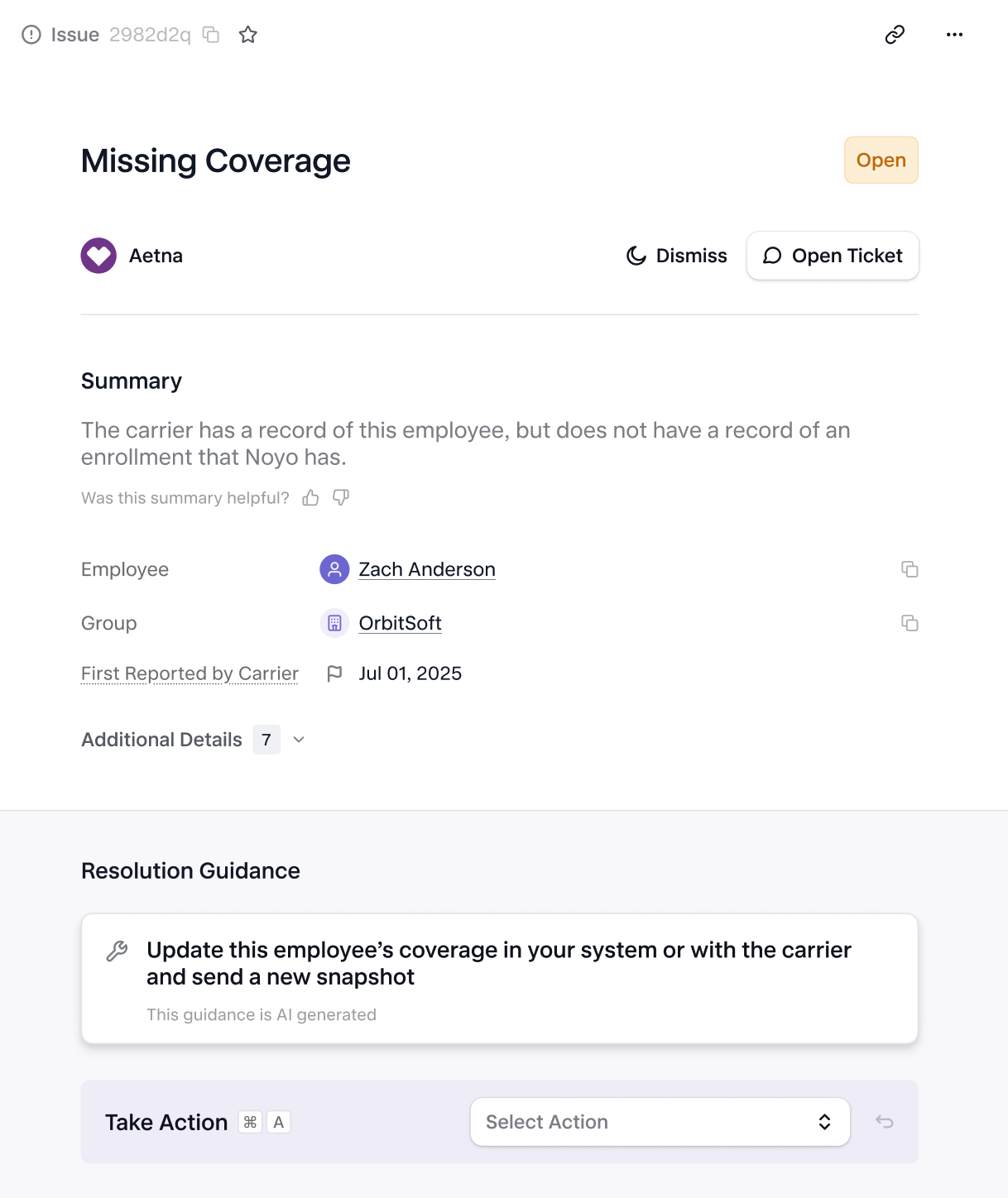
What’s in an Issue
Category: Each Issue is assigned a category based on the type of problem it represents. Summary: At-a-glance analysis of what has happened, and its potential impact. Resolution Guidance: Clear, actionable guidance for how to resolve the issue with Noyo or the carrier. Tracked Action: Record what action was taken to resolve the issue, such as updating data in the benefits administration system or reaching out to the carrier. Taking an action moves the issue into Pending Resolution status, this helps teams keep track of actions they’ve taken, but does not impact resolution. Issues are automatically marked as resolved when Noyo confirms the issue is no longer detected. Notes: Leave comments for other users with any additional context on this issue. History: Review when this issue first occurred, and all past instances that have been detected. For EDI error reports, view more details about the upload that created the issue and download the original document received from the carrier. For issues from API sources, dive into the Snapshot details where the Issue was found.Lifecycle
Origination
Issues can be detected across all carriers in our network, however they originate from a variety of sources:- EDI error reports
- Carrier API responses
- Noyo tracking and confirmation
- Validation errors from Snapshot Fulfillment Summary
- Manually by Noyo Operations
- COBRA Status Conflict — COBRA enrollments are submitted for carriers or workflows that don’t support them
- Coverage Date Conflict — Coverage dates violate rules (e.g., overlaps, before hire/birth, outside plan/account timelines, misaligned with subscriber)
- Duplicate Member — Duplicate employee or dependent records exist (e.g., same SSN, name/DOB) causing conflicts
- Enrollment Conflict — Enrollment structure is invalid (e.g., duplicate records, conflicting elections, too many dependents, missing required coverages)
- EOI Pending — Enrollment is blocked pending Evidence of Insurability submission
- Event Conflict — Employment or lifecycle events (e.g., termination) don’t align with coverage data or required dates
- Future Change — Requested effective dates exceed carrier-supported future limits
- Invalid Address — Address data is invalid, incomplete, or incompatible with plan/service area requirements
- Invalid Carrier Config — Submitted data doesn’t align with required carrier configuration (e.g., IDs, bill groups, classes, account structures, etc.)
- Invalid Coverage — Coverage selection is invalid, unsupported, or cannot be matched to a specific plan
- Invalid Demographic Info — Member demographic data (e.g., name, DOB, SSN, hire date) is invalid, inconsistent, or fails validation rules
- Invalid Volume — Volume values are included for coverages that don’t support them
- Missing Coverage — Expected active coverages are omitted without proper termination or handling
- Overage Dependent — Dependent exceeds eligibility rules (typically age limits) for coverage
- Retro Change — Requested changes fall outside the carrier’s allowed retroactive window
Member Matching
Issues are also automatically matched to employees and dependents in Noyo. When the issue source is a carrier-provided document that doesn’t use Noyo IDs or thecustom_individual_id field, members are matched using their name, date of birth, and other identifying information like carrier-assigned ID or SSN.
Issue Matching and Resolution
Issues are automatically matched to previous issues to update or resolve them. If the same issue is found in a new upload or transmission, it will not be duplicated. If the issue is no longer found, it will be automatically resolved.Dismissing Issues
If an issue doesn’t need to be addressed, it can be dismissed. Dismissed issues are filtered from default views in the app, but can still be returned by the API when not filtered. Dismissed issues are still tracked by Noyo and will be moved to resolved only when they are no longer detected.Roadmap
We are actively working on expanding the feature set for Issues, including:- Generate issues from more sources (e.g. expanding coverage of carrier-specific API responses and tracking/confirmations)
- Field-level context to understand and action Issues faster (in-app only)
- AI-enabled dashboards, analytics, and recommendations
- Improved workflow management (e.g. assignment, collaboration, prioritization)
API Reference
The Issues API is currently in beta. As this product evolves, fields returned are subject to change.
List all issues
GET issuesGet single issue
GET issues/{issue_id}